The assistant reads the guest survey and the guest offers the same way their Back Office pages do. It needs the Back Office configuration right, like those pages.
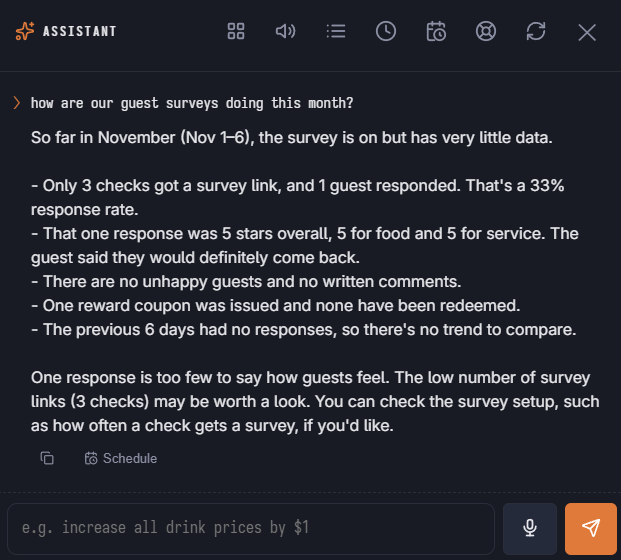
Ask
- “How are our guest surveys doing this month compared with last month?”
- “What are guests complaining about?”
- “Show the last 1 and 2 star comments.”
- “Which unhappy guests asked us to contact them?”
- “Which surveys are waiting for my approval?”
- “Which guest offers are on, and how many coupons were used?”
Results cover response rate, average stars and how they spread, happy and unhappy share, the trend against the period before, and the breakdowns of the Results tab. Answers stay as anonymous as the survey is set up to be: order, table and server only appear while the store keeps them.
The assistant does not run Summarize With AI or Generate With AI — those spend your AI allowance and only run from their buttons. It points you to them.
Change
- Turn the guest survey on or off.
- Approve or retire a survey — the card shows its questions, when it is used and its reward before you approve.
- Change the survey reward — the discount the coupon gives and how many days it can be used, for the store or for one survey.
- Turn a guest offer on or off — win-back, birthday, celebration, first visit, order again, cart and coupon reminders, referrals and the online banner. When you turn an email offer on, its emails start going out automatically at the send hour; the card says so.
- Mark a follow-up handled once someone has called the guest back.
The on/off, approval and reward changes can be undone with undo.
In the launcher
The Customers area has the four changes above and three questions. A survey waiting for approval shows in Needs Attention.
See Guest survey, Survey results and AI summary and Guest offers.