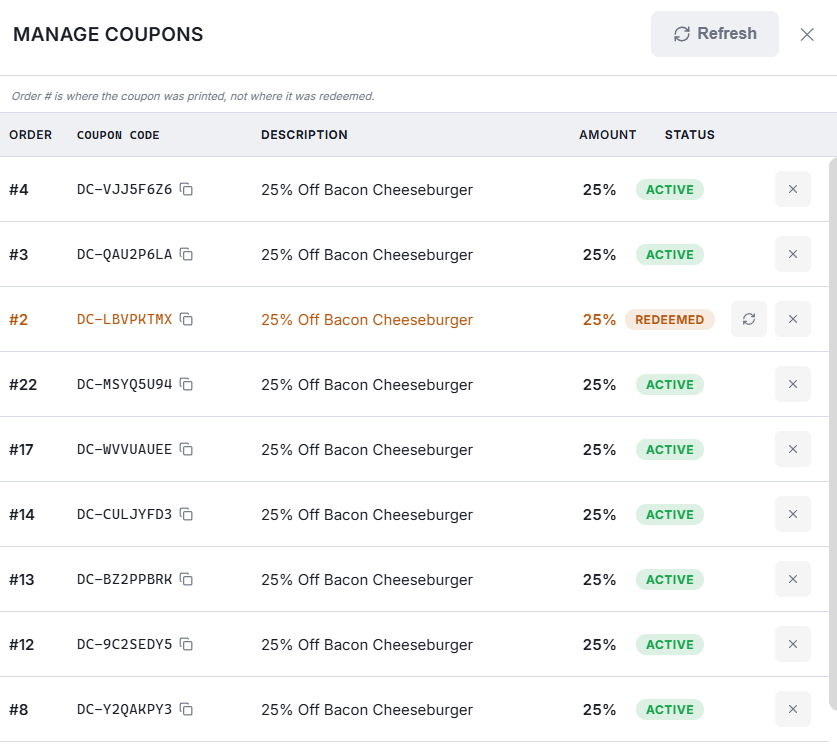
The coupons log lists the coupons presented on this business day: the order, the code, its description, the amount it took off and whether it is redeemed or still active.
Two actions
- Unredeem — releases a coupon so it can be used again. This is the fix when a coupon was scanned onto the wrong check, or the order it was used on was voided.
- Disable — kills a coupon permanently. Use it for a code that is being abused or was printed in error.
Unredeeming does not put the discount back on the check. It only frees the coupon; the order is corrected separately.
Older coupons: the Back Office log
End Of Day clears the register's list, so it only shows coupons issued since the last one. For everything else open Back Office › Discounts & Promotions › Coupons Log. It lists every coupon issued in the dates you pick, with its status (Active, Redeemed, Expired or Disabled), the order it was printed on, and when, on which order and by whom it was redeemed.
- Click an order number to open that order.
- Click a code to copy it.
- Click a total at the top, or use Status and the search box, to narrow the list.
- Export CSV saves the list as it is filtered.
- Unredeem and Disable work here exactly as they do on the register.
Coupons themselves — how they are created, printed and scanned — are covered under Discounts & Promotions.