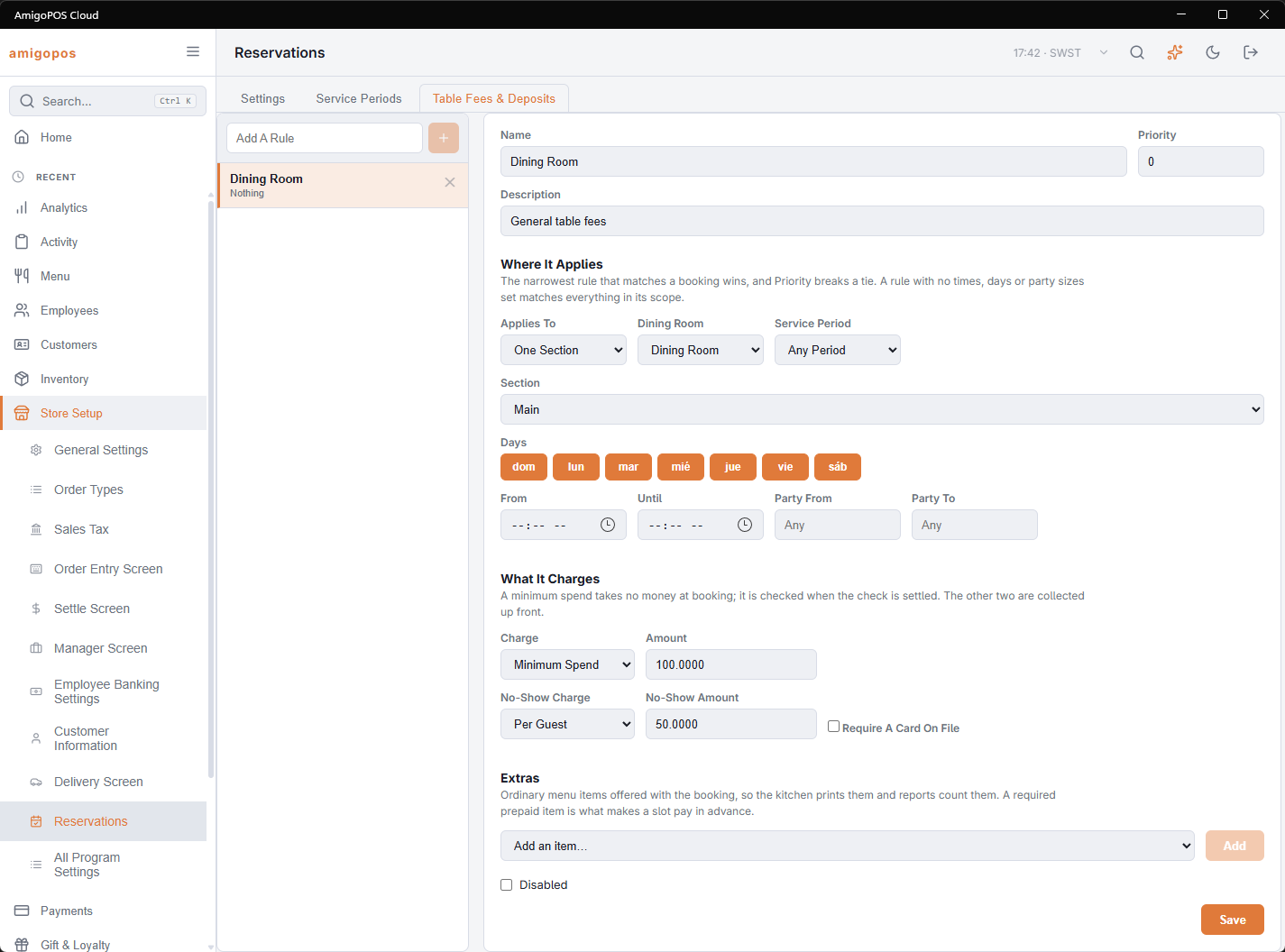
Back Office › Store Setup › Reservations, on the Table Fees & Deposits tab. A rule says where it applies — the store, a section, or named tables — narrowed by service period, days, times and party size. The narrowest rule that matches a booking wins, and Priority breaks a tie.
Deposit or fee: they are not the same
Both take money at booking. A deposit is credited to the check when the party is seated, so the guest gets it back as food — that happens by itself, as a payment on the check. A table fee never comes back: it is revenue for holding a table people want, and it is usually taxed differently. The difference is the Credit It To The Check tick.
Minimum spend
Takes nothing at booking. It is a floor the party commits to, shown to the host when they are seated and checked when the check is settled, where the shortfall can be added as a line.
No-show charge
A retained deposit is the penalty for not turning up, so the no-show charge only collects what is still owed above it. A booking with a 20 deposit and a 50 no-show charge is billed 30; one with a 50 deposit and a 50 charge is billed nothing more.
Extras
Ordinary menu items offered with the booking — a bottle on the table, a cake, a set menu at a price per guest. They are normal items, so the kitchen prints them and reports count them. An item marked required and prepaid is what makes a time pay in advance.
A card on file: what the guest sees
A rule that requires a card without taking a deposit sends the guest to a card page after their details. It charges nothing; the guest is told before they type anything, again above the Save button, and again on their booking page: a card is held; a no-show fee of 250.00 applies only if you do not turn up. The amount is the rule’s no-show charge for that party — a per-guest charge is already multiplied out. In the day book the booking shows a Card on file chip once the card is saved, and moves from Pending to Confirmed on its own.
Charging the no-show fee
Nobody charges it by hand. Marking a booking No show in the day book starts a fifteen-minute clock; when it runs out the fee is taken from the card off-session, less any deposit already held, and the booking records No-show fee charged with the amount, or the decline. Inside the fifteen minutes Undo no-show takes the mark back and nothing is charged. After it, the row shows Fee settled, and a refund is the ordinary deposit-refund path.
Before Stripe is set up
A rule can ask for money before the store has entered its Stripe keys and public web address. Online bookings are still taken: the guest is not shown a deposit, the booking is written without one, and a note on it says what the rule would have collected so the host can settle it at the door. The Table Fees & Deposits tab shows a warning while an enabled rule asks for money and this is the case.
In the accounts
With QuickBooks Online or Xero connected, deposits are sent on the day they are paid, as money owed to the guest (Customer Deposits). Seating the party puts the deposit on the check and draws that balance down; a refund takes it back out; a deposit forfeited on a no-show, and a no-show fee charged to a card on file, are posted as income (No-Show Fees). Map both accounts once on the integration's Mappings tab.
Rule fields
Type a name in Add A Rule and press +. A new rule charges Nothing, applies every day, and has Credit It To The Check and Refundable ticked with 24 hours to refund. Change the fields and press Save.
- Name, Priority (0–100, breaks a tie between equally narrow rules), Description.
- Where It Applies — Applies To: The Whole Store, One Section or Chosen Tables. Pick the Dining Room first; Section and Tables list that room’s bookable tables. Then Service Period (or Any Period), Days, From / Until, and Party From / Party To (blank means any).
- What It Charges — Charge: Nothing, Fixed Per Booking, Per Guest or Minimum Spend, with its Amount. For a fixed or per-guest charge: Credit It To The Check, Refundable and Refund Until (hours before) (0–336). Then No-Show Charge (Nothing, Fixed or Per Guest) with its No-Show Amount, and Require A Card On File.
- Extras — pick an item in Add an item… and press Add. Each row has Required, Per Guest, Prepaid (ticked for a new extra) and Max (1–99).
- Disabled — keeps the rule without applying it.
Save refuses a rule with no name, a charge with no amount (set one, or change the charge to Nothing), One Section with no section chosen, or Chosen Tables with no table. Deleting a rule (×) does not change amounts already quoted on bookings.