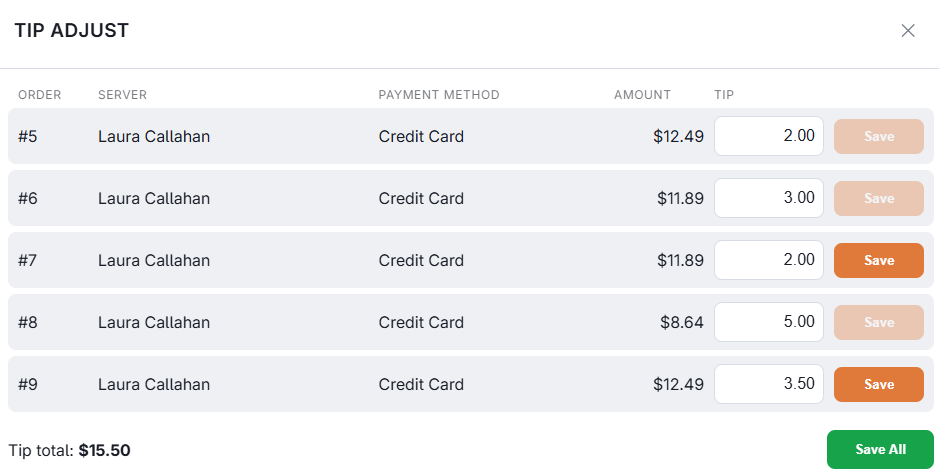
Where guests write a tip on a printed card slip, the amount has to be entered afterwards. The tip adjust screen lists every card transaction from the current business day that can still take one.
Entering them
- Open tip adjust from the manager section of More.
- Each row shows the order, the server, the payment method and the amount charged. Type the tip against the row.
- Save the row, or work down the list and save all at the end. A running tip total is shown as you go.
Saving needs the Adjust Credit Card Tip permission. Without it, a manager approves — once for save all. The same permission covers Adjust Tip, Tip / Capture and Enter Tips on More › Credit Cards.
DC Direct card payments
A tip entered here on a DC Direct card payment is also adjusted at Datacap, together with the payment. Enter it before the day’s card batch settles; after that the payment can only be refunded. See Voids, refunds and tip adjustments in Integrations › DC Direct.
DC Direct in pre-auth mode
When the store’s DC Direct method authorizes cards instead of charging them (Card Payment Type Pre-Auth), the first tip entered here on a payment captures the authorization for the check plus the tip. To capture one with no tip, use Tip / Capture or Enter Tips on More › Credit Cards. See Table service: authorize, then capture with the tip in Integrations › DC Direct.