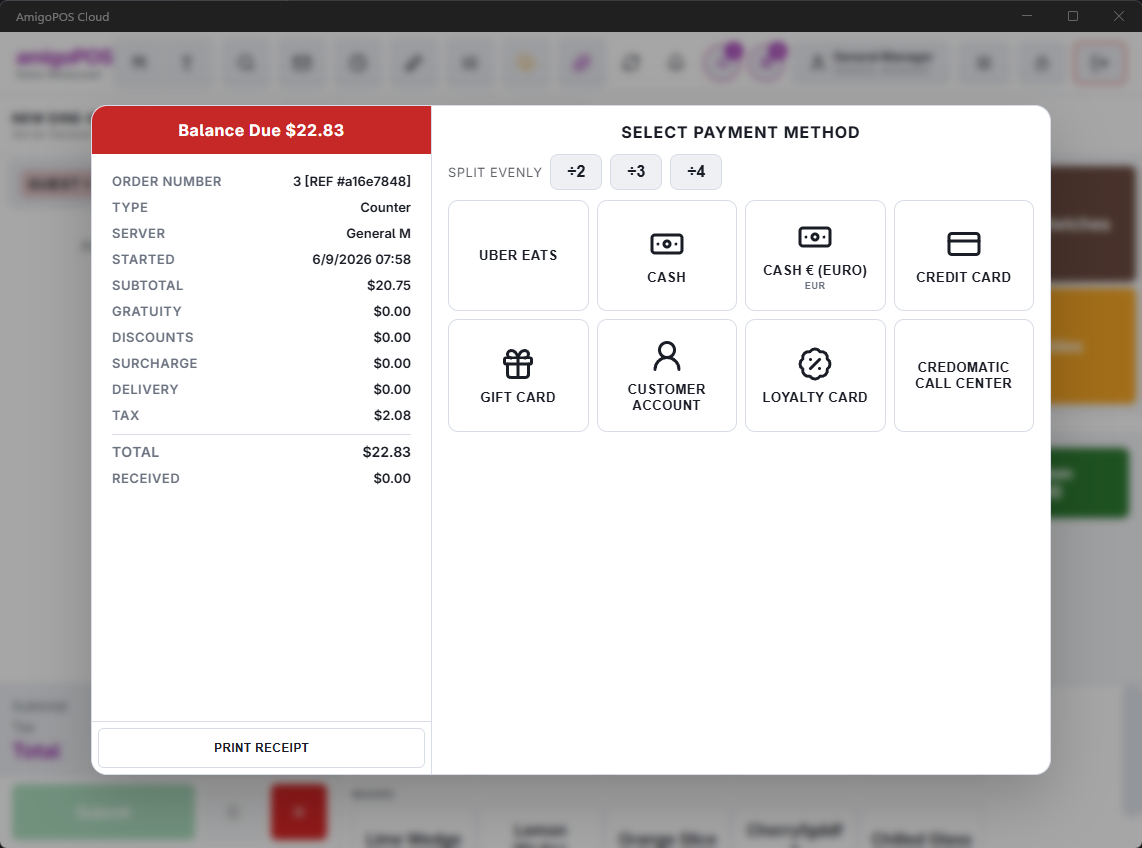
The settle screen is one screen with three parts: what is owed on the left, how you are taking it on the right, and what has already been taken underneath.
The order panel
Order number, order type, server and when it started, plus the money: subtotal, gratuity, discounts, surcharge, delivery, tax, total, received so far, and the balance due. Balance due is the number that matters — everything you do here reduces it to zero.
Taking payment
Choose a payment method to move to the amount step. Methods are configured per store, so a store takes cash, cards, gift cards, house accounts, vouchers and whatever else it has set up. Once a payment completes you can take another payment against the remaining balance, print a receipt, or finish.
Split evenly
The ÷2 / ÷3 / ÷4 buttons split the balance into equal shares and walk you through them one at a time. Each share can be paid by a different method. The last share always pays the exact remaining balance, so the pennies from an odd split never go missing. The ✕ clears the split.
Transactions
Transactions lists what has been taken on this order and lets you remove a payment that was entered wrongly, before the order is finished.
An order that already owes nothing
An order comped or discounted to zero has nothing to tender, so the settle screen offers Close order instead of payment methods. That closes it cleanly with no payment recorded, which is what keeps it out of your cash figures.