Some halls charge the table, some charge per player, most do a bit of both: $10 an hour for up to two players, $3 for each player after that. Two fields on the time-based item cover all three.
The fields
| Field | Meaning |
|---|---|
| Players Included | How many players the item’s price covers. |
| Extra Player Price | Charged per interval for each player beyond those included. Leave it at 0 for a plain table rate. |
Rate per interval = Price + (players − Players Included) × Extra Player Price, when there are more players than included.
| You charge | Price | Players Included | Extra Player Price |
|---|---|---|---|
| $10/hour for the table, any number of players | 10.00 | 0 | 0.00 |
| $10/hour for up to 2, $3 for each extra | 10.00 | 2 | 3.00 |
| $4/hour per player | 0.00 | 0 | 4.00 |
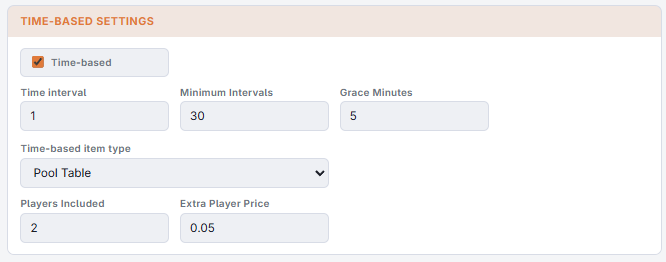
At the register
- A game starts with the included number of players (at least 1).
- Tap the running line on the check. The item panel shows a Players stepper instead of Quantity.
- Tap + or −.
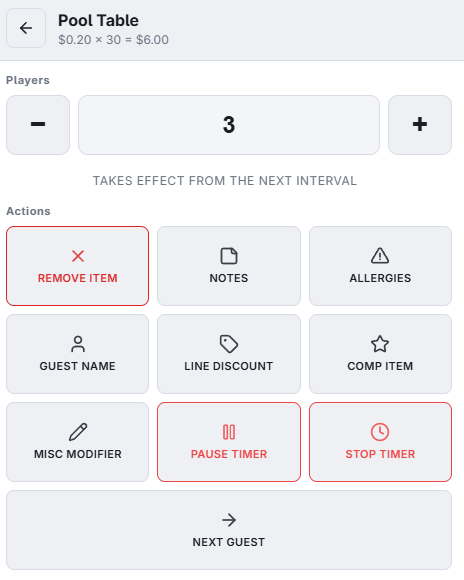
- A change counts from the next interval. The interval in progress was started with the old count and is billed that way. While the change waits, the panel says Takes Effect From The Next Interval; pressing + again just moves the waiting count.
- Corrections: a change in the first two minutes of a game (or of a new rate segment) corrects the count instead, and reprices from the start.
- When the new count kicks in, the game continues on a new line, just like a happy-hour change; the line’s label reads, for example, 3 Players or Happy Hour · 3 Players.
Items without an Extra Player Price do not show the Players stepper, and their quantity is not editable while the timer runs — it is set by the clock.