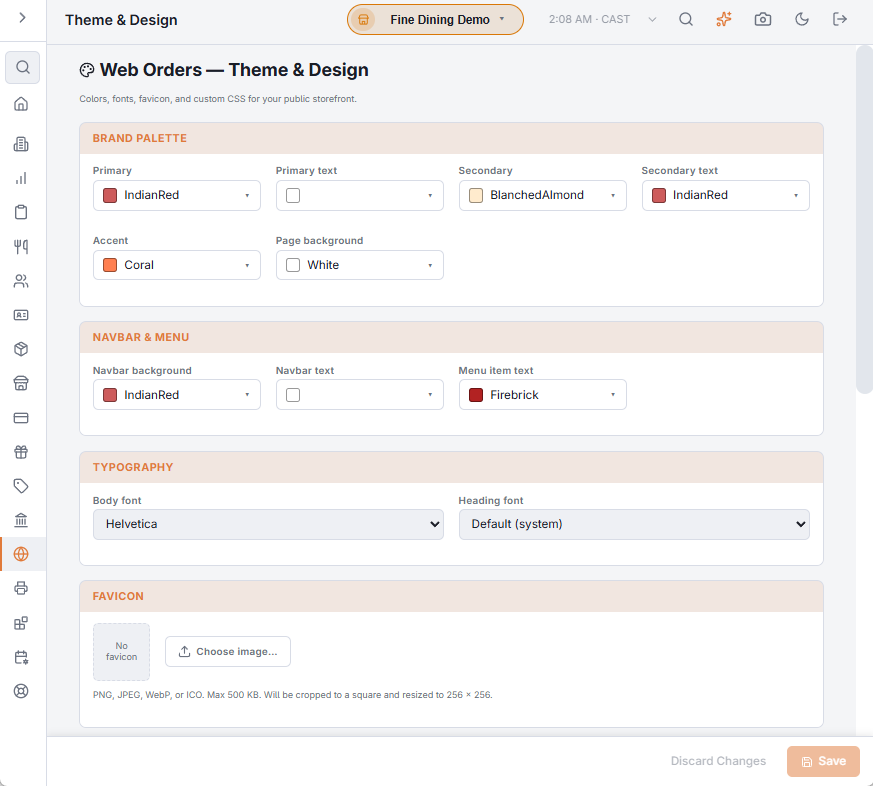
Back Office › Web Orders › Theme & Design styles the online ordering site to the brand — colours, fonts, favicon and custom CSS — with a live preview beside the controls. Colours, fonts and CSS take effect on the site when you select Save. If the save fails, Save failed is shown and your changes stay on the page, unsaved.
Colours
Each colour has its own picker.
- Brand palette — Primary (buttons and highlights) with its Primary text, Secondary with its Secondary text, Accent and Page background.
- Navbar & menu — Navbar background, Navbar text and Menu item text.
The Live preview draws a small version of the site as you change values: the top bar with the brand and the Home, Menu and Cart links, a heading, an active and an inactive category pill, an item card, and the primary and secondary buttons.
Typography
Body font and Heading font each offer Default (system) or one of Arial, Helvetica, Segoe UI, Roboto, Open Sans, Lato, Montserrat, Verdana, Tahoma, Trebuchet MS, Georgia, Times New Roman and Courier New.
Favicon
The small icon in the browser tab. Choose image… uploads it straight away, without Save: PNG, JPEG, WebP or ICO, up to 500 KB, cropped to a square and resized to 256 × 256. Remove deletes it. Uploading or removing the favicon saves only the favicon: colour, font and CSS changes you have not saved yet stay unsaved.
Advanced
Custom CSS is applied last and overrides the theme. Use it for a tweak the controls don’t cover, and keep it short: custom CSS is the part of a theme that can break when the site is updated.