CloudPos can send each day of trading to Xero automatically, so the accounts are up to date without anyone keying figures in twice. One business day becomes one sales invoice in Xero, plus a credit note on days with refunds.
What gets sent
At the close of each business day CloudPos raises one sales invoice covering that day, and then applies one payment per tender against it.
The invoice carries the day's trading as separate lines:
- Sales for each menu category at full menu price, each to its own revenue account
- Discounts — order, item and percentage discounts together — and comps, which reduce the total
- Delivery charges and surcharges
- Tax — either on its own line, or carried on the sales lines with Xero's tax rates (see Using Xero Tax Rates)
- Tips and gift cards sold, posted as money owed rather than income; tips handed to staff in cash bring that balance back down
- Reservation deposits taken online, held as money owed to the guest until the party is seated
- Cash paid outs, house account write-offs and a cash over or short line when the takings do not match the sales
The payments are the money actually taken: one for cash, one for each card type, one for gift cards redeemed, and so on. Each goes to its own account, which is what makes the bank reconciliation straightforward later.
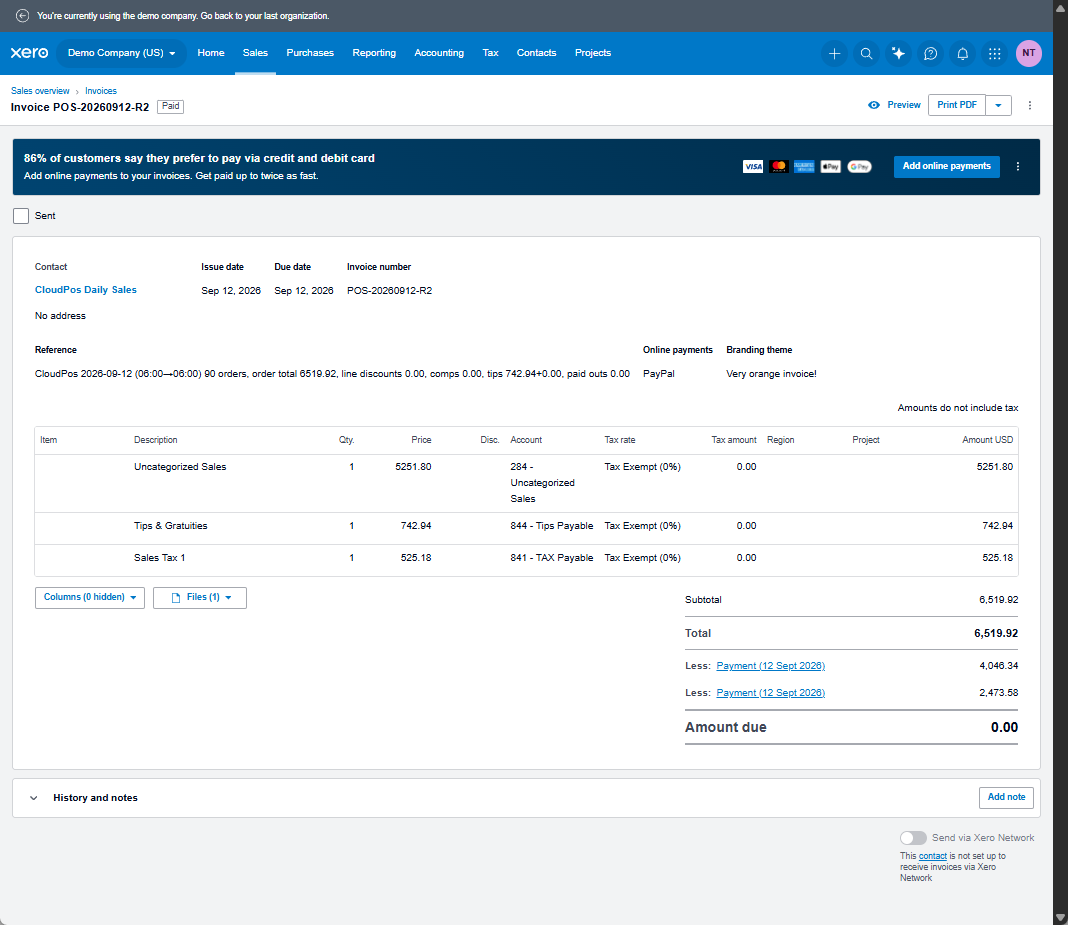
Because the payments always add up to the invoice total, the invoice settles to paid the moment it is raised. It is a record of the day, not a bill anyone has to chase.
Refunds
A refund given at the POS is sent on the day it was given, not the day of the original sale. Xero does not accept an invoice or a payment below zero, so the day's refunds go on their own credit note, with one refund payment per tender. See Refunds, Deposits And Write-Offs.
Also available
- Supplier bills — inventory receivings sent as bills from each supplier. Off until switched on; see Supplier Bills.
- Payroll journal — one journal per pay period from the Payroll page. See Payroll Journal.
Why an invoice and not a journal
An invoice puts the day's takings where Xero expects to find sales, so the revenue appears in Xero's own reporting, and it lets each tender be paid into a separate account that the real bank deposit can be matched against.
What it does not do
- It does not send individual orders or receipts. Xero holds one summary per day; the detail stays in CloudPos, where the reports are built for it.
- It does not send card processing fees or employer payroll taxes — CloudPos does not know them. The bookkeeper posts those.
- It does not see refunds made directly on a card terminal without being recorded at the POS.
Before starting
The business needs its own Xero subscription. Setting up takes three passes, in this order:
- Connect CloudPos to the Xero organisation.
- Map each figure the POS posts to an account in Xero.
- Preview a day, check it, and post it.