When the store dispatches its own deliveries, the assistant can read the delivery board and do the board's everyday jobs. It needs the Manager right, the same as the manager phone's Dispatch screen.
Ask
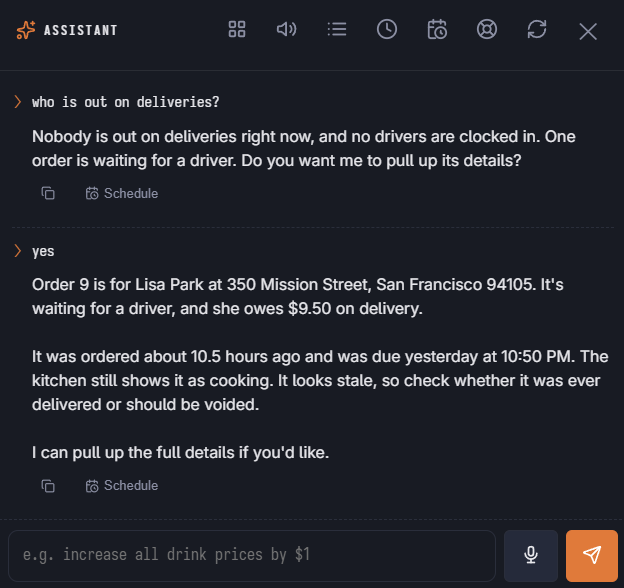
- “What deliveries are late right now?”
- “Who is out on deliveries and what are they carrying?”
- “What happened with order 52?”
- “How much cash is each driver holding?”
- “How did deliveries go today?”
Answers come from the same board the register shows: waiting, scheduled for later, with Entreo, out with a driver, and delivered but not checked in. The day summary uses the Delivery Performance figures and needs the Reports right.
Change
- Assign a driver — one or more orders, in the order the driver will deliver them. The driver gets the run on their phone and the customer is told the order is on the way, as when you dispatch from the board. Assigning an order that is already out with another driver moves it: it is taken off the first driver, and the customer gets a second “on the way” message.
- Take an order off a driver — only while it is out and not yet delivered at the door.
- Send to Entreo — queues the order for an Entreo driver exactly like the board. It is refused without a street, city and ZIP. This cannot be taken back from the assistant.
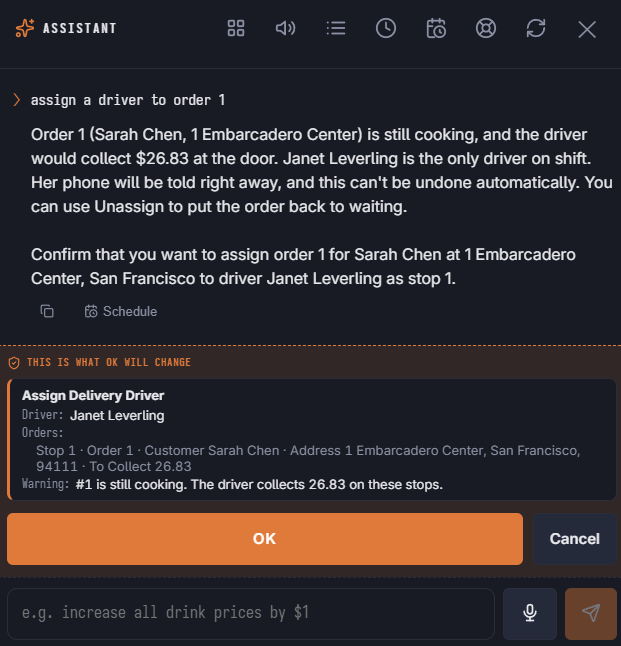
Marking an order delivered, banking a driver and settling cash still happen on the register or the driver's phone — they need a cash drawer. None of the delivery changes can be undone with undo, because the driver and the customer have already been told.
In the launcher
The Deliveries area has Assign A Driver, Take An Order Off A Driver and, with Entreo on, Send To Entreo, plus three questions. An order waiting for a driver shows in Needs Attention, marked urgent after 15 minutes.
See How a delivery travels and Entreo on the delivery board.