The top of the quick-actions launcher shows what needs doing now, and in Back Office the actions for the page you are on.
Needs Attention
When something at the store can be fixed with one quick action, it appears at the top with what to do. Tap it and the action opens with the form already filled in where possible. The list is checked each time you open the assistant and again after each change you make there.
- Someone is still clocked in after 12 hours — opens Fix A Forgotten Clock-Out (with that person picked when there is only one).
- Online ordering is paused — opens Resume Online Ordering.
- The store is marked closed today — opens Open Again On A Closed Day for today.
- Draft shifts are not published — opens Publish A Week for that week. The count is the whole week, because publishing a week publishes every draft in it.
- Time-off requests are waiting — opens Approve Or Decline Time Off.
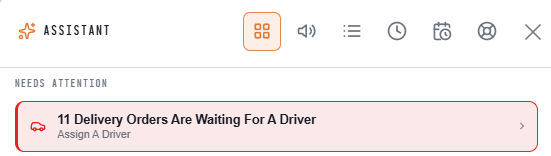
Items only show for actions your job may do. Urgent items, such as paused online ordering, are shown in the warning color.
On This Page
Open the assistant from a Back Office page and the actions for that part of Back Office appear first: menu actions on the menu pages, employee actions on the employee pages, and so on. See All opens the whole area.
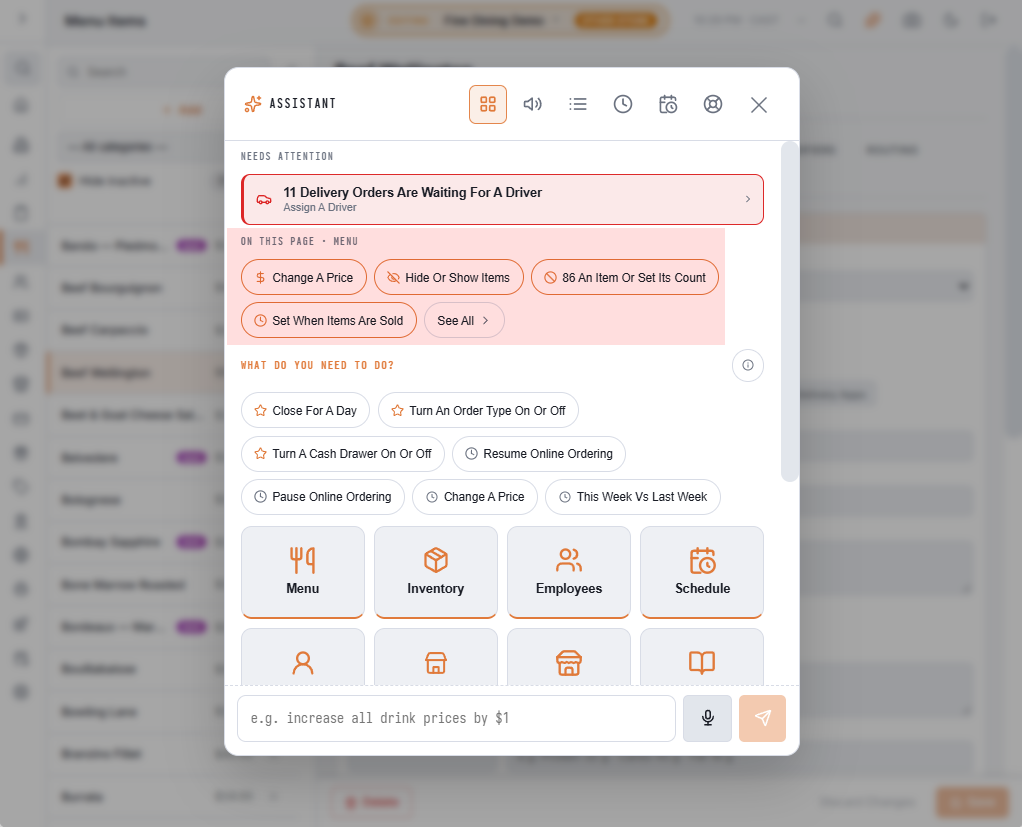
See Quick actions: done in a few taps.
More items it can show
- Manager alerts are open — opens I'm On It; severe alerts are urgent.
- Uber Eats is paused — opens Resume Uber Eats.
- An order is waiting for a driver — opens Assign A Driver; urgent after 15 minutes. Orders with Entreo and scheduled orders not yet due are not counted.
- A survey is waiting for your approval — opens Approve Or Retire A Survey.