Employee banking replaces the shared till for roles that carry their own cash: servers who keep guests’ payments in their apron, and delivery drivers who collect at the door. The system stops tracking a drawer for them and starts tracking the person: what they’ve collected, what they’re owed, and what they owe the house.
The core idea: the sale and the cash are two different records
When a banked server settles a cash order, the sale records immediately — the order settles, leaves the active list, and lands in sales and tax reporting at the moment the guest paid. But no cash drawer is touched: the transaction carries no drawer attribution, no drawer opens, and no drawer’s expected cash changes. The money is in the server’s apron, and the system knows it — that amount joins the server’s running liability.
This split is what keeps both books honest. The drawers expect exactly the cash physically inside them; the liability tracks exactly the cash walking around the floor. Neither ever double-counts the other.
One bank per person
Servers and drivers share a single model: one liability per employee, one unified deposit record, one end-shift log. The server’s bank fills as they settle their own tables; the driver’s fills as their runs are banked on return. Either can check their position any time via the Bank report button on the time clock, and both square up the same way — the deposit (see Employee banking and deposits).
Banking an order
An order joins an employee’s bank when it is banked: dine-in and pickup orders from the Bank button on the orders list (with Undo bank for mistakes), delivery runs when the driver returns. Banking a table order frees the table immediately — the guests have paid and left; only the cash custody remains open. Banked orders stay visible with a Banked by attribution until settlement completes at deposit time.
Configuration
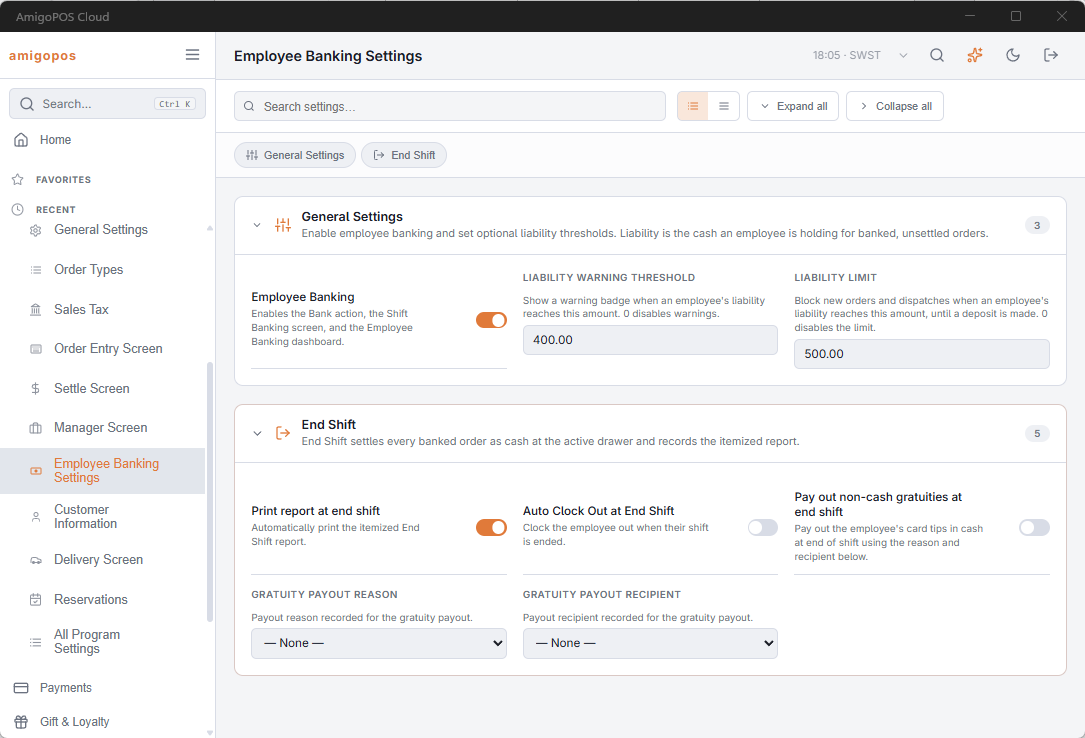
Banking is switched on for the store on Back Office › Store Setup › Employee Banking Settings, which also holds the liability warning and limit and the End Shift options — see Employee Banking Settings. Any job that can both take cash and settle orders can bank; the job’s Server and Driver flags decide who appears in the transfer list and on the driver rail. The cash discount on banked orders is the Cash Discount (%) on the same page.
While banking is on, nobody is asked to claim a cash drawer at clock-in: employee banking and the drawer lockdown clock-in flow are mutually exclusive store-wide — a store runs one custody discipline or the other.
The manager’s live view is the Shift banking overlay; the day’s history is the Employee Banking dashboard (Back Office › Cash Management › Employee Banking); the full custody picture across drawers, aprons, and safe is Where the cash is: settle to deposit to EOD.