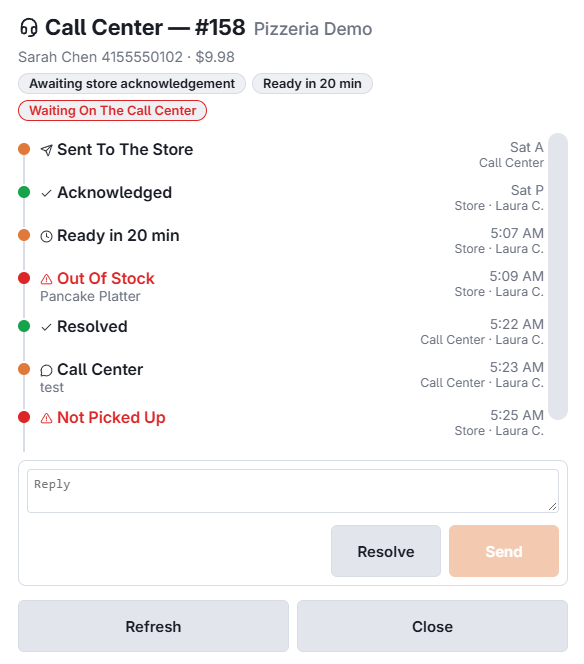
A call-center order carries an event trail, and both ends see it as it happens. It is what lets someone on the phone answer "where is my food?" without ringing the store.
The lifecycle
- Submitted — the call centre sent it to the store.
- Acknowledged — the store picked it up.
- Promised ready — the store set an ETA.
- Pay link sent — somebody sent the customer a link to pay online, with the number it went to and whether the message was accepted.
- Payment received — the customer paid online, so the balance cleared without anyone touching the order.
- Issue reported — the store hit a problem, with its note. The call centre can then mark it resolved.
- Updated or voided — the call centre changed or cancelled it after sending.
- Picked up, out for delivery, delivered — how it ended.
Events push to both sides as they happen, so a store acknowledging an order removes it from every other station’s pending list at the same moment.
Dine-in service pace uses the same event mechanism for its own milestones — seated, drinks served, entrees served. Same trail, different questions.
Delivery and payment news
- Out for delivery carries the driver’s name, and delivered the time it was handed over.
- Problem at the door — the driver’s report from their phone, with the reason.
- Payment declined — the customer’s card was refused on a pay link or a QR payment, with the reason.
The call center sees all of it in the tracker: Following your orders: the tracker. The store sees the delivery events on the delivery board.