Back Office › Customers › Customer Accounts holds the house accounts: customers you let charge orders now and pay the balance later, such as regulars, staff or a company. Each account belongs to one customer and has its own credit limit, card and history.
Finding an account
Type in the search box: the list updates as you type, and Enter searches at once. It finds accounts by account number, card number or barcode, and customer name. The list shows 50 accounts a page, each with the customer’s name and the account number, and the arrows under it move between pages; the count shows how many accounts match. Locked accounts are greyed out. A new search starts again at page 1.
Opening an account
- Press New Account (+). Select Customer opens.
- Search for the customer by name or phone and pick them. The account is created at once and opens; if the customer already has one, it opens instead.
- Fill in the fields below and press Save.
The account
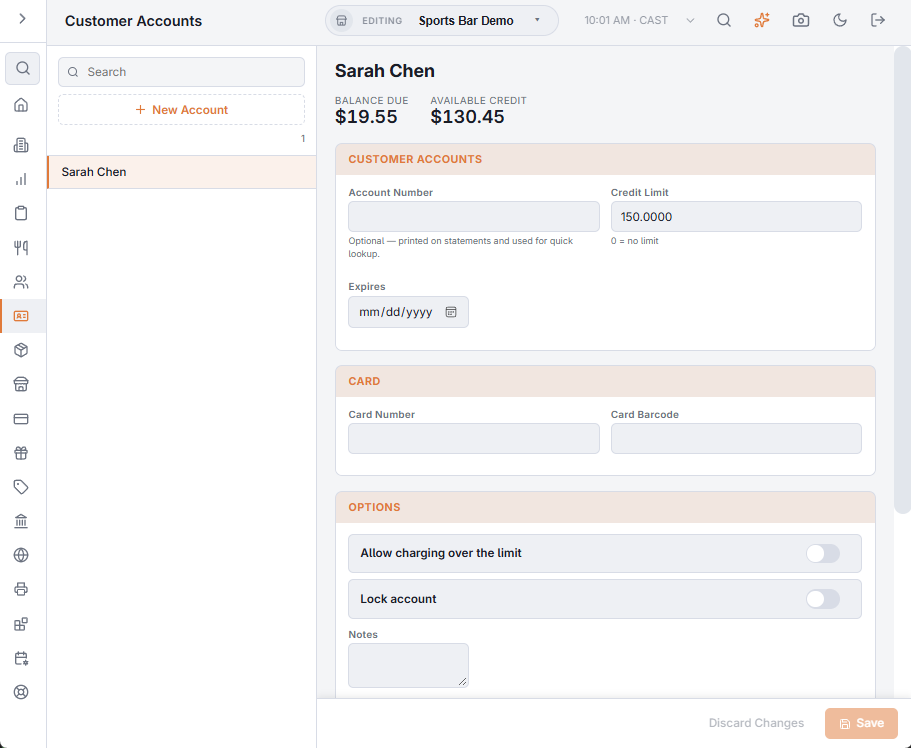
The top of the account shows the Balance Due and the Available Credit (∞ when there is no limit), with an Account Locked or Account Expired badge when it applies.
| Field | What it does |
|---|---|
| Account Number | Optional. Printed on statements and used to find the account. |
| Credit Limit | The most the customer can owe; 0 means no limit. |
| Expires | Optional date. After it, the account can’t be charged. |
| Card Number and Card Barcode | A card for the account, so staff can find it by scanning or typing the card. |
| Allow charging over the limit | Lets a charge go through even when it is more than the available credit. |
| Lock account | Stops new charges and keeps the balance and history. A Reason box appears for why. |
| Notes | Free text for staff, for example “bills monthly”. |
Changes are kept until you press Save or Discard Changes. Delete is offered only while the account has no transactions. If the delete fails, The Entry Could Not Be Deleted is shown.
The balance
The balance due is always the charges less the payments, leaving out voided lines. It is worked out each time the account is opened, so it never drifts from the history. The Transactions list and the Statement are described in Account transactions, voids, and statements.