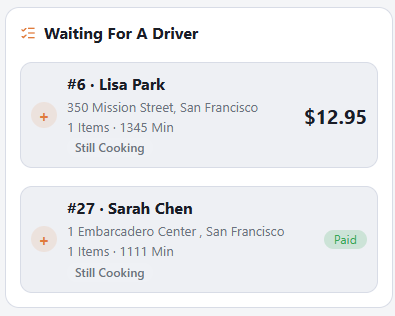
In a busy store nobody has to stand at the delivery board. With Drivers Take Orders on, each driver sees the delivery orders that are waiting for a driver, on their own phone, and takes them.
Taking orders
- Open Deliveries. Waiting For A Driver lists the orders nobody has yet, oldest first, with the address, the number of items and the total, or Paid. An order scheduled for later shows the time it is for.
- Tap the orders in the order you will deliver them. Each one gets its stop number; tap it again to take it out.
- Tap Take N Orders. They are now your run.
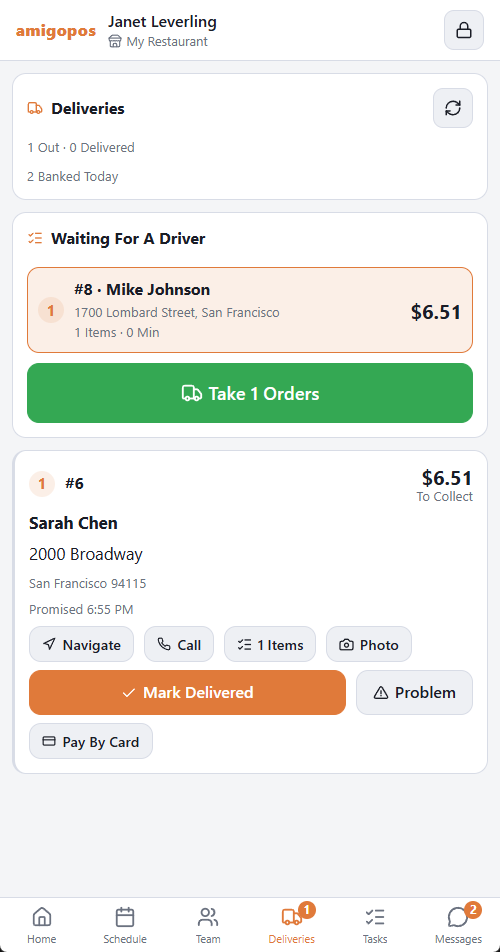
It is the same dispatch the register makes: the customer gets the on-the-way message, the route is worked out, the call center sees the order leave, and the delivery board moves the orders to Out.
When it says no
| The phone says | Why |
|---|---|
| Clock In On A Driver Job To Take Orders | With Clocked In Drivers Only on, you must be clocked in at this store, on a driver job. |
| You Are Holding Too Much Cash. Make A Deposit First. | The same liability limit that stops a dispatch at the register. |
| Those Orders Were Already Taken | Another driver, or the register, got there first. When only some were taken, you get the rest and the message says how many were not yours. |
| This Store Does Not Let Drivers Take Orders | The switch is off. |
Switching it on or off
Back Office › Store Setup › Delivery Screen › Driver Phones › Drivers Take Orders. It is on by default. Switched off, drivers still see and work their own run; only the waiting list is hidden. See Delivery Screen settings.
Is it ready?
At a store with kitchen screens, each waiting order shows Still Cooking or Ready · 4 Min, so nobody takes an order that is still on the grill. A scheduled order stays off the list until it is due in the kitchen.