The drawer badge is a number on the register’s top bar that appears when a cash drawer has passed one of its own levels — Mandatory count at or Mandatory drop at on Back Office › Cash Management › Cash Drawers. The number is how many alerts are open. See Mandatory count and mandatory drop thresholds.
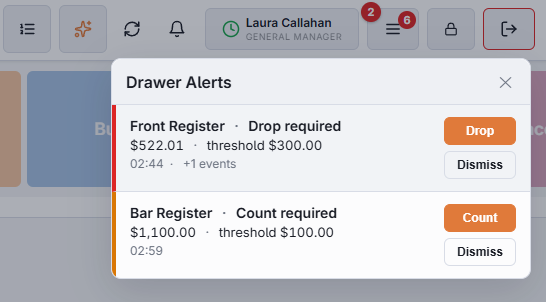
The two reasons
- Count required — the drawer’s expected cash has passed the level at which the store wants it counted. After a count, that level is the lowest expected cash since the count plus Mandatory count at, and the alert shows it.
- Drop required — it holds more cash than the store wants in a till, and some should go to the safe.
The badge takes the colour of its most urgent alert. A count alert starts amber and a drop alert red; each gets more urgent after five more cash events with nothing done.
The list
Tap the badge to open Drawer Alerts. Each alert shows the drawer and the reason, the expected cash against the level (threshold), the time it was raised and how many cash events have happened since. The list refreshes every 30 seconds.
- The first button reads Count on a count alert and opens Drawer Spot Count for that drawer; on a drop alert it reads Drop and opens Cash Drops. A saved count clears the drawer’s count alerts in the currencies counted; a drop alert clears right after a drop that brings the drawer under the drop level.
- Dismiss — closes the alert without counting. Only jobs with Drawer Count see it.
On managers’ phones
When manager alerts are on, a drawer that needs a count or a cash drop is also pushed to managers’ phones and listed in Manager Alerts. See Cash drawer and forecast alerts.