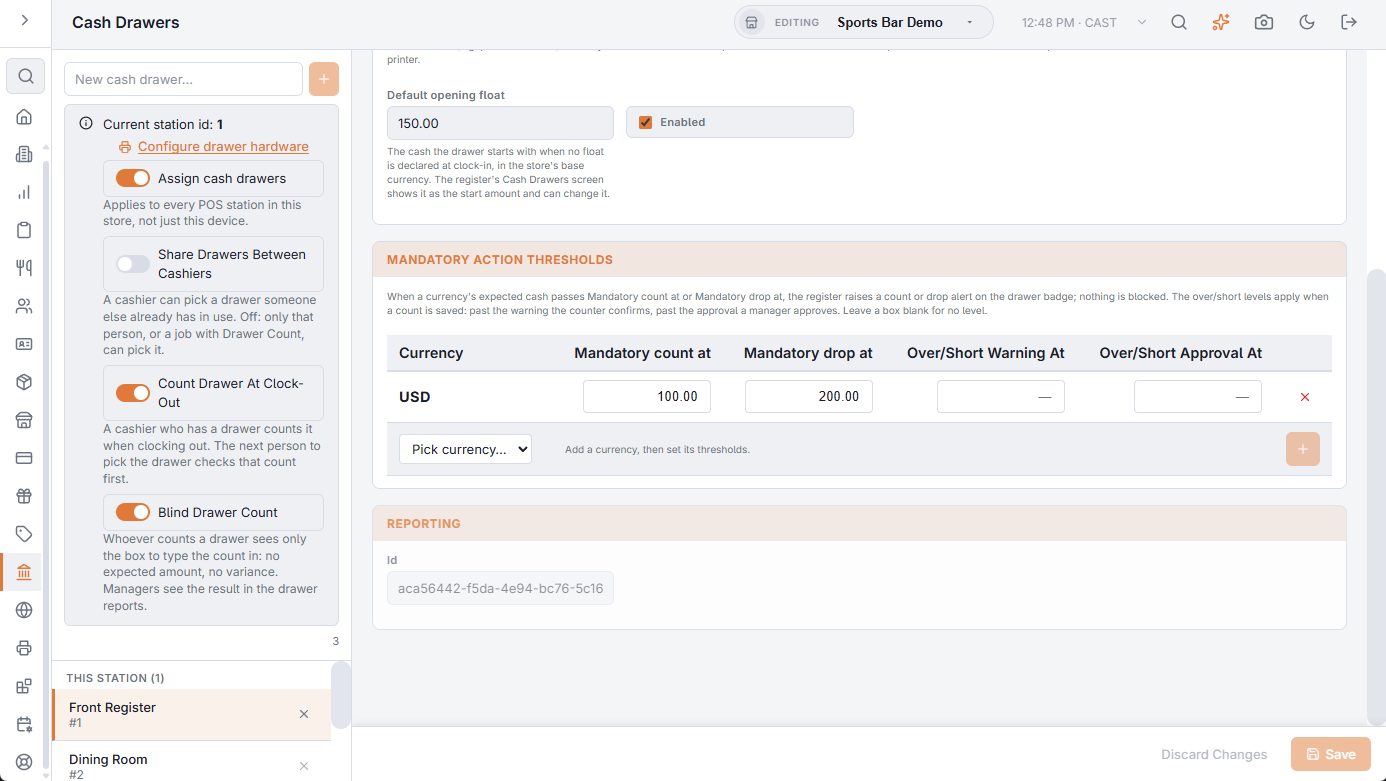
Each drawer can carry two cash levels per currency, set on its entry at Back Office › Cash Management › Cash Drawers, Mandatory action thresholds: Mandatory count at and Mandatory drop at. When the drawer’s expected cash passes one of them, the register raises an alert on the drawer badge. See Creating and editing cash drawers.
How they behave
After each cash event the register compares the drawer’s expected cash in each currency with that currency’s levels:
- Above Mandatory drop at — a Drop required alert. The drawer holds more cash than the store wants in a till; take some to the safe with Cash drops to the safe. The alert clears right after a drop that brings the drawer back under the drop level; a smaller drop leaves it open.
- Above Mandatory count at, but not above the drop level — a Count required alert. Count the drawer with Drawer Spot Count; saving the count clears the drawer’s Count required alerts in the currencies you counted.
After a count
A count does not switch counts off for the rest of the day. From the latest count on, the register tracks the lowest the drawer’s expected cash has been in each currency. The next Count required alert comes when expected cash passes that lowest amount plus Mandatory count at, and the alert shows that amount as its level. A drop or payout after the count lowers the starting point, so the next alert comes sooner. A drawer reset after the count starts over from the plain level.
Voiding a cash drop or a cash payout puts its amount back into the drawer’s expected cash, and the alerts are worked out again. An employee deposit raises the expected cash of the drawer that took it when it is recorded, and stays there until that drawer is reset; it comes back out only if it is voided. End Shift takes the deposits it applies off the expected cash of the drawer it runs at. The alerts are worked out again each time.
With Enforce Count And Drop Levels off, nothing is blocked: the register keeps taking cash while an alert is open. Each cash event while it is open is added to the alert, and after five of them it gets more urgent: a count alert turns from amber to red, a drop alert from red to critical. Resetting the drawer clears both.
The alert shows on the drawer badge in the register’s top bar, where a job with Drawer Count can also dismiss it without counting. See The drawer alert badge.
Setting the levels
- Mandatory drop at — the most cash you will leave in the till: the float plus what you would accept losing.
- Mandatory count at — a lower level, for a check before the drop is due, or the only level at a store that prefers counts to drops.
- Leave a box empty for no alert. A drawer with no currency rows never raises one.
Enforcing the levels
Enforce Count And Drop Levels, with the other switches at the top of Back Office › Cash Management › Cash Drawers, makes the levels more than a reminder. It is off by default.
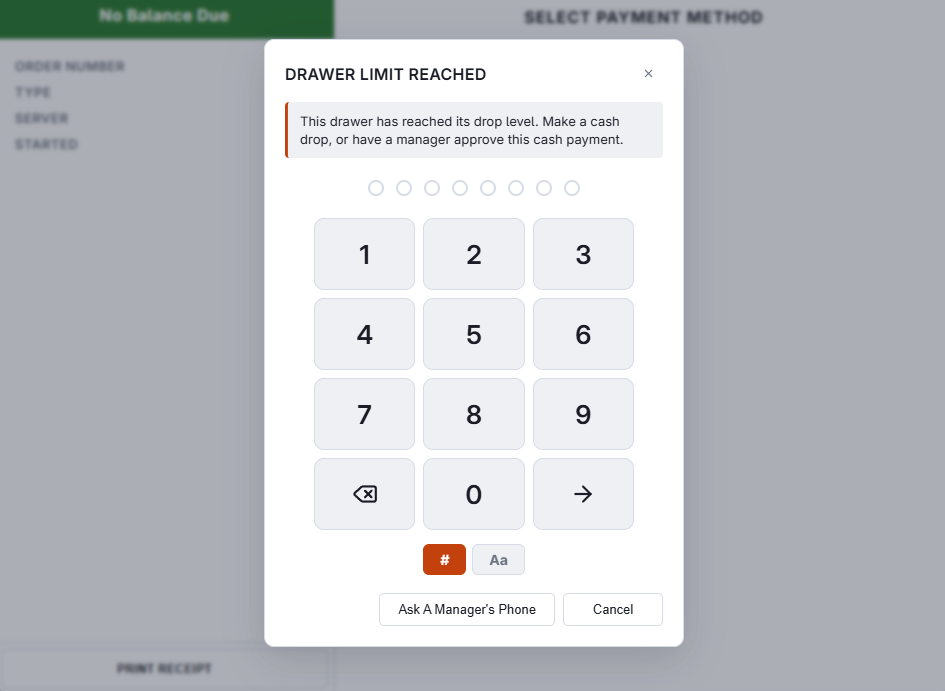
- While the drawer in use has a count or drop alert open, choosing a cash payment — on the payment screen or with a speed-bar cash button — shows Drawer Limit Reached with the reason: This drawer has reached its drop level. Make a cash drop, or have a manager approve this cash payment., or the same for its count level.
- A manager can approve that one payment; the manager’s job needs Drawer Count and Override. If the approval is refused, the register goes back to the payment buttons.
- Each cash payment asks again until the count or the drop is done. The alert then clears and cash is taken as usual.
- Someone whose own job has Drawer Count is not stopped. Card payments, cash kept by a banked employee and sales made offline are never stopped.