All manager-alert settings are in Back Office › Activity › Shifts & End of Day › Manager Alerts › Settings. They are per store.
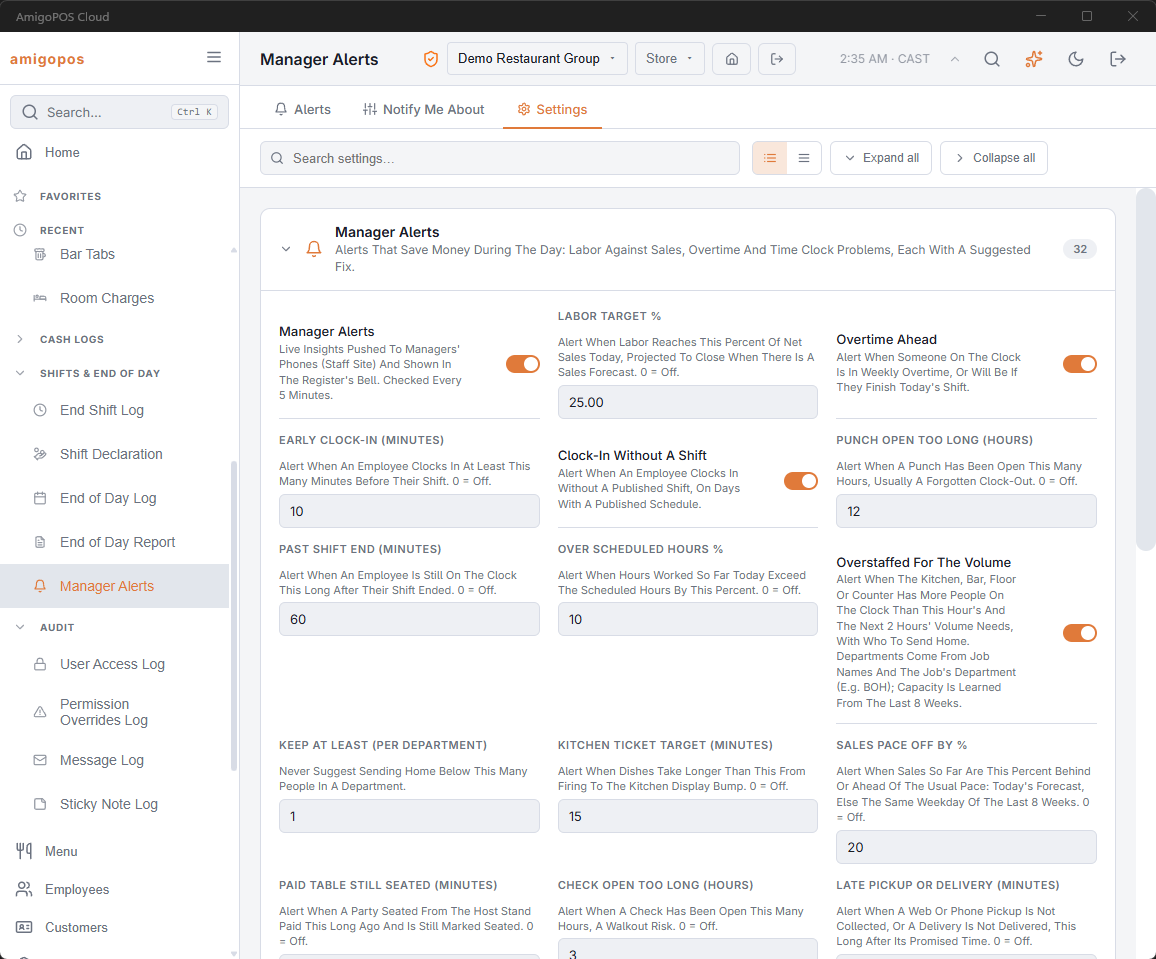
- Turn on Manager Alerts. Nothing is checked or sent until you do.
- Set Labor Target % to the labor percentage you run to.
- Leave the other thresholds at their defaults for the first week, then tighten or loosen them.
- Set Quiet Hours Start and End if managers should not be woken at night.
Who gets the pushes
Pushes go to the managers clocked in at the store — anyone on the clock under a job with manager access. When no manager is clocked in, every manager gets them. Turn on Push To Every Manager to always send to every manager. During quiet hours only urgent alerts are pushed; the rest still appear in the lists.
Each manager can also turn whole kinds of alerts off for themselves — see Getting and handling alerts.
The thresholds
For number settings, 0 turns that alert off.
| Setting | Default | Alerts when |
|---|---|---|
| Manager Alerts | Off | Turns the whole system on for this store. |
| Labor Target % | 25 | Labor cost as a percent of net sales today. |
| Overtime Ahead | On | Someone on the clock is in, or heading into, weekly overtime. |
| Early Clock-In (Minutes) | 10 | Clocked in this long before the shift. |
| Clock-In Without A Shift | On | Clocked in with no published shift. |
| Punch Open Too Long (Hours) | 12 | A forgotten clock-out. |
| Past Shift End (Minutes) | 60 | Still on the clock after the shift ended. |
| Over Scheduled Hours % | 10 | Hours worked so far against hours scheduled so far. |
| Overstaffed For The Volume | On | More people on than the volume needs. |
| Keep At Least (Per Department) | 1 | Never suggest going below this. |
| Kitchen Ticket Target (Minutes) | 15 | Firing to kitchen display bump. |
| Sales Pace Off By % | 20 | Sales behind or ahead of the usual pace. |
| Paid Table Still Seated (Minutes) | 15 | Host-stand party paid and still seated. |
| Check Open Too Long (Hours) | 3 | Walkout risk. |
| Late Pickup Or Delivery (Minutes) | 15 | Past the promised time. |
| Average Check Drop % | 15 | Per guest, against the same weekday. |
| Call-Center Order Not Acknowledged (Minutes) | 10 | Sent by the call center, nobody here has acknowledged it. |
| Pay Link Unpaid (Minutes) | 20 | Held for a pay link the customer has not paid. |
| Missed Calls Today | 3 | Rings on the store’s line nobody took. |
| Items Removed After Firing (× Usual) | 3 | Removals of food already made. |
| Discounts And Comps % | 10 | Of gross sales; twice this for one server. |
| Overrides For One Person | 5 | One manager, one employee, one day. |
| No-Sales, Price Cuts, Refunds (× Usual) | 3 | Against the employee’s own normal. |
| Cash Refunds And Voids | On | Every cash refund and voided cash sale. |
| High Card Tip % | 40 | Tip as a percent of the sale. |
| Repeated Over/Short Amount | 5 | Three times in 14 days. |
| Weekly Loss Prevention Flags | On | Every Monday, one alert for each employee who picked up a new red cell on the loss prevention scorecard in the last seven days. See Loss prevention alerts. |
| May Run Out Before Close | On | Ingredients short for the rest of today. |
| Waste Spike (× Usual Day) | 2 | Today’s waste cost. |
| Cost Of Goods Target % | 32 | Recipe cost against net sales. |
| Supplier Price Rise % | 10 | On receiving. |
| Below Reorder Level | On | Nothing on order. |
| Special Price Outside Its Hours | On | Happy hour ringing early or late. |
| Quiet Hours Start / End | Blank | Pushes pause, except urgent alerts. |
| Push To Every Manager | Off | Off: managers clocked in, or every manager when none is. |
Call Center Message Unanswered (Minutes)
Default 15. How long a message this store sent the call center about an order (an issue, a change made at the register, a reply) may go without the call center resolving it before the manager is alerted. 0 turns the alert off.