The customer receipt can list each gift card that paid (the amount taken and what is left on it) and, when a loyalty card is on the order, the points or bonus earned and the card’s balance. Points appear once the order is paid, because that is when they are earned.
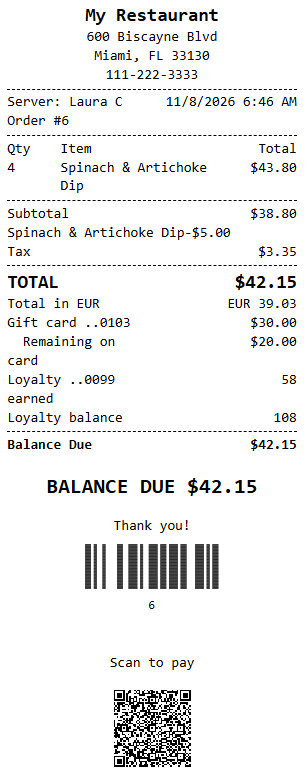
Two store settings in All program settings (search), both on by default, turn each part off: Receipt Show Gift Card Balance and Receipt Show Loyalty Points.
Custom receipt templates
The default customer receipt already has these lines. A store with its own saved template needs this block pasted in, usually after the total and currency lines:
{BlockIf=GiftCards}
{Foreach=GiftCards}
Gift card ..{GiftCardLast4}{Col}{Right}{GiftCardAmount}
  Remaining on card{Col}{Right}{GiftCardBalance}
{EndForeach}
{EndIf}
{BlockIf=Loyalty}
Loyalty ..{LoyaltyCardLast4} earned{Col}{Right}{LoyaltyEarned}
Loyalty balance{Col}{Right}{LoyaltyBalance}
{EndIf}
Tokens: inside {Foreach=GiftCards}, GiftCardLast4, GiftCardAmount and GiftCardBalance; with {BlockIf=Loyalty}, LoyaltyCardLast4, LoyaltyEarned and LoyaltyBalance (points as whole numbers, bonus programs as money). Rewards taken as discounts print as a Loyalty reward discount line.