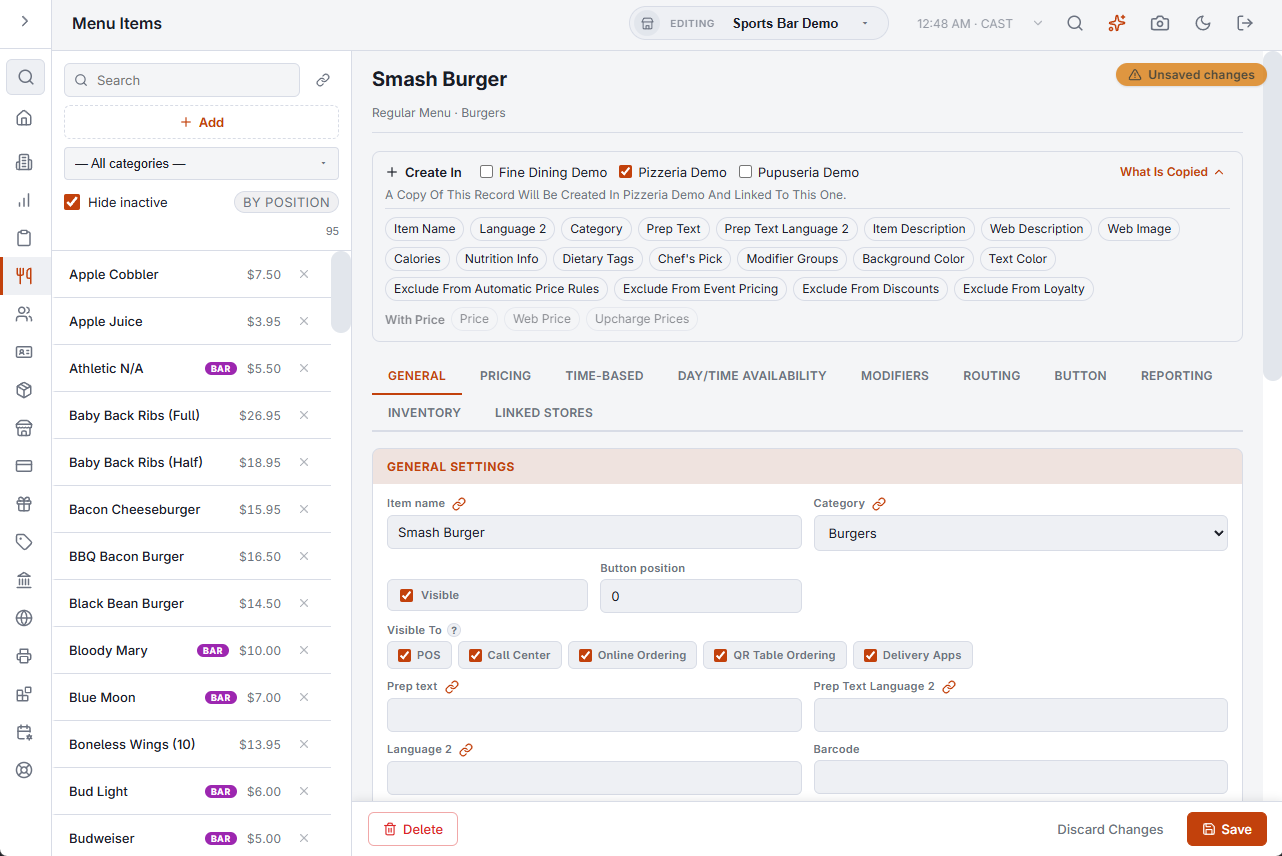
Also Save To changes a record that already exists in the other store. Create In is for a record the other store does not have yet. In the same bar, after the stores the record is linked in, the stores where it does not exist are listed under Create In. Tick one and press Save: a copy of the record is created in that store and linked to this one.
What the new record starts with
The whole record is copied, so the copy starts with the same settings, price, visibility and position as the one you are editing. What hangs off the record follows as with Also Save To: an item’s modifier groups and upcharge prices, a modifier’s level prices, a discount’s assignments. A few things are different on purpose:
- What the record points at follows the links: its category, modifier group, order type, revenue center, and an inventory item’s category, unit, suppliers and aisle. One that is not linked in the other store is left empty.
- Button and recipe images are left empty. Each store has its own image library.
- An order type is never created as the default order type.
- A pricing event is created disabled.
- An inventory item is created with no stock and no count.
When nothing is created
A menu item or upcharge needs its category, a modifier or modifier level needs its modifier group, and a price rule needs its item or category. If that is not linked in the other store, nothing is created and the message says so. Link the category or group first, or create it there the same way.
What is not created with it
- The contents of a record. A category arrives without its items and a modifier group without its modifiers and levels. Each of those is created from its own editor.