Most outages need nothing from you. Queued orders sync on their own, the banner turns green, and the day carries on. This topic covers the cases that don't resolve themselves — and how to confirm that nothing has been left behind, since an order that never reaches the server is money that never reaches your reports.
For using the register during an outage, see Working offline.
What happens automatically
- Queued orders are sent as soon as the connection returns, and again roughly every minute afterwards until the queue is empty.
- Each offline order is given its real daily order number by the server. The temporary 900000 number disappears.
- Cash taken offline posts against the order. Sending the same payment twice is not possible, so a retry is always safe.
- Prep tickets that couldn't be printed during the outage are dispatched.
- The orders list refreshes and the Cached / Not synced pills disappear.
Checking that everything synced
On any station, open the menu (☰), tap the gear icon, and under Maintenance tap Unsynced Orders. The button carries a count whenever anything is waiting.
Each order shows its number, total, customer or table, and how many sync attempts it has made.
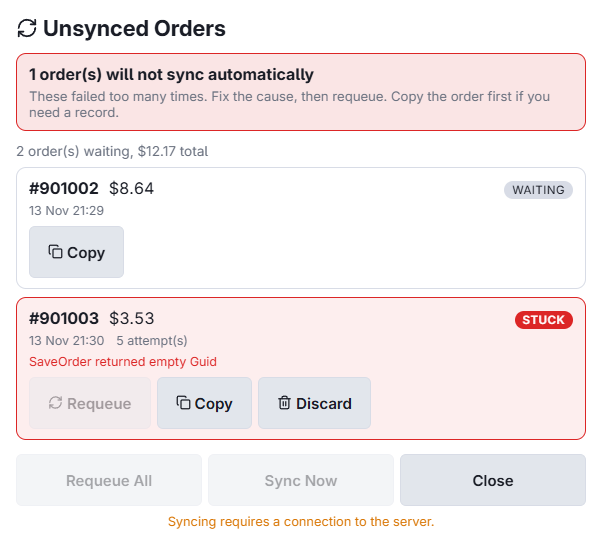
Waiting
Normal. The order is queued and will send itself. If the station is online and it hasn't cleared, tap Sync now.
Stuck
The order failed to send several times and is no longer retried automatically. This needs a person. The reason is shown on the row — most often the order was settled or voided on another station during the outage, so the server refuses the change.
- Read the message on the row to understand why it failed.
- Tap Copy first if the order holds cash or you may need to re-enter it. This puts the full order on the clipboard, so you can paste it somewhere safe before doing anything else.
- Fix the underlying cause if you can — for example, reopen an order that was settled prematurely.
- Tap Requeue to put it back in the queue, or Requeue all for every stuck order at once.
Reviewing the outage in Back Office
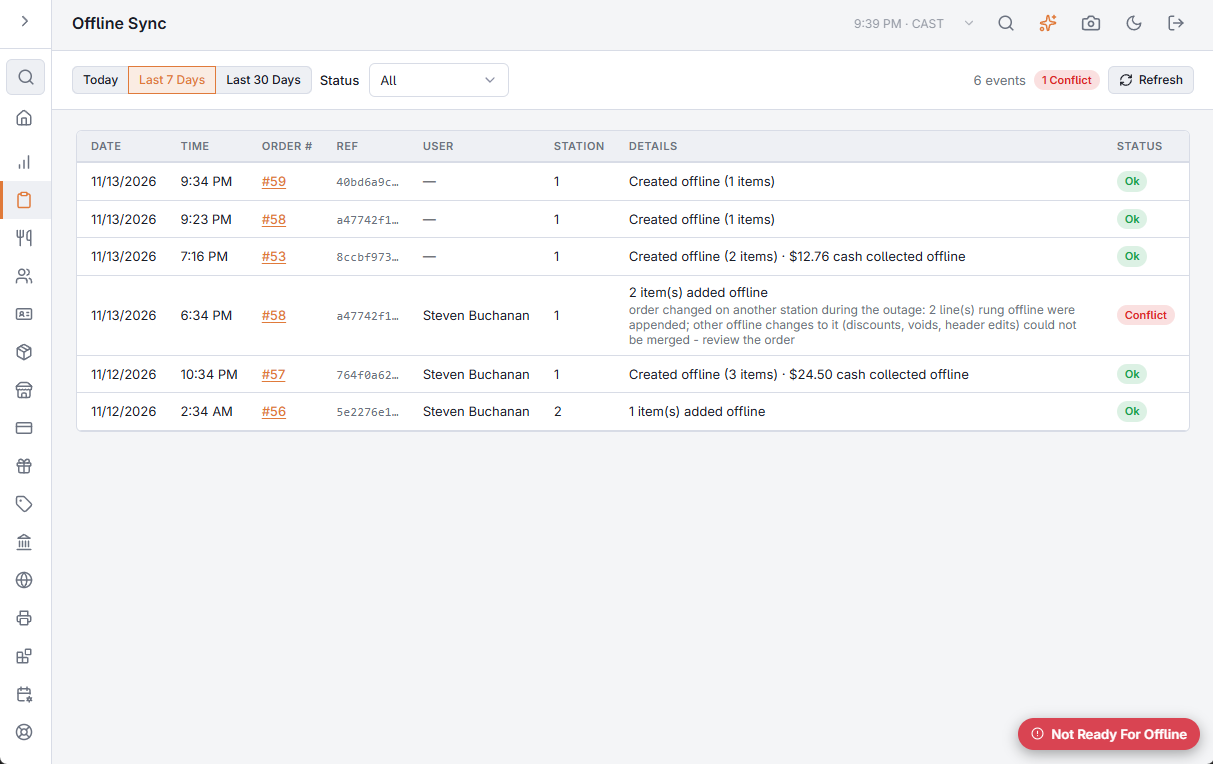
Go to Back Office ▸ Activity ▸ Offline Sync for a record of everything that happened, per station and per member of staff — orders created, items added, cash collected, and any conflicts the server rejected. Choose today, 7 days or 30 days.
Common situations
An order was settled on another station during the outage
The server refuses the offline change and the order goes stuck. Decide which version is correct — usually the one where the customer actually paid — then either reopen the settled order and apply the difference by hand, or requeue after correcting it.
The same coupon was accepted on two registers
Coupons are only checked when the order syncs, so a single-use coupon can be accepted by more than one offline register. The second redemption is rejected at sync. Adjust the affected order manually.
End of day is blocked
Working as intended. Closing the day while orders are queued would archive it without them, and they would then land in the next business day. Clear the queue on every station first — including any stuck orders — and try again.
An order is missing entirely
Check Unsynced Orders on the station that took it, not just the one you're standing at. Queued orders live on the device that created them, so a station that is switched off is holding its own queue until it comes back.
Before you close the day
- No station shows the offline banner.
- Unsynced Orders is empty on every station, with nothing stuck.
- Back Office ▸ Activity ▸ Offline Sync shows no unresolved conflicts.
When two stations changed the same order
If an order was open on a station when the connection dropped, and another station changed it during the outage, the server does not let the offline copy overwrite the other station's work. Instead:
- The items rung offline are added to the order, and cash taken offline is posted.
- Other offline changes to that order — a discount, a void, a change of order type — are not carried over.
- The event is recorded as a conflict in Back Office ▸ Activity ▸ Offline Sync, with the number of items added. Open the order and check its total.
If the other station had already settled or voided the order, nothing can be added and the order goes to Stuck, as described above.

Cash was taken twice for one order
If two stations each took cash for the same order during the outage, both payments are posted, because both sums are in a drawer. Offline Sync shows a conflict with the amount paid over the total. Refund the difference, or void one of the payments.
Clock punches
Punches made during the outage are sent before the orders. See Clocking in and out while offline for the few cases where a punch is not applied.