Staff can clock in and out during an outage. The punch is saved on the station with the station's time, the employee shows as clocked in or out at once, and the punch is sent to the server when the connection returns.
Clocking in or out
- Sign in with your PIN and open the time clock as usual.
- The status screen shows a line saying that punches are kept on this station and sent when the connection returns.
- Tap Clock in or Clock out.
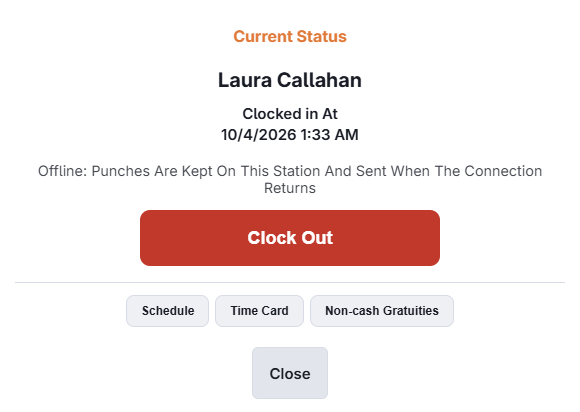
What is different during an outage
- No schedule checks. Early or unscheduled punches and overtime limits cannot be checked, so nothing is blocked and no manager approval is asked for.
- Your job. If the station lost the connection after you signed in, you choose your job as usual. If you signed in with your PIN during the outage, you are clocked in under the job you signed in with.
- No drawer steps. Choosing a drawer, opening floats and the drawer count are skipped. The register uses its own drawer while offline.
- Cash tips. If your job declares tips, you enter the cash amount only. The sales summary is not shown and no minimum is applied. Card tips and sales are filled in by the server afterwards.
- Breaks and reports are not available until the connection returns.
- Open orders. The rule that stops you clocking out with open orders is not applied offline.
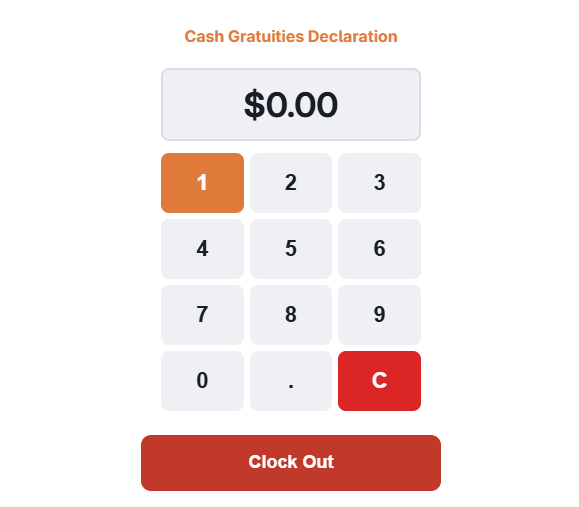
Clock out on the station where you clocked in. A shift that was started offline is known only to that station until it syncs. Another station will show you as not clocked in.
When the connection returns
- Punches are sent first, before orders, each employee's in the order they were made.
- The server writes each punch at the time the station recorded, with the same rounding and schedule link as an online punch.
- Like any new punch, it waits for approval under Reviewing and approving punches. The manager override log shows it was recorded offline.
Punches the server does not apply
A few punches cannot be applied. They are not retried, and the override log records why.
| Situation | What happens |
|---|---|
| Clock-in, but the server already shows the employee clocked in | The open punch stays. The offline one is dropped. |
| Clock-out, but the server shows no open punch | Nothing to close. The punch is dropped. |
| Clock-out earlier than the clock-in | The station's clock was wrong. The shift stays open for a manager to close. |
| The punch falls in a locked pay period | The punch is dropped. Unlock the period to add it by hand. |
| The employee has no job assigned | The punch is dropped. |
Note: The punch time comes from the station's clock. A clock that runs fast is corrected to the server's time. Keep the date and time on every register set automatically.