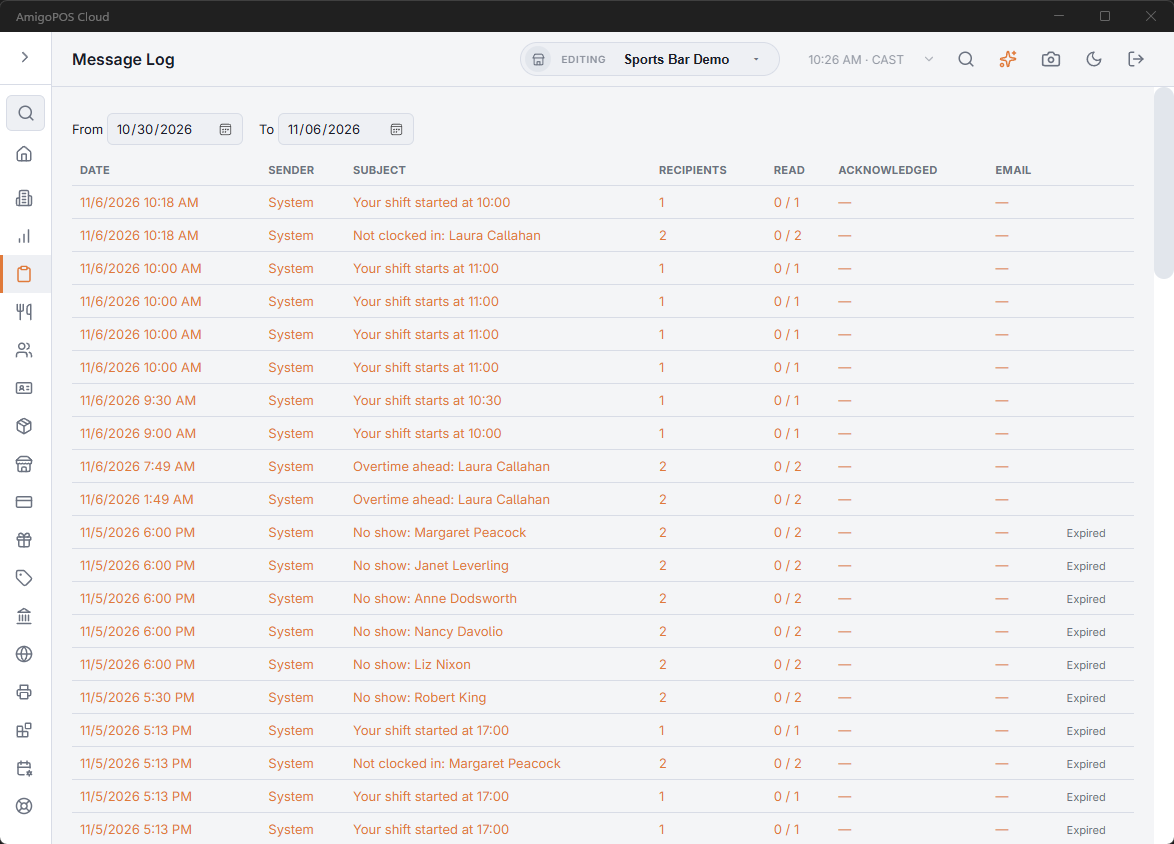
Back Office › Activity › Audit › Message Log lists every staff message sent in the store, by anyone, with how many people have read it, acknowledged it and been emailed it. Use it to check that an announcement reached the team.
The page appears for employees whose job has the Message Log permission.
Choosing the dates
From and To are calendar days in the store’s time; the last 7 days to start. The list reloads when you change a date. Newest messages come first.
The list
| Column | Shows |
|---|---|
| Date | When the message was sent. |
| Sender | Who sent it. Messages the system sends on its own, such as security alerts, show System instead of a person. |
| Subject | The message’s subject. |
| Recipients | How many people it was sent to. |
| Read | How many of them have read it, for example 3 / 5. |
| Acknowledged | How many confirmed it, when the message asks for acknowledgement. — when it does not. |
| For a message also sent by email: how many emails went out (✓) and, after a dot, how many failed (✕). — when it was not emailed. | |
| (last) | Expired once the message is past its expiry time. |
- Quick alerts are shown in the accent color.
- Replies are listed as rows of their own.
- Deleted messages are not listed.
The log is read-only. To see who exactly has read a message, edit a scheduled one or expire one, open it from Back Office › Employees › Communication & Audit › Messages: see Messages.
Messages older than 90 days are removed when End of Day runs.