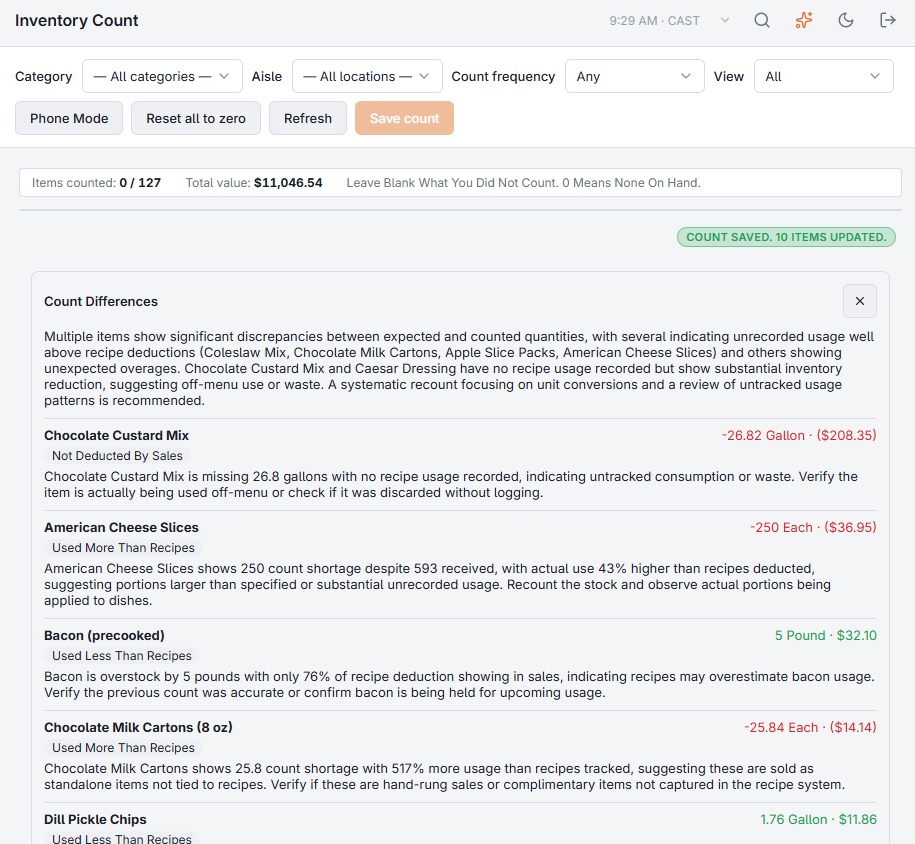
After you save an inventory count that has differences, Explain Differences appears next to the saved message. It looks at the items with the biggest differences by value (up to 15) and what happened to each since its previous count.
The labels
These come from your own records, not from the AI:
- Possible Pack Or Case Mix-Up — the difference is exactly one to three packs or cases, as if something was counted in the wrong unit.
- Matches A Delivery — the difference is the size of one delivery: entered but not all received, or received but never entered.
- Not Deducted By Sales — a shortage on an item that sales never took off (no recipe uses it), so all its use only shows at a count.
- Used More Than Recipes / Used Less Than Recipes — the difference is 10% or more of what recipes took off: bigger portions, unrecorded waste or theft, or recipes set higher than what is served.
- First Count — the item had no earlier count, so the last 14 days are used.
The explanations
For each item the AI writes one or two sentences with the most likely cause and one thing to check, plus a short summary of the whole count, in your language. It works only from the numbers shown and says so when nothing explains a difference — then a recount is the next step. When AI is not available, the numbers and labels still show.
See also Inventory counts.