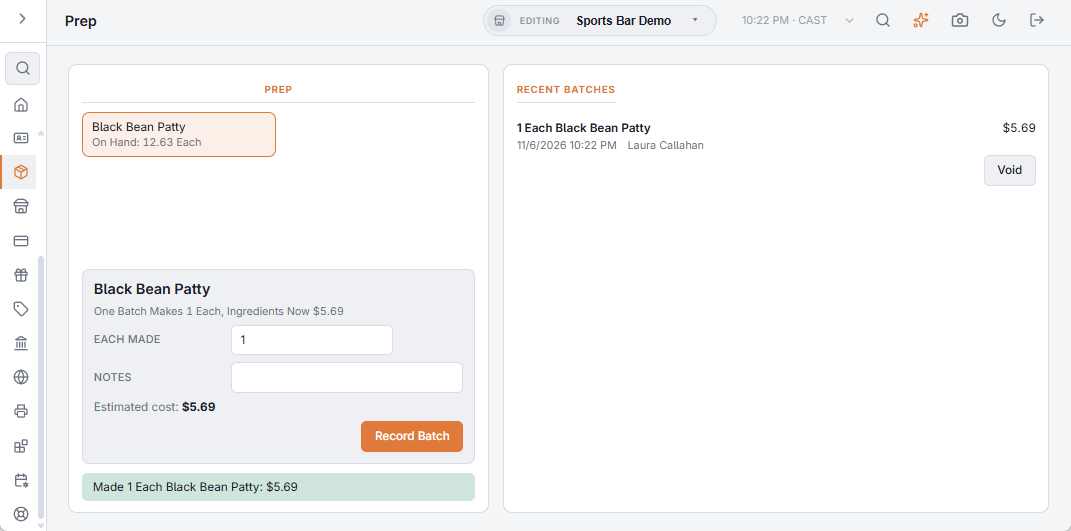
The Prep page (Back Office › Inventory › Operations › Prep) lists every item made in house, with what is on hand and what one batch costs right now (for example “One Batch Makes 4 L, Ingredients Now $6.80”). Items appear here once they are set up — see Prep items made in house.
Recording a batch
- Pick the item. The quantity starts at one batch; change it to what was actually made (half a batch, two batches).
- Add notes if needed and choose Record Batch.
The ingredients come off stock at their real, oldest-first cost, and the prep item goes into stock at what that batch cost. An ingredient that runs short goes below zero and shows as Oversold, just like a sale.
Recent Batches
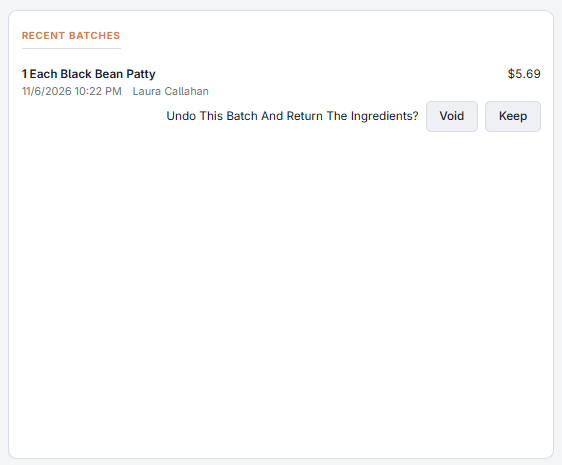
Recent Batches lists the last 7 days of batches with their cost. Void undoes a batch recorded by mistake: the ingredients go back and the prep item comes out.
Record batches when they are made, not at the end of the week. A sauce sold before its batch is recorded shows as oversold, and the batch recorded later fills that gap.