Some guests who get a win-back email would have come back anyway. To see what your emails really do, keep a small group of guests who get nothing and compare how many of each group come back.
Turn it on
In Discounts & Promotions › Guest Offers › Settings › Extras In Your Emails, set Holdout Group (%). 5 to 10 is plenty; 0 (the default) turns it off.
- Each guest due an automatic email (win-back, birthday, celebration, first visit anniversary, order again) or an Email The List email is held out at random at that rate: no email and no coupon.
- Held-out guests aren’t picked again for that email, don’t count toward the daily limit and don’t show as sent.
- Guests in an A/B subject test, and thank-you coupons, are never held out.
Read the result
The Results tab shows a What The Emails Really Did card once guests have been held out in the period. For each email: how many were emailed and how many of them came back, how many were held out and how many of them came back, and Extra Guests Back.
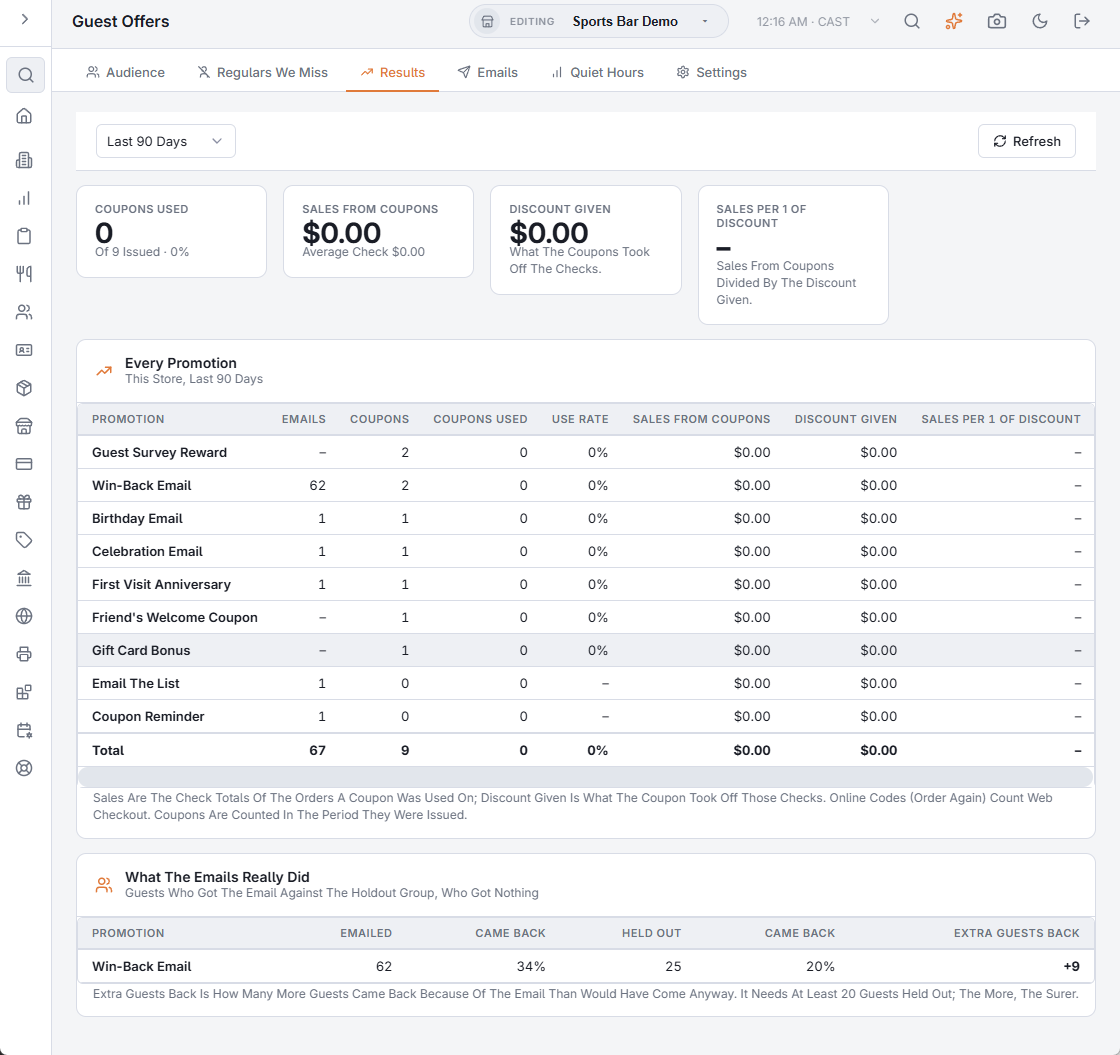
- Extra Guests Back = (the emailed guests’ return rate − the held-out guests’ return rate) × guests emailed. +12 means 12 more guests came back because of the email.
- “Came back” means they ordered again after the email was due.
- It shows Too Few Yet until at least 20 guests have been held out; the more, the surer the number.
- Only emails from the first held-out guest on are compared, so older sends don’t skew it.
Related: Offer results · Guest offers: extras in your emails