Back Office › Inventory › Reports & Audit › Audit Log lists the manual changes made to stock, with who made them and when. Use it with Inventory logs: the logs show what moved, the audit log shows who moved it.
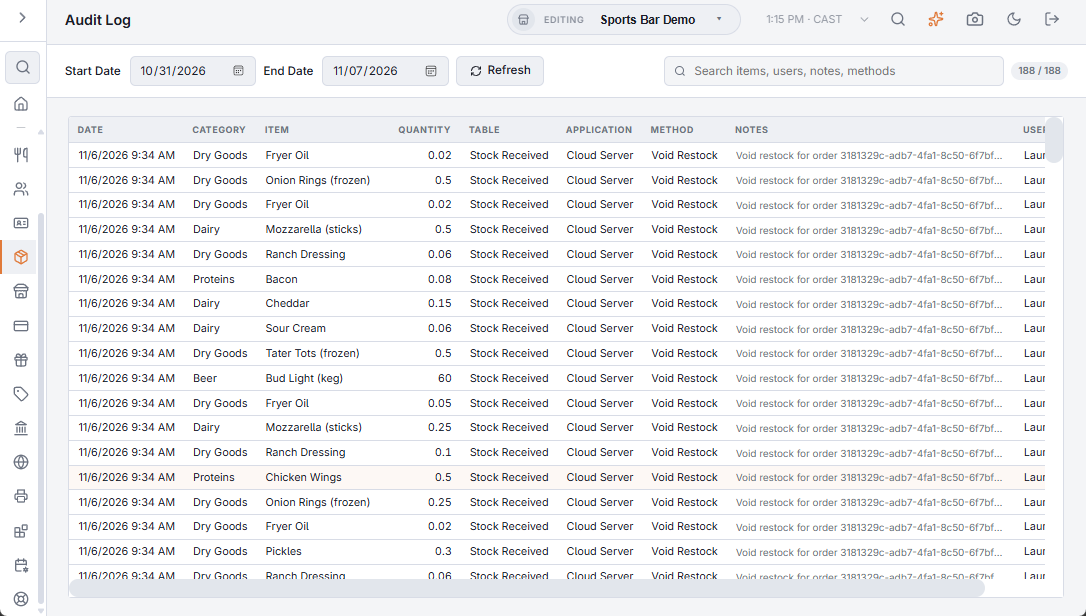
What is recorded
- Deliveries entered on Receive Inventory, one at a time or from a scanned invoice.
- Count changes saved on Inventory Count: each shortage, overage or reset to zero, with what the sheet showed and what was on hand.
- Stock put back when an order is voided, when items are returned to inventory, or when a line is refunded.
Sales, waste, prep batches, purchase order receipts and transfers are not listed here; they have their own records on their pages and in Inventory Logs.
Reading the log
- Pick the Start Date and End Date (the last seven days when the page opens); the list reloads when you change a date. Refresh reloads it again.
- Each row shows the Date, the item’s Category and Item, the Quantity (positive for stock added, negative for stock taken), Table, Application and Method (which record changed and which part of the program changed it, such as Stock Received and Inventory Count), the Notes and the User. The standard notes, such as those of a delivery or a count, are shown in your language; anything the counter typed is shown as typed. Changes made by the system with no user show System.
- The search box matches items, categories, users, notes, methods, applications and tables, as shown on screen. The badge beside it shows how many rows match out of the total. Newest rows are at the top.
When an item’s stock jumped and you don’t know why, search the item here first: a delivery entered twice or a count typed in the wrong unit shows up with the person and the time.