Guests can book from a page of your own, without an app and without a marketplace taking a cut of the cover. Switch it on in Back Office › Store Setup › Reservations, on the Settings tab: Take Bookings Online, the Dining Room Offered Online (left at None, the first dining room is offered), and the Largest Party the page takes by itself (8 to start, up to 40; bigger parties are asked to phone). The same tab holds the booking link and its QR code under Guest Links, ready to hand to the restaurant for their website or the front door.
What the guest sees
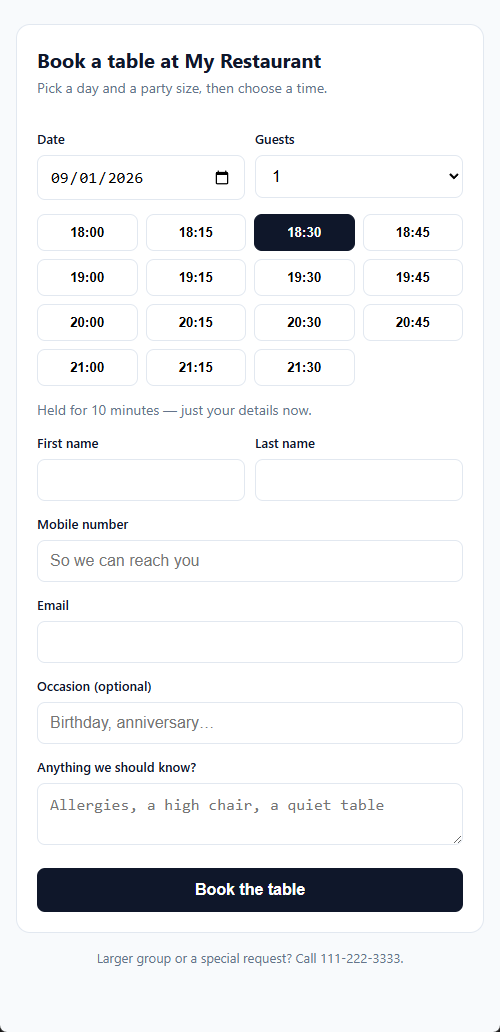
A day, a party size, the free times, then their details. Times that carry a deposit show the amount before they commit. They land on a page of their own with a confirmation code, where they can say they are coming or cancel.
Deposits
A booking that owes money is written but stays unpaid and unconfirmed until the payment goes through — a table people want is not held on the strength of a form. If the guest closes the payment page, their booking page offers it again, and a booking that is never paid releases itself after three quarters of an hour.
When nothing is free
With Let Guests Join The Queue Online switched on, a guest who finds no times can join the queue instead. They see the likely wait before they commit, get a page showing their place in it, and are texted when the table is ready. They appear on the host stand’s waitlist beside the walk-ins.
Confirmations and reminders
A confirmation goes out shortly after the booking: it is the store’s text-message action Reservation Confirmation, switched on to start with, on Back Office › Integrations › SMS and on the WhatsApp page. A reminder goes out before the sitting when Send Reminders is on under Booking Messages on the Settings tab (off to start); Remind Hours Before sets how long before (24 to start, 1–168). Each message links to the guest’s own page, so confirming or cancelling is one tap and reaches the book immediately. Guests who left an email get one as well as, or instead of, the text.
The public web address
Every link a guest receives — the booking page, the QR code, the links in confirmation messages, the return from the payment page — is built on the store’s public web address: the Base URL under Integrations › Stripe, also listed in All Program Settings. Until it is set the Settings tab says so and none of those links work.
Getting the link onto Google
The restaurant can put a Reserve a table link on its own Google Business Profile, no partner programme required. The steps are in Putting the booking link on Google.
The host stand
Warn This Many Minutes Ahead (Host Stand section) sets how soon a booking counts as due on the POS reservations badge: 15 minutes to start, 5–720. Parties already past their time always count.
Guest Links and QR codes
The Booking Page and Waitlist Page each have a QR Code button. It shows the code with Copy link and Open in browser, for printing or for the restaurant’s website.
Saving
The Settings tab saves each setting as you change it, with a tick to confirm; there is no Save button. The other two tabs have their own Save button.
Who pays for the messages
Texts go through AmigoPOS’s text service and are charged per message, billed monthly, outside the subscription. WhatsApp messages go through the store’s own WhatsApp account and Meta bills the store directly. The SMS Log shows every message, texts and WhatsApp alike.
Birthdays and anniversaries
Guests can choose Birthday or Anniversary under Occasion (optional), with the date when it isn’t the day they book. The occasion is kept for the guest, and the celebration email can invite them back next year. See Celebrations and first visit anniversaries.
Letting the guest pick the table
Let Guests Pick Their Table, in the same Online Booking section (off to start), shows the online dining room as a floor plan after the guest chooses a time: the free tables that fit the party are outlined, the guest taps one — or Any Table — and the booking arrives at the host stand with that table assigned. How it works, what is held and which tables are offered: Letting guests pick their table online.