Back Office › Discounts & Promotions › Suggestive selling › Payouts is the ledger of the rewards staff earn through Performance programs and contests. A row is added the moment an employee reaches a reward in a program’s period; here you see what is owed and record what you have paid.
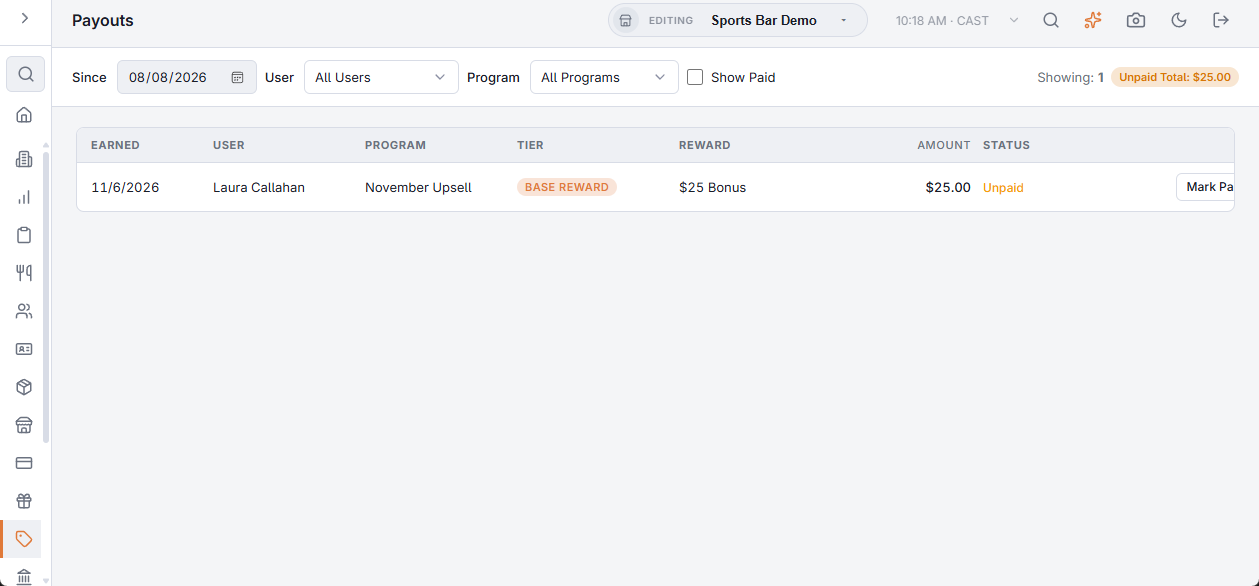
Filters
- Since — rewards earned from this date; it opens on 90 days ago.
- User and Program — one employee or one program, or all.
- Show Paid — off (the default) lists only what is still owed; on lists paid rewards too, after the unpaid ones.
The toolbar shows how many rows are listed and, in the unpaid view, the Unpaid Total of their amounts.
The rows
| Column | Shows |
|---|---|
| Earned | The date the reward was reached, in the store’s time. |
| User | Who earned it. |
| Program | The program it came from. |
| Tier | Base Reward, Tier 2 Reward or Tier 3 Reward. |
| Reward | The reward text of that tier. |
| Amount | The tier’s cash value, when the program has one. |
| Status | Unpaid, or Paid with the payment date on hover and the note under it. |
Marking a reward paid
- Press Mark Paid on the row.
- Optionally write Notes, for example “paid in cash” or a payroll reference.
- Press Confirm. The row is marked paid with today’s date and leaves the unpaid view; Cancel closes it without changes.
Marking paid only records that the reward was settled; it doesn’t move money. Pay through your normal payroll or cash process, then record it here so the ledger stays right.