Back Office › Discounts & Promotions › Suggestive selling › Reports shows how your offers perform: how often they are shown, how often they are accepted, and the sales they add — by rule and by employee.
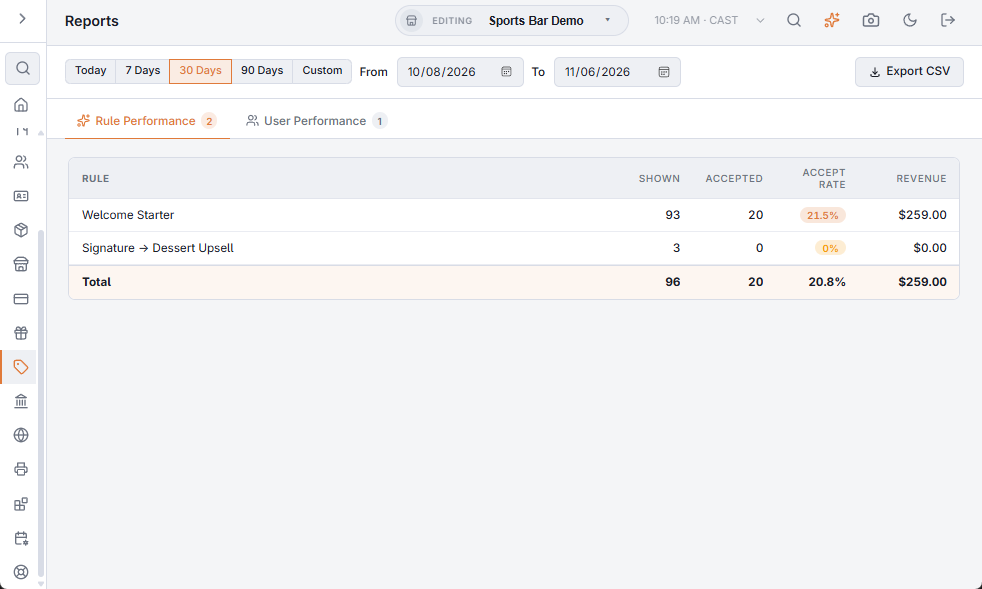
Choosing the dates
Pick Today, 7 Days, 30 Days (where the page opens) or 90 Days, or set From and To yourself, which switches to Custom. Dates are store days, and both From and To are included; the presets end today. Both tabs use the same dates.
Rule performance
One row per rule, the rules with the most revenue first, and a Total row. A rule under A/B test shows each variant on its own row, named with the rule and the variant letter (for example Rule · A and Rule · B), and the variants of a rule stay together. The letter shows only when the rule had more than one variant in the dates (A/B testing offers).
| Column | Meaning |
|---|---|
| Shown | Times the offer was presented. |
| Accepted | Times the item was added from the offer. |
| Dismissed | Times it was turned down. |
| Ignored | Times it was shown and left without an answer. |
| Accept Rate | Accepted out of shown, as a percentage. Rates of 50% and more show in green. |
| Revenue | The sales of the items added from the offer. |
An offer replaced by a newer one before anyone answered is not counted.
User performance
One row per employee, with Shown, Accepted, Accept Rate and Revenue, and a Total row.
Exporting
Export CSV downloads the tab you are on, for the same dates, with the column headings in the language the Back Office is shown in.