Back Office › Troubleshooting › Support Ticket sends a ticket to AmigoPOS support by email. Your store, device and release details are attached automatically, so the form only asks what you alone can answer.
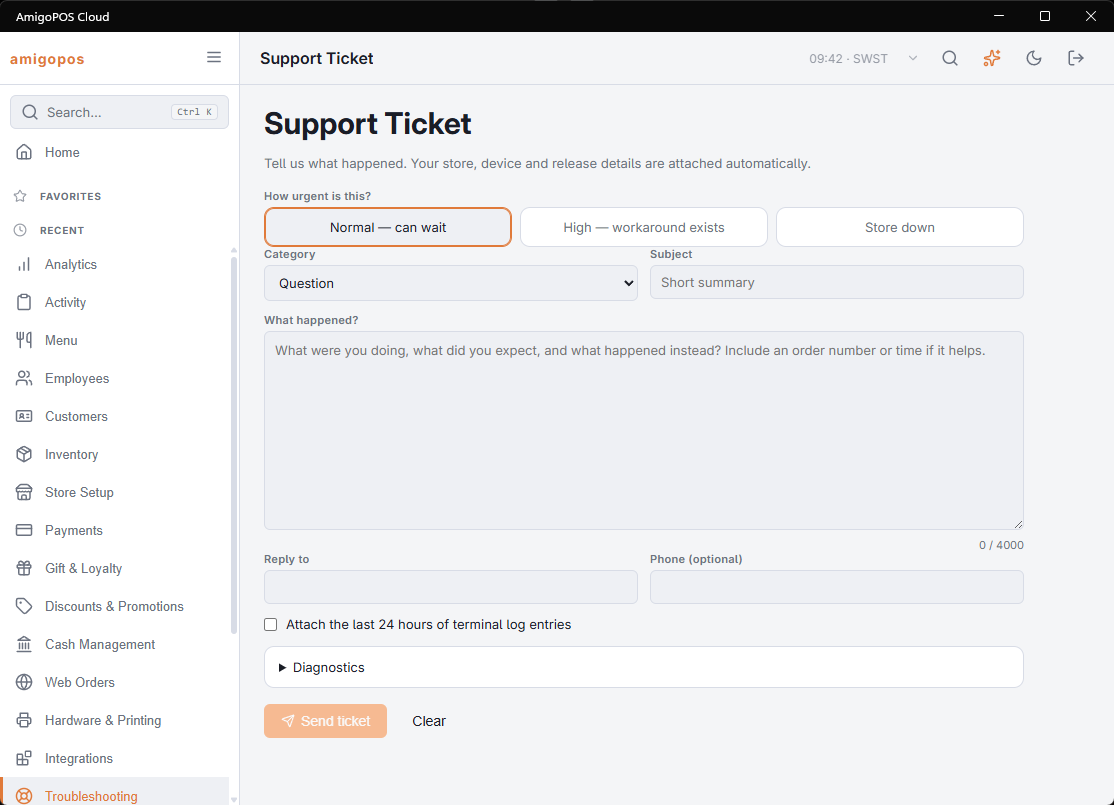
The form
- How urgent is this? — Normal — can wait, High — workaround exists or Store down. Choose Store down only when you cannot take orders or payments right now; the form then reminds you to call support as well, because email alone may not reach support fast enough.
- Category — Question, Something is broken, Hardware / printing, Payments, Menu / pricing, Reporting or Feature request.
- Subject — a short summary, up to 120 characters.
- What happened? — the description, up to 4,000 characters. A counter shows how many you have used.
- Reply to — the email address support replies to. It is filled in with the signed-in user’s email address when there is one.
- Phone (optional) — a number support can call.
- Attach the last 24 hours of terminal log entries — adds the most recent entries, up to 200, that the store’s stations logged on the server in the last 24 hours. Tick it when you are reporting a fault.
- Diagnostics — open it to see what is sent with the ticket: release, platform, runtime, language, store, device, station, the signed-in user and the time.
Send ticket is available once Subject and What happened? are filled in. Clear empties the form. If the ticket cannot be sent, the page says The Ticket Could Not Be Sent. Check The Connection And Try Again.
After sending
The page shows the ticket’s reference, for example APS-7K3M2Q. Quote it if you call. A confirmation with the reference goes to the Reply to address, and the page says A copy was sent to that address. New ticket starts another one.
What to put in the description
Four things turn a two-day exchange into one reply: what you did, what happened instead, which station, and what time. Add the order number if there is one, and the exact wording of any message — a paraphrased error is usually not searchable.
For a problem on one station, its own logs help even more; see Analyzing station logs with AI.