Ask the assistant an inventory question and it does the arithmetic a manager would otherwise do on a notepad: it takes the demand forecast for each menu item, multiplies it through the item's recipe, adds everything up per ingredient, and compares the result with what is on hand. The answer is a purchasing list, not a sales number.
What you can ask
- Needs for one item — "How much inventory do I need for caesar salads next week?" The assistant matches every item containing the words you used (Caesar Salad and Chicken Caesar), forecasts units per day, and lists each ingredient with quantity needed, on hand, shortfall, cases to order, estimated cost and vendor.
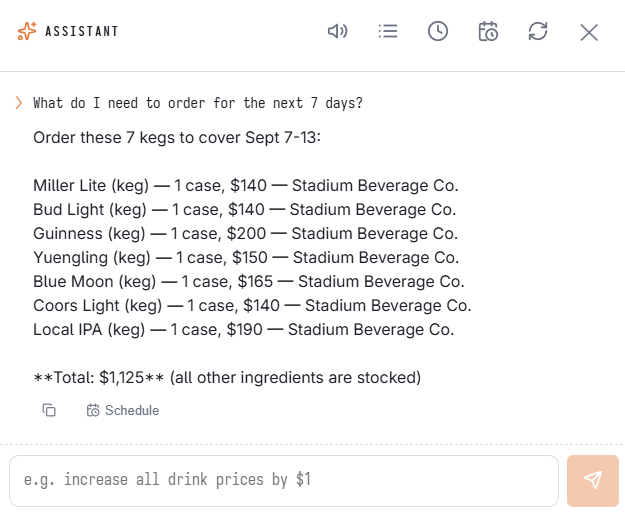
- The whole order — "What do I need to order for the next 7 days?" Same calculation across every item that has a recipe, sorted by shortfall, with a total estimated cost at the bottom.
- Stock checks — "How much romaine do we have?" or "What's low on stock?" (everything at or under its reorder level).
- Recipes and plate cost — "What goes into the burger?" or "What's my food cost on the burger?" — ingredients per portion, plate cost from current inventory costs, and food-cost percent against the menu price.
- Actual usage — "How much chicken do we go through a week?" — real consumption recorded from sales, with daily and weekly averages.
Reading the answer
Ingredients come first, biggest shortfall on top, then the forecast units behind them. Needed is forecast units × recipe quantity for the window you asked about (default: tomorrow for 7 days, up to 14). On hand is the current quantity across your received-inventory layers. Shortfall is needed minus on hand, never negative. Cases to order rounds the shortfall up to whole cases using the item's pack and case sizes, and the estimated cost uses the case cost when you have one, otherwise the weighted average cost of the stock on the shelf.
Where the numbers come from
Demand per item per day is the same nightly forecast shown on Analytics › Performance › Demand Forecast, so chat and dashboard always agree. The stored forecast covers your top 300 items for 7 days; for lower-volume items, or for days 8–14, the assistant uses a four-week same-weekday average from actual sales and marks those items as estimates from recent sales. Forecasts need about two weeks of history before they are trusted.
When an item has no recipe
An item without a recipe still forecasts units, but contributes nothing to the ingredient list — the assistant names those items so you know the purchasing total is incomplete. Recipes are set up in Back Office › Inventory › Setup › Recipe Editor (see Recipes (yield, cost, ingredients)); the more items that carry one, the closer the order list gets to a real shopping list.
What might run out today
What are we going to run out of tonight? — the assistant compares each ingredient’s forecast use for the rest of today (the day’s forecast minus what was already used) with what is on hand plus deliveries due today. Will run out means the rest of the day needs more than that, with how much it is short; tight means within 20%.
Drafting purchase orders
Draft our orders for the weekend — one draft purchase order per supplier from the forecast, created after you confirm. See Drafting purchase orders from the forecast. Invoices can be photographed straight into Receive Inventory: Scanning a supplier invoice.