Every change the AI Assistant makes after you confirm it is written to the store’s AI change log: price changes, new menu items, employee edits, drawer changes, drafted purchase orders and so on. Questions and reports change nothing, so they are not logged.
What each entry shows
- What was done — the same summary you saw in the preview before confirming.
- Who and when — the signed-in employee and the time.
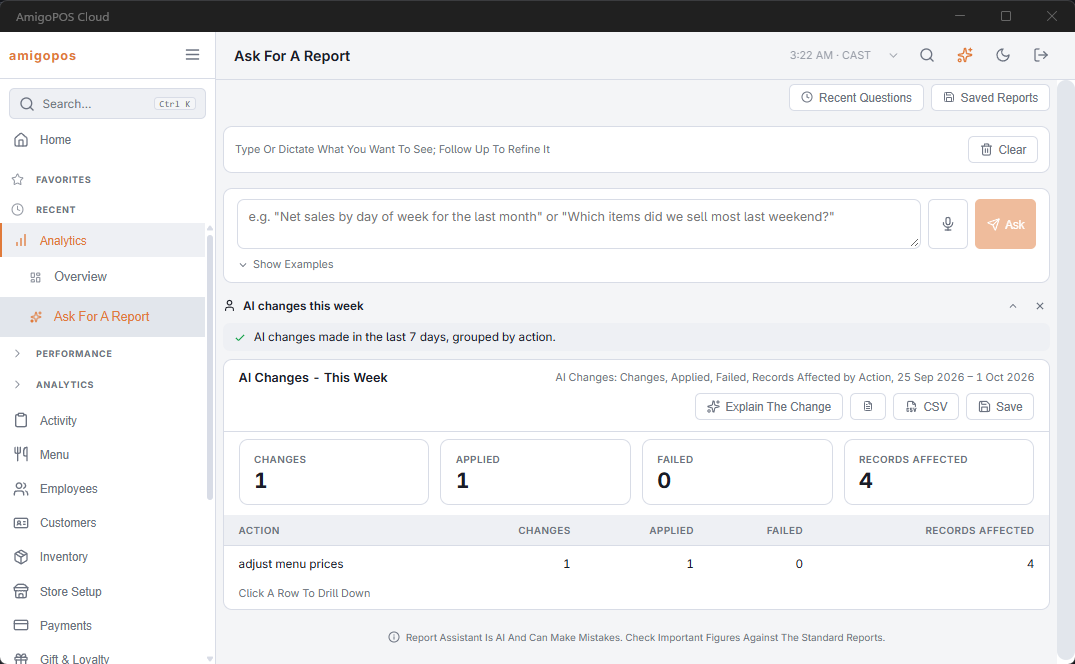
- How many records it changed, and whether it was applied. A change that failed is logged too, so you can see it was tried.
- Whether it can be undone. An undo is its own entry, so the history stays complete.
PINs, passwords and other secrets are masked in the log.
Seeing the log
Open Ask For A Report and ask for it in your own words — for example AI changes this week or what did the assistant change yesterday by employee. The AI changes dataset can be grouped by day, employee or type of change like any other report.
To reverse a change, see Undoing a change. Changes always need a confirmation first — see Previews, confirmations, and safety.