Any device that runs AmigoPOS can be a customer display: a tablet on a stand facing the guest, or a PC with a monitor. It is paired to one station and follows that station.
Pair a display
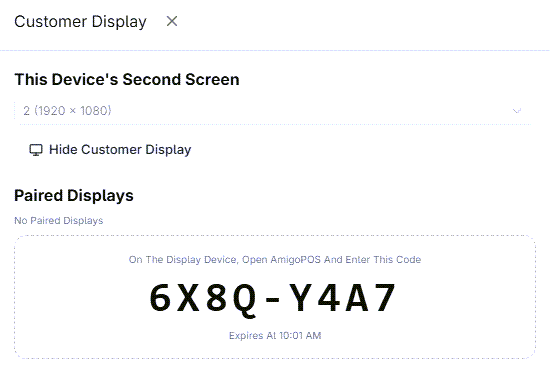
- On the station the display belongs to, sign in and open More › Customer Display.
- Tap Pair A Display. An 8-character code appears. It can be used once, within 15 minutes.
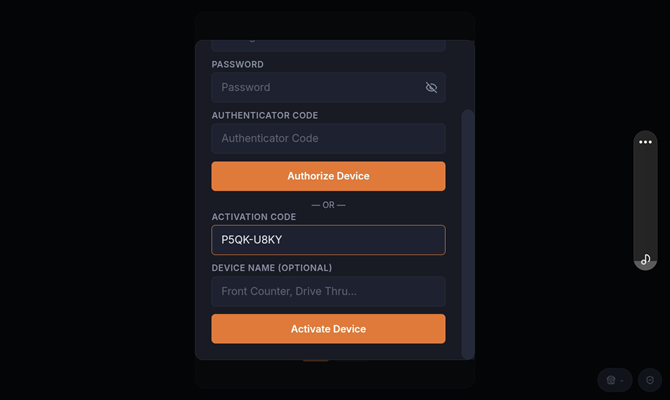
- On the display device, install and open AmigoPOS and enter the code on the activation screen.
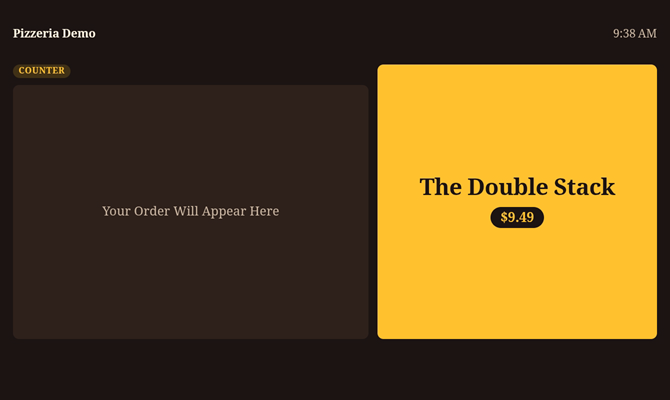
- The device becomes that station's customer display: it opens the display full screen, keeps the screen on, and shows the station's sales from then on.
Pairing needs a user who is allowed to register devices. If Pair A Display says you can't, ask a manager.
Unpair a display
Any of these does it:
- At the station: tap Unpair next to the display in More › Customer Display, or in Back Office › Hardware & Printing › Customer Display › Settings › Paired Displays.
- In Registered Devices: Deactivate the display's row. A display that was paired more than once has one row per pairing; the live one is the row whose Last Seen keeps moving.
- On the display itself: press and hold the top-left corner of the screen for about four seconds. A small panel shows the store, device, station and connection; enter a manager PIN (a job allowed to register devices, or a manager) and tap Unpair This Display.
The display shows This Display Was Deactivated (This Display Is No Longer Paired if it is restarted later) with a Pair Again button, which takes it back to the activation screen for a new code. A running display picks this up on its own, at once while it is connected and within a minute otherwise; it does not need to be restarted.
Good to know
- A paired display needs internet like the POS. If the connection drops it keeps showing its design and promotions and catches up when it reconnects; a small red dot means it is reconnecting.
- A paired display does not count as a station.
- A paired display can show the design in another language than the POS — see Wording, behavior and stations.