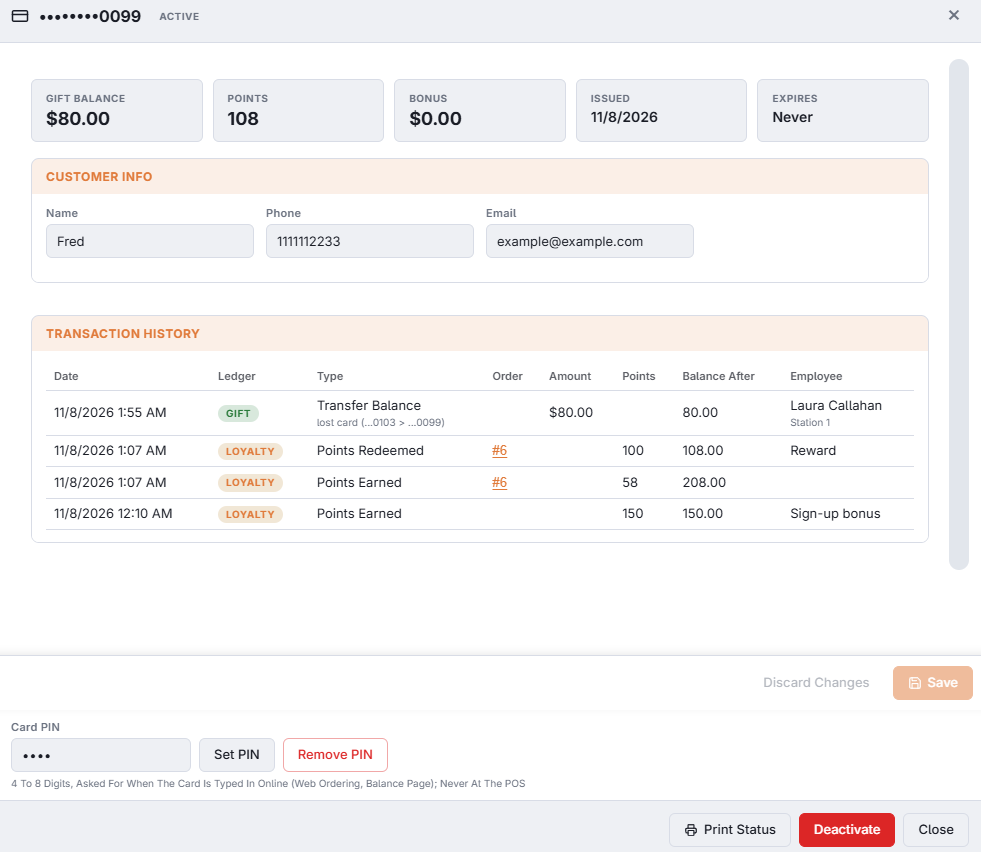
Balances, customer details, the full history, printing a status slip, PIN and deactivating a card.
Opening a card from All Cards shows everything about it in one window.
Tiles — gift balance, points, bonus, issue date and expiry.
Customer Info — name, phone and email; edit them and Save. Reminder emails go to this email.
Card PIN — set or remove the PIN asked for online (Card PINs).
Transaction history — gift and loyalty lines together, newest first: date, ledger, type, amount, points, balance after and employee.
Footer buttons
Print Status — prints the gift slip, the loyalty slip, or both, on this station’s receipt printer.
Deactivate / Activate — a deactivated card is refused everywhere until activated again; its balance is kept. It asks you to confirm, and it needs the Deactivate Gift Card permission.