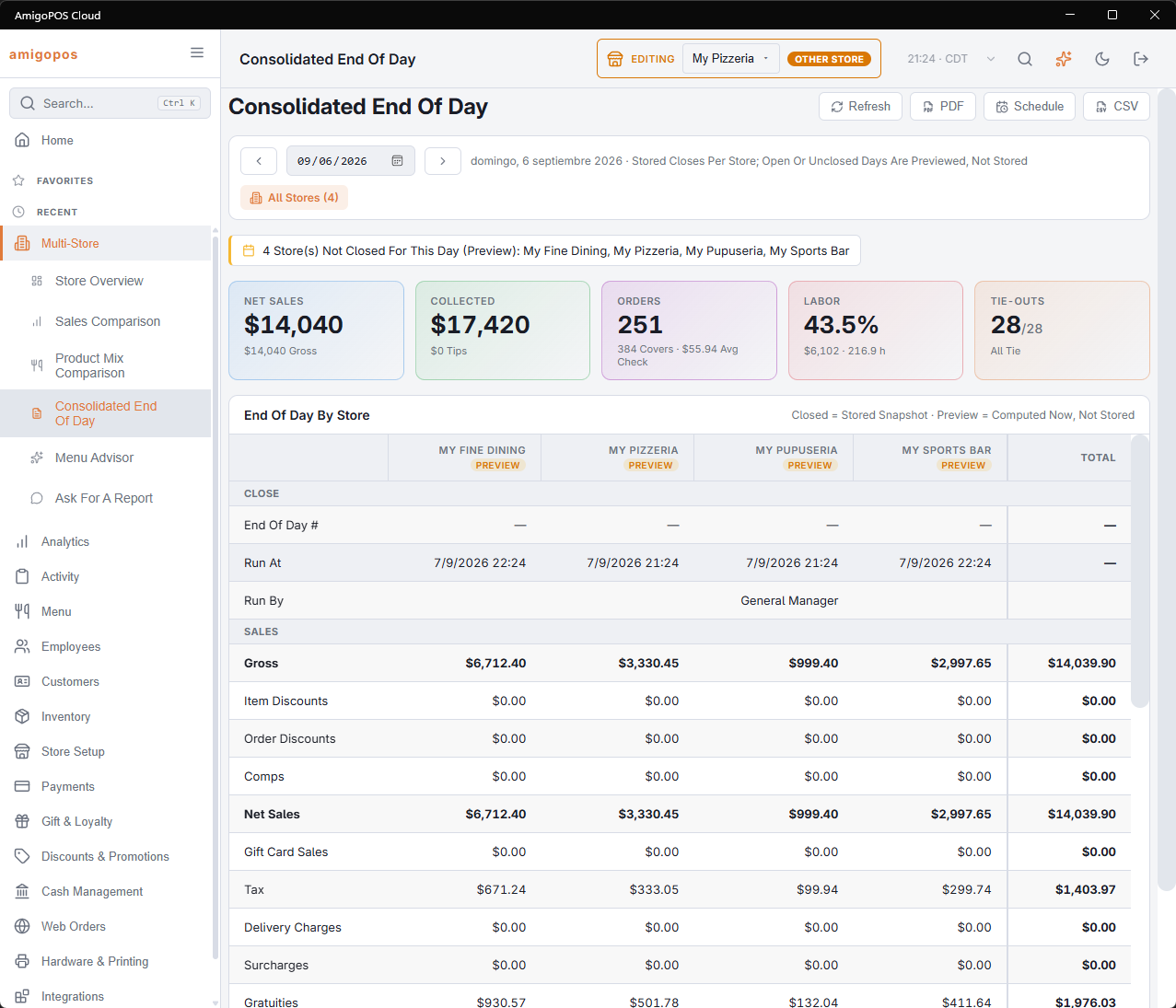
Back Office › Multi-Store › Consolidated End Of Day lays one business day of every store side by side, one column per store, with a Total column for the account.
Choosing the day
The page opens on yesterday. Use the arrows (Previous Day, Next Day) or type a date. Refresh loads the figures again.
Closed and Preview
Under each store name a tag says where its figures come from:
- Closed — the store ran its end of day for that date, and the column is the stored close, exactly as it was signed off.
- Preview — the store has not closed that date. The column is worked out now from the same figures; it is not stored, and it keeps changing until the store closes.
- No Data — that store’s business day has not started yet. Its cells show a dash.
- Error — the store’s figures could not be read.
The Total column adds every store that has a Closed or Preview column, so a total that includes a preview is provisional too. The insights strip names the stores still in preview.
The figures
The top boxes give the account’s Net Sales (with gross), Collected (with tips), Orders (with covers and average check), Labor (percentage, cost and hours) and Tie-Outs passed out of the total. The table below groups its rows:
- Close — End Of Day #, Run At and Run By.
- Sales — from Gross down through item and order discounts and comps to Net Sales, then gift card sales, tax, delivery charges, surcharges and gratuities to Amount Due, and refunds, tendered, tips, cash discounts and card fees to Collected.
- Counts — orders, covers, average check, voids and orders open at close.
- Tenders — one row per kind of tender any store took, named as on the Payment Methods page, in the language Back Office is shown in.
- Cash — cash sales, paid outs, drops, Drawer Variance and no sales.
- Labor — hours, labor cost and labor as a percentage of net.
- Markdowns — voided orders and removed items.
- Tie-Outs — how many of the end-of-day checks passed and how many failed.
The insights strip also lists failed tie-outs by store (or says all of them pass), drawer variances of 5 or more, and orders still open at close. What each line means is explained in The end-of-day report.
Taking it away
- PDF — the same table as a document.
- Schedule — emails the PDF on a schedule. Choose Daily with Yesterday to receive the previous day each morning.
- CSV — one row per line, one column per store, then the total.
The preview, email and schedule screens work as on the Analytics pages; see Exporting and PDF preview.