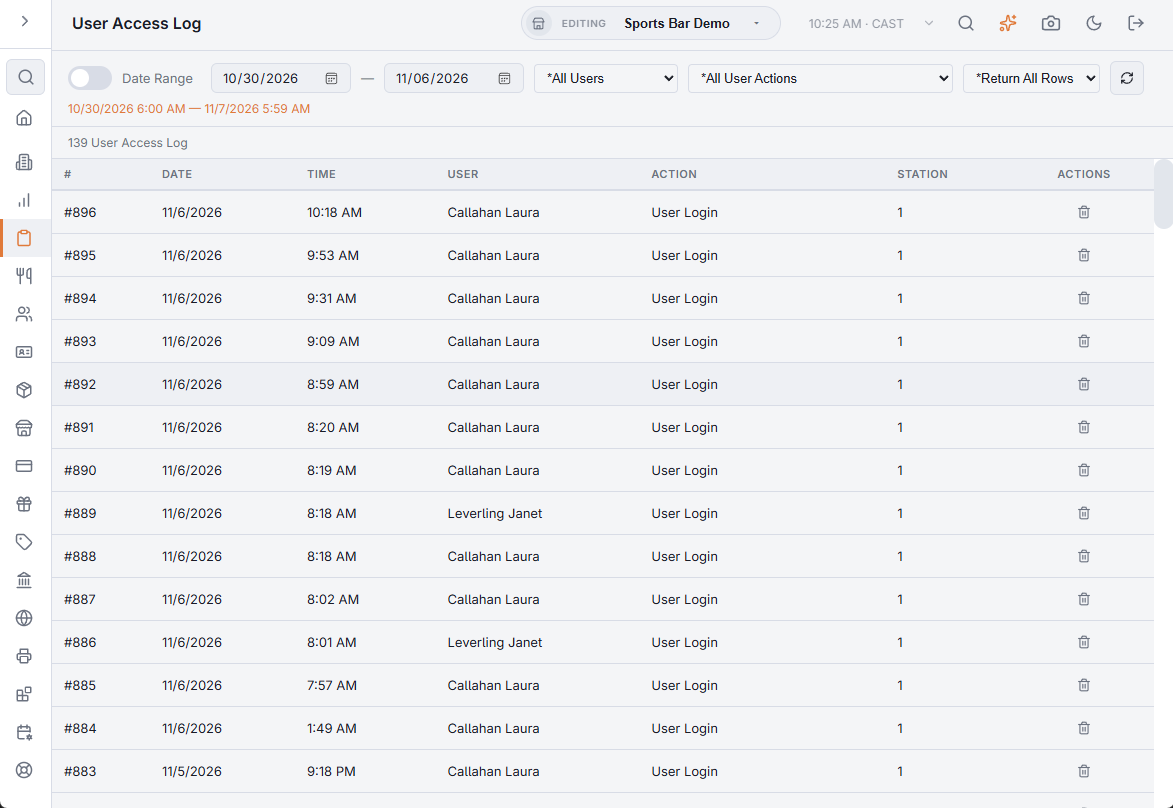
Back Office › Activity › Audit › User Access Log lists the actions the system records against an employee: register sign-ins, manager approvals and refusals, and changes to the store’s devices. Use it to see who signed in, when and at which station, and which manager approved what.
What it records
- Sign-ins at the register — each successful PIN sign-in, as User Login, with the station it happened at.
- Manager approvals — when a manager approves an action someone else’s job does not allow, the entry is written under the manager’s name and named after the action: Void Order, Comp, Split Order, Transfer Order, a discount, a price change, a refund, a time clock exception, and so on. An action done by someone whose job already allows it is not recorded here.
- Refused approvals — Manager Override Denied, under the person who entered their PIN or password but could not approve: their job lacks the right, it was their own action, or the store requires the approving manager to be clocked in and they were not.
- Devices — a device registered, authorized with an activation code, deactivated, renamed or given a new role. An activation is written under the manager who created the code; the others under the person who made the change in Back Office.
Choosing what to list
- Current Business Day / Date Range — the switch on the left. On, the list covers everything since the last End of Day. Off, two dates appear; the range follows the store’s business day, so a day runs from the business day start time to the same time the next day.
- All Users — or one employee.
- All User Actions — or one action. The list offers only the actions the system records: User Login, the manager approvals (including each time clock exception, such as Override: Early Clock In), Manager Override Granted, Manager Override Denied and the five device changes.
- Return All Rows, or Top 100, 500, 1000 or 2000 — limits how many entries come back.
Changing the dates, the employee, the action or the row limit does not reload the list. Click the refresh button at the end of the toolbar (Update Results) to apply them. The line under the toolbar shows the period the list covers.
The list
| Column | Shows |
|---|---|
| # | The entry’s number. |
| Date and Time | When it happened, in the store’s time. |
| User | The employee the entry is recorded against. Empty when the change was made by a Back Office account that is not an employee. |
| Action | What happened. |
| Station | The station number of the register or device involved. |
The newest entries come first. The count above the list shows how many entries it holds.
The trash button at the end of a row (Delete) asks you to confirm deleting that entry (This Cannot Be Undone.). A deleted entry no longer shows in the list. Deleting needs the Void Records, Delete Records or Manager Screen permission. Without one, the page shows The Entry Could Not Be Deleted.
Related logs
- Permission overrides and override log — each approval with both names: who needed it and who approved it, and which permission.
- The Security Log — sign-ins, accounts and devices across the registers, Back Office, the website, the apps and online ordering.