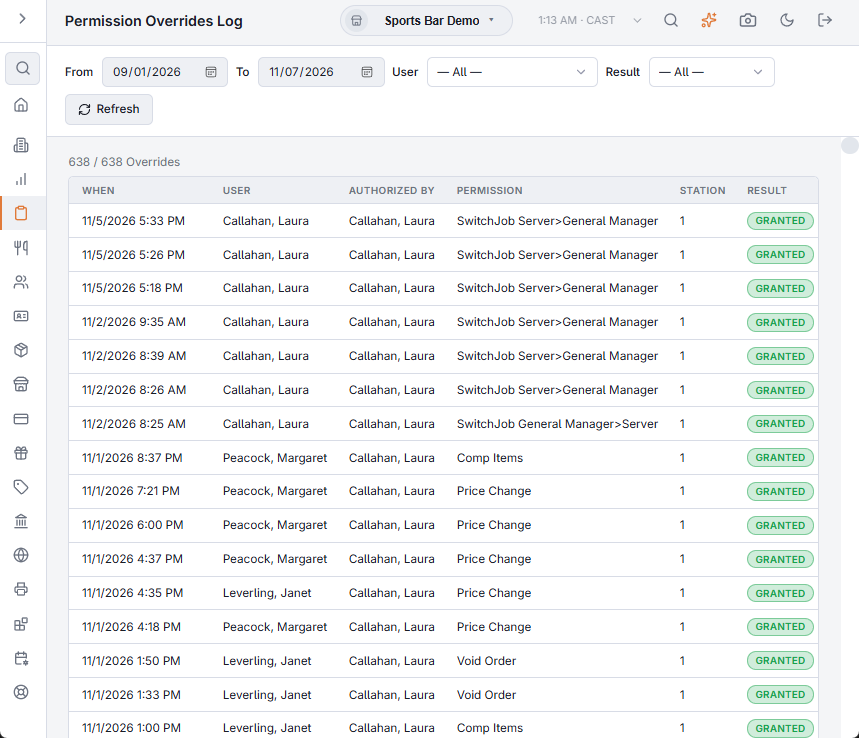
When someone tries an action their job does not allow, the register asks for a manager override: a manager approves that one action with their own PIN, without the employee signing out. Back Office › Activity › Audit › Permission Overrides Log is the record of those approvals, and of the ones that were refused.
The override prompt
The prompt names what the employee is not allowed to do. A manager enters their PIN or password and only that action goes ahead; the employee stays signed in. To approve, the manager’s job needs Override and the permission for the action itself. A manager cannot approve their own action, and when the store requires it, the manager must be clocked in. See Manager override prompts.
What is recorded
- Granted — the manager approved the action.
- Denied — a manager’s PIN or password was recognised but they could not approve: their job lacks the right, it was their own action, or they were not clocked in when the store requires it.
A wrong PIN, or closing the prompt without approving, is not recorded.
Time clock approvals are recorded here too (clocking in early or without a shift, for example), along with:
- Manager Clock-Out (Phone) — a manager closed someone’s forgotten punch from the staff site. The employee is the user and the manager is the one who authorized it. See Fixing punches from your phone (managers).
- Punches a register made while offline — the employee is both the user and the one who authorized it, because no one was asked. See Clocking in and out while offline.
Filtering the log
- From and To — calendar days in the store’s time; the last 7 days to start. The list reloads when you change a date.
- User — one employee. It shows entries where they are either the employee or the manager who authorized it.
- Result — All, Granted or Denied.
- Refresh — loads the range again.
The line above the list shows how many entries match the filters out of all entries in the range, for example 12 / 40 Overrides.
The list
Newest first.
| Column | Shows |
|---|---|
| When | Date and time of the approval or refusal. |
| User | The employee who needed the approval. |
| Authorized by | The manager who entered their PIN or password. |
| Permission | What was needed, by the permission’s name in the job editor (for example Void Order or Refund). Approvals that are not a permission show their own name: the time clock exceptions (such as Early Clock In or Unscheduled Shift), Offline Clock Punch Applied, Offline Clock Punch Not Applied with the reason in brackets, Drawer Variance Over Maximum and Exclude Cover Charge. |
| Station | The station number of the register. |
| Result | Granted or Denied. |
In User and Authorized by, — means no one is recorded, and # with a short code means the person is not in the employee list.
The log is read-only. End of Day does not clear it: earlier days stay in the list.
Reading it
- A permission approved many times a day for the same job may belong on that job. Change it in Jobs, roles, and permissions.
- Repeated Denied entries for the same manager usually mean their job is missing the right they are being asked to approve.
The approving manager’s side of each approval is also listed in the User access and activity log.
Approvals from a manager’s phone
An override approved from the staff site (Ask A Manager’s Phone on the prompt) appears here like one approved with a PIN: Granted, with the manager under Authorized by and the register’s station. A manager’s decline is Denied. A request nobody answered within two minutes, or one the employee withdrew, is not recorded. See Asking a manager’s phone for an override.