A pool table might be $12 an hour normally, $8 during happy hour and $15 on Saturday night. You set those rates with price rules, the same rules that discount drinks at happy hour. CloudPos applies them to timed items one interval at a time: each interval is charged at the rate in effect when that interval starts.
Setting it up
- Open Back Office › Menu › Pricing › Price Rules and add a rule for the timed item (or its category) with the days and times it applies — for example Monday to Friday, 16:00–19:00.
- Choose a fixed price per interval ($8.00) or a percentage off (20%).
- Save. Games already running pick it up at their next interval.
More on rules: Special and event pricing.
What the check shows
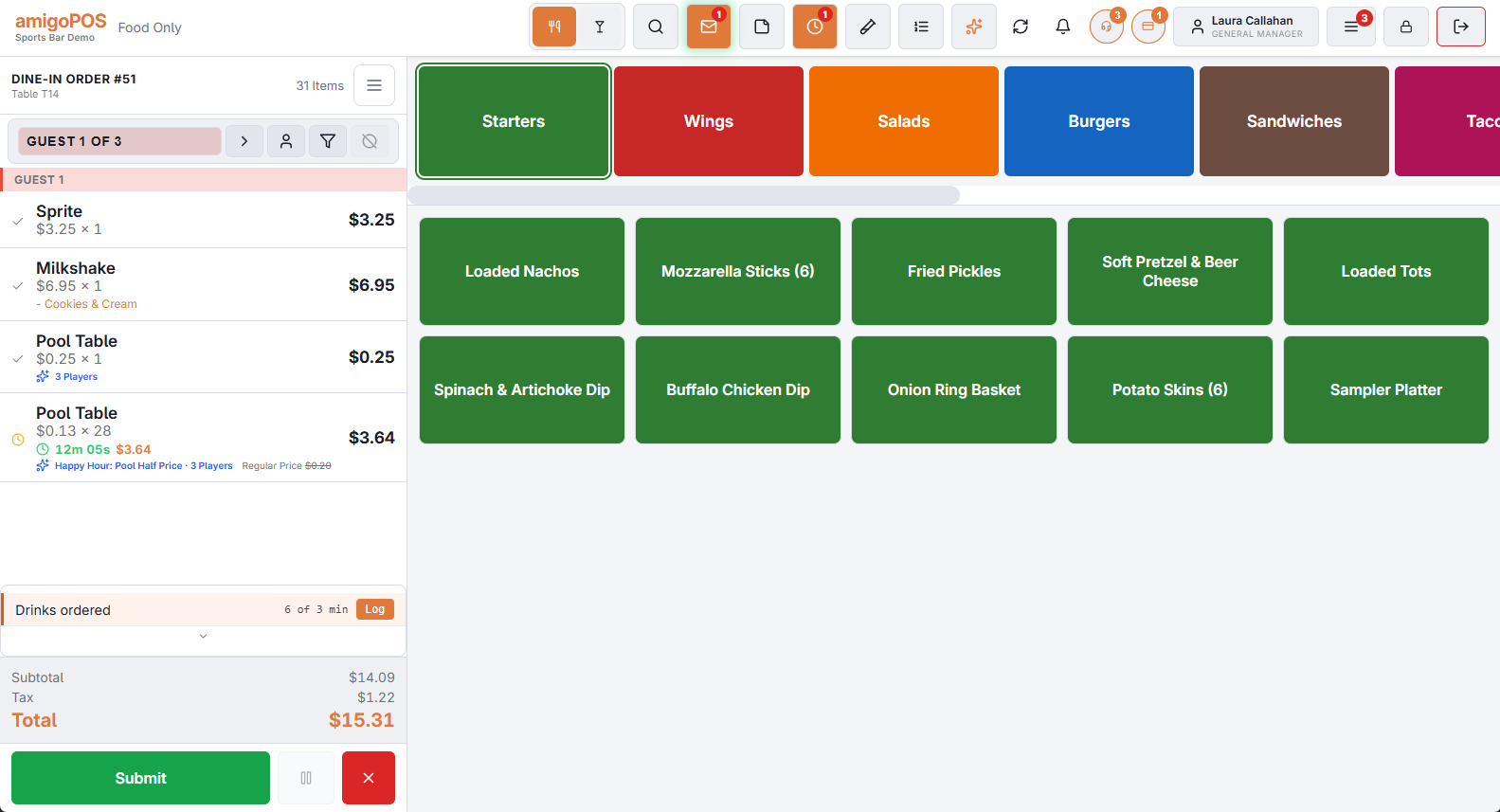
When the rate changes mid-game, the line that was running is frozen at the intervals played at the old rate, and a new line continues the same game at the new rate:
| Line | Price | Qty | Total |
|---|---|---|---|
| Pool Table | $12.00 | 2 | $24.00 |
| Pool Table · Happy Hour | $8.00 | 1 (running) | $8.00 |
Every line stays an honest price × quantity, so the receipt, reports and accounting all read it correctly. The rule’s name shows under the running line.
Details worth knowing
- The minimum applies to the whole game. A one-hour minimum is met across both lines; the second line does not charge its own minimum.
- The clock shows the whole game. The running line’s clock includes the time on the frozen line, and so does the pill on the floor plan.
- Starting during happy hour starts at the happy-hour rate, and the game moves back to the regular rate when happy hour ends.
- Orders nobody has open are brought up to date when they are next opened, printed, saved or settled — the split happens retroactively at the right interval. Until then the floor plan pill may show the old rate.
- Quantity bands in a rule (“2 or more”) are ignored for timed items: their quantity is intervals played, not items bought.
- Players: a percentage rule also takes its share off the extra-player charge; a fixed-price rule replaces only the table rate. See Charging by number of players.
Changing an item while its timer runs
A running timer keeps the base rate, interval, grace and player pricing it started with. If the item is changed in Back Office (or by the assistant) during a game, the change applies to timers started afterwards — time already played is never re-priced. Price rules such as happy hour still apply by the clock.