Back Office › Menu › Pricing › Event Pricing sets up price events: a fixed amount added to, or taken off, every item on the menu while the event is on — game night, a festival weekend, New Year’s Eve. An event is either switched on by a manager or runs itself inside a time window.
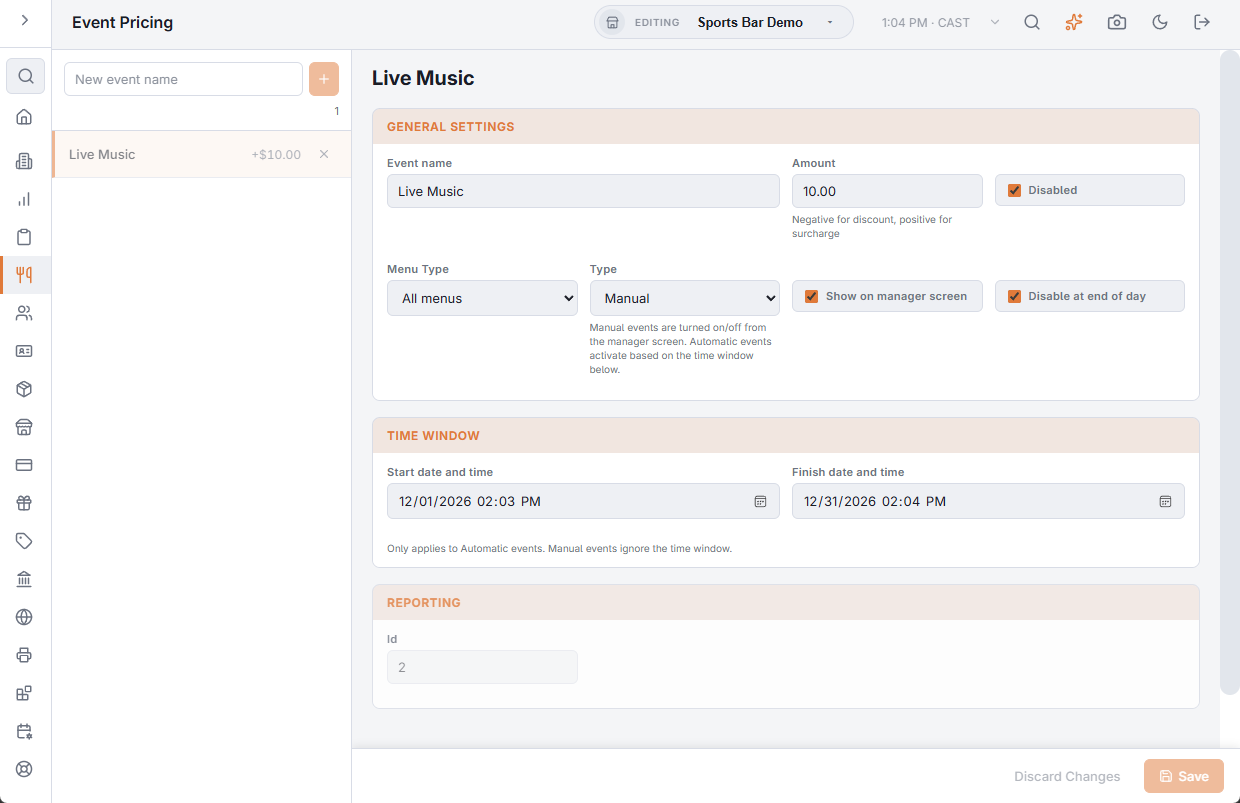
The event list
Type a name in New event name and add it. The list shows each event with its amount; an event that is Disabled is muted. The delete icon removes an event after you confirm. A new event starts as a manual event, disabled.
Changes to an event are kept until you choose Save.
General Settings
- Event name — shown with the order lines the event prices.
- Amount — added to each item’s price. Negative for a discount, positive for a surcharge.
- Disabled — ticked, the event is off. For a manual event this box is the on/off switch: clearing it and saving turns the event on now.
- Menu Type — All menus, Regular Menu or Bar Menu: which items the event changes.
- Type — Manual or Automatic.
- Show on manager screen — manual events: lists the event in the register’s Event Pricing screen, where a manager turns it on and off. See Event pricing overlay.
- Disable at end of day — manual events: End of Day turns the event off, so it cannot run into the next day.
Time window
Start date and time and Finish date and time are for automatic events: the event is on between them, as long as Disabled is clear. Manual events ignore the window.
How the amount applies
- Only one event prices at a time. Only one manual event is on at a time: turning one on turns the others off. An active manual event wins over an automatic one.
- The amount is added when an item is rung, on top of its price, its upcharge price or a price rule’s price, and the line shows the event’s name, or the price rule’s when a rule set the price. A line already rung keeps its price when the event ends.
- Items marked Exclude From Event Pricing, and the items of a category marked so, are not changed. See Menu items (prices, SKUs, buttons) and Categories (food groups).
The Reporting section shows the event’s Id.