Back Office › Web Orders › Notifications decides who hears about online orders: the email the store receives for each new order, and the email and texts customers receive. Changes take effect when you select Save. If the save fails, Save failed is shown and your changes stay on the page, unsaved.
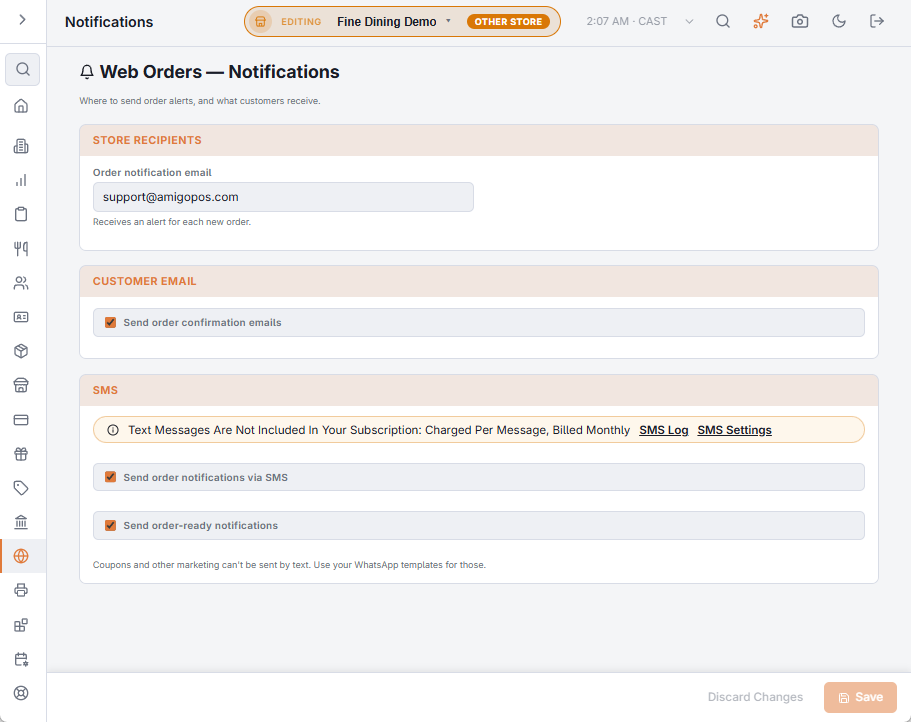
Store recipients
Order notification email receives an email for each new online order — a backstop for the register’s pending-order badge. Leave it empty for none.
Customer email
Send order confirmation emails emails the customer a confirmation when they place the order.
Texts to the customer
- Send order notifications via SMS — texts the customer that the order was received, with its number and total.
- Send order-ready notifications — texts the customer that the order is ready, once, at its first bump on the kitchen display or when someone selects Mark Ready And Notify on the orders list.
A text goes out only when the order has the customer’s phone number. Orders placed from a table QR code get no email and no texts: the guest is in the restaurant.
Coupons and other marketing can’t be sent by text; use your WhatsApp templates for those. See WhatsApp message templates.
Messaging and costs
Texts go through AmigoPOS’s text service, which sends only what is switched on in SMS settings. Each text is charged and billed monthly, outside the subscription. Where the store has connected its own WhatsApp account and switched order messages to WhatsApp (Back Office › Integrations › WhatsApp), they go by WhatsApp instead and Meta bills the store directly. The SMS Log lists every message, including online-order notifications, with its status and cost. See SMS log and message costs.