Back Office › Analytics › Analytics › Discounts shows the discounts on tickets during the dates on the toolbar: how much, which discounts, on whose tickets and on which order types, with a line-by-line list.
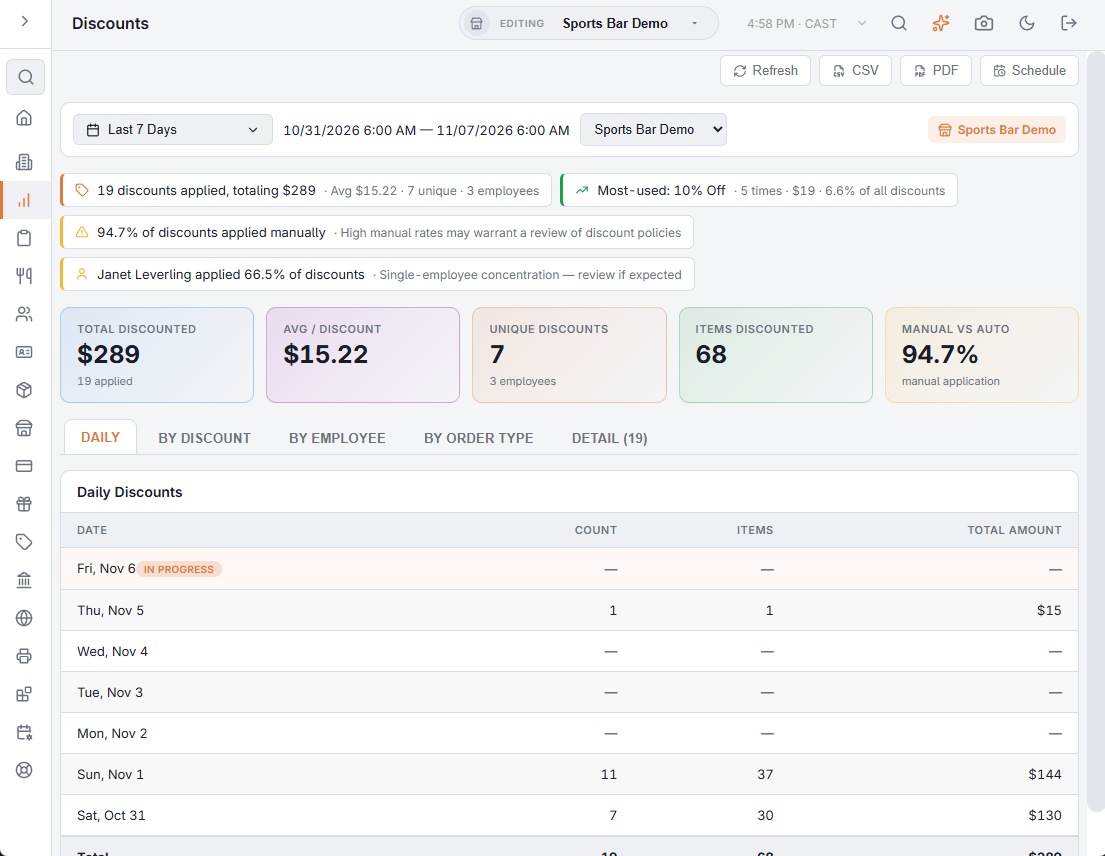
The page counts each time a discount was applied to a ticket that is not voided; coupons count as the discount they apply. For the dates, store and export buttons, see Exporting and PDF preview.
Insights
- How many discounts were applied and their total, with the average, the number of different discounts and of employees.
- Most-used — the discount applied the most times (on a tie, the one with the larger total), with how many times, its total and its share of all discounts.
- The share applied manually, when it is above 60% and there are more than 10 discounts.
- One employee’s tickets carrying more than 40% of the discount total, when more than one employee has discounts.
KPI cards
| Card | What it shows |
|---|---|
| Total Discounted | The amount discounted, with how many times a discount was applied. |
| Avg / Discount | Amount per application. |
| Unique Discounts | Different discounts used, with the number of employees whose tickets had one. |
| Items Discounted | Items the discounts covered. |
| Manual vs Auto | The share of applications whose discount does not have Automatic ticked in its setup. Turns amber above 60%. |
Tabs
- Daily — Daily Discounts: Date, Count, Items and Total Amount per day, newest first, with a total row.
- By Discount — By Discount Type: Discount, Type (Auto or Manual), Count, Items, Total and % of Total, largest total first.
- By Employee — Employee, Discounts On Their Orders (point at the heading for an explanation), Items, Total Amount and % of Total.
- By Order Type — Order Type, Count, Total Amount and % of Total.
- Detail — newest first, up to 200: Ticket #, Date/Time, Discount, Coupon (the code entered, if any), Employee, Order Type, Items and Amount. The tab shows how many rows it holds.
The Automatic box and the other discount settings are described in Discounts (types and rules); coupon use is also listed in the Coupons log.
Export
CSV exports the daily, by discount, by employee, by order type and detail tables. PDF opens the Discounts Analytics Report with the same sections.
All Stores
With All Stores selected, the page adds up every store. Discounts with the same name and the same Automatic setting share one row, and so do order types with the same name; an employee who worked at two stores has one row. Unique Discounts and the number of employees count those combined rows. The Detail tab holds each store’s rows, up to 200 per store. The PDF covers one store: with more than one store, pick a store before you open it.