Back Office › Analytics › Analytics › Taxes is the filing-support report: what tax was collected over the dates on the toolbar, under which rates and order types, and which tickets were exempt. It counts settled tickets that are not voided.
For the dates, store and export buttons, see Exporting and PDF preview.
Insights and KPI cards
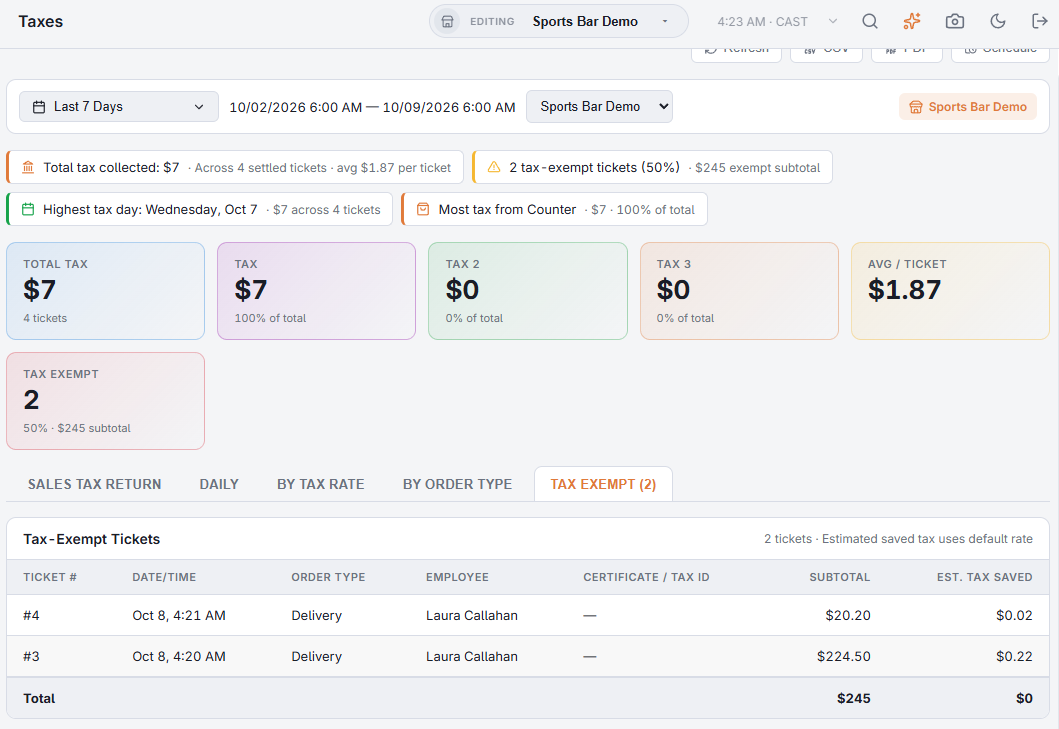
Up to four insights: the total tax collected (with the number of tickets and the average per ticket), the number of tax-exempt tickets, the highest tax day and the order type that brought in the most tax.
- Total Tax — all tax on the tickets, inclusive bar tax included, with the number of tickets.
- One card per tax component, named as in Sales tax setup (Tax 1, Tax 2, Tax 3 when unnamed), with its share of the total.
- Avg / Ticket — tax per ticket.
- Tax Exempt — exempt tickets, their share of all tickets and their subtotal. Turns red above 10%.
Tabs
The page opens on Daily.
- Sales Tax Return — the figures a return asks for, in filing order. See Filing your sales tax return.
- Daily — Daily Tax Collected: one row per day, newest first, with each tax component, Total, Tickets and Exempt, and a total row; the rows your filing period sums over.
- By Tax Rate — each rate used, with Components (the rate’s percentages, such as 6% + 1%), Items, Taxable Amount, Non-Taxable, Tax Collected and % of Total. Tax collected is read from the tax each line was saved with; a line on the rate that carried no tax counts as non-taxable. A rate without a name shows as Rate and its number.
- By Order Type — Tickets, each tax component, Total and % of Total per order type. Where take-out is taxed differently from dine-in, this is where you check the split.
- Tax Exempt — every exempt ticket: Ticket #, Date/Time, Order Type, Employee, Certificate / Tax Id (as entered at the register), Subtotal and Est. Tax Saved, with totals. The tax saved is an estimate at the store’s default rate. The tab shows how many tickets it lists.
Export and schedule
CSV exports every section, the return lines and the tax by rate and component first, then daily, by tax rate, by order type and tax exempt. PDF opens the Tax Report: the KPI cards, the return, then the other sections. Schedule emails it on a cadence — Monthly, day 1, over Last month covers most filings.
All Stores
With All Stores selected, every tab adds up the stores, the Sales Tax Return included, and the insights are worked out from the totals. Order types with the same name share one row. Tax rates are set up in each store, so By Tax Rate lists each store’s rates on their own rows, and joins two stores’ rates into one row only when their rate number, name and percentages all match. The PDF covers one store: with more than one store, pick a store before you open it.