A new device joins a store with a one-time activation code. Codes are generated in the Device Activation card at the top of Back Office › Hardware & Printing › Registered Devices.
Generating a code
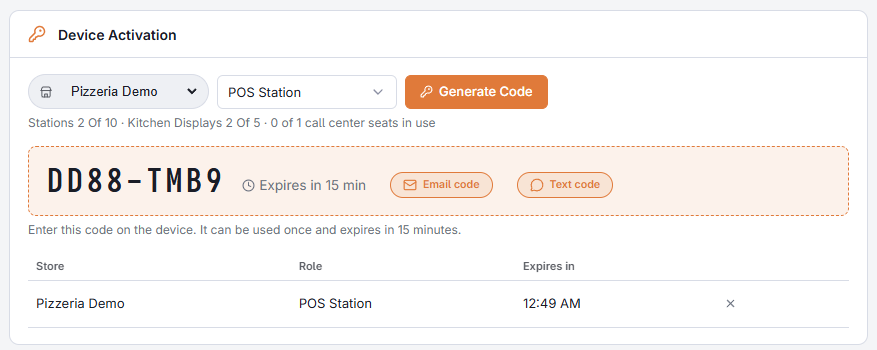
- Choose the store. The picker starts on the store Back Office is editing.
- Choose what the device will be: POS Station, Call Center, Kitchen Display or Print Agent.
- Press Generate Code and confirm.
- Type the code on the new device. It is good for 15 minutes and for one device.
The code is copied to the clipboard, and Email Code and Text Code send it to whoever is standing at the device. Codes that have not been used yet are listed under the card with their store, what they are for and when they run out; press × to cancel one.
What your plan allows
Under the role list, a line shows what the chosen store has against what its plan allows, for example Stations 2 Of 5 · Kitchen Displays 2 Of 3 · 0 of 1 call center seats in use.
- Stations are registers. POS stations and call center seats share the store’s station numbers.
- Kitchen displays are the screens the plan includes, plus any that were added to it.
- Call center seats are shown only when the store’s plan includes the call center.
Print agents are not counted.
When an entry is greyed out
When the store has no room for a kind of device, its entry in the role list is greyed and says why — so you find out here, and not at the new device with a code that will not work:
- No Station Free, on POS Station and Call Center — every station number of the store is in use, or the account has reached its device limit.
- No Display Free, on Kitchen Display — the store already has every kitchen display in its plan. Not In Plan there means the plan includes none.
- Not In Plan or No Seats Free, on Call Center — the store’s plan has no call center, or all of its seats are taken.
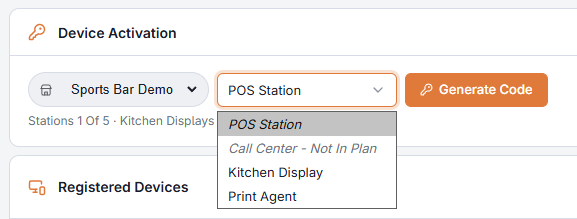
To make room, deactivate a device that is no longer used — one marked Not Seen In 30 Days is the usual candidate; see Deactivating a device — or have stations, displays or seats added to the store’s plan.
If a code is refused on the device itself, see A device will not activate.