The Loyalty Program tab of Back Office › Gift & Loyalty › Cards sets how members earn and spend rewards. There is one program for the whole business, used by every store, at the register and online. Changes are kept until you press Save, or Discard Changes, which also puts back the tiers, rewards and promotions as last saved.
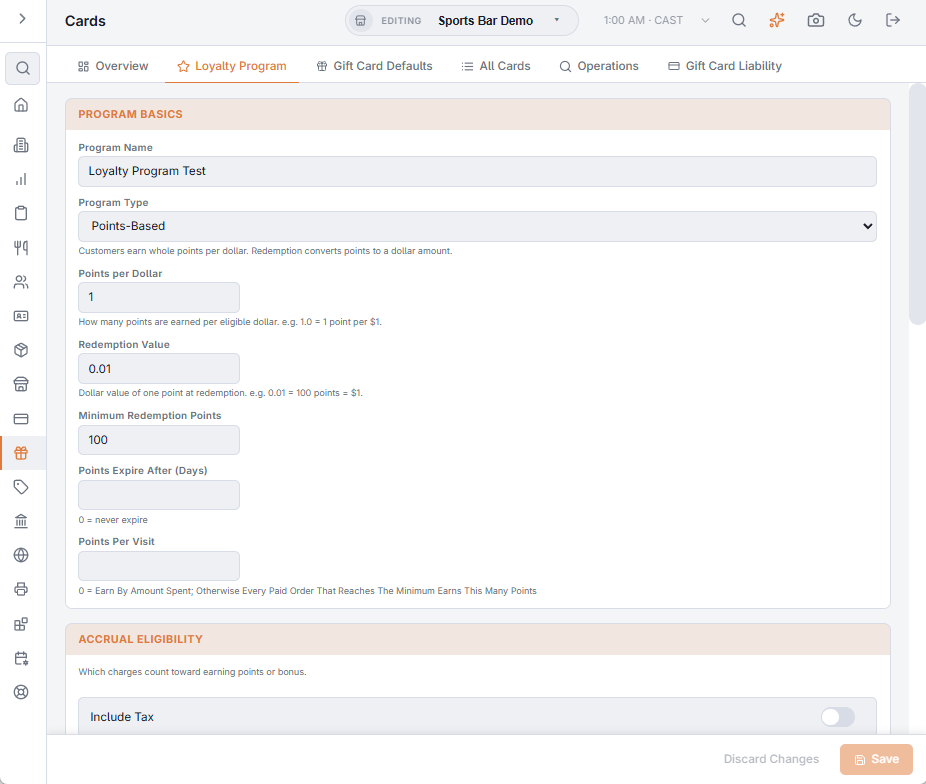
Program Basics
- Program Name — the name shown to staff and members, for example House Rewards.
- Program Type — Points-Based: members earn whole points and spend them at a set value. Percentage Bonus: members earn a percentage of what they spend as a money bonus to spend later.
- Points per Dollar (points) or Bonus Rate (bonus) — the earning rate on the eligible amount. A bonus rate of 0.05 is 5%.
- Redemption Value (points) — what one point is worth when spent; 0.01 means 100 points = 1.00.
- Minimum Redemption Points (points) or Minimum Redemption Amount (bonus) — the least a member can spend at a time.
- Points Expire After (Days) (points) — 0 means points never expire. See Points expiry and warnings.
- Points Per Visit and Minimum Spend For A Visit (points) — earn a set number of points per paid order instead of per amount. See What earns points.
Accrual Eligibility
What the earning rate is applied to. It starts from the order subtotal; Include Tax, Include Gratuity, Include Surcharge and Include Delivery Charge add those amounts, and Deduct Discount takes the order’s discounts off, so members earn on what they actually paid. Items and categories marked to be left out of loyalty never earn.
Loyalty Tiers
Points programs only. Turn on Enable tiers and add rows with Add tier: a Tier name, the Min lifetime points that reach it and an Earn multiplier (1.25 means 25% more points). A member earns at the multiplier of the highest tier their lifetime points reach. The bin icon removes a tier.
Sign-Up Bonus
Points On Sign-Up (points) or Bonus On Sign-Up (bonus) is given once, when a card first joins the program; 0 means none. See Bonus-points promotions and sign-up bonus.
Loyalty Rewards
Points programs only: the reward catalog members can take as a discount. See Rewards as discounts.
Bonus Points Promotions
Multipliers for chosen days, hours or order types, such as double points on Tuesdays. See Bonus-points promotions and sign-up bonus.
Birthday Reward
Turn on Enable birthday reward and set Birthday points (points) or Birthday bonus (bonus). Each day, members whose customer record has that day as their Birthday get the reward on their loyalty card, once a year. The birthday is entered on the customer’s Overview tab (Customers list, types, and merge).
Program Status
- Allow same-order redemption — members can spend what an order earns on that same order. Off, what an order earns can only be spent on a later visit.
- Program Active — off pauses earning on every card. Balances are kept, and the program’s settings, tiers, rewards and promotions stay here and can still be changed and saved while it is off.