Back Office › Payments › Payment Terminals lists the store’s stand-alone card terminals — machines that are not connected to the register. When a card is run on one of them, the cashier records the payment at the register with Manual Credit Card and picks the terminal it was run on, so each payment shows which terminal and batch it went through.
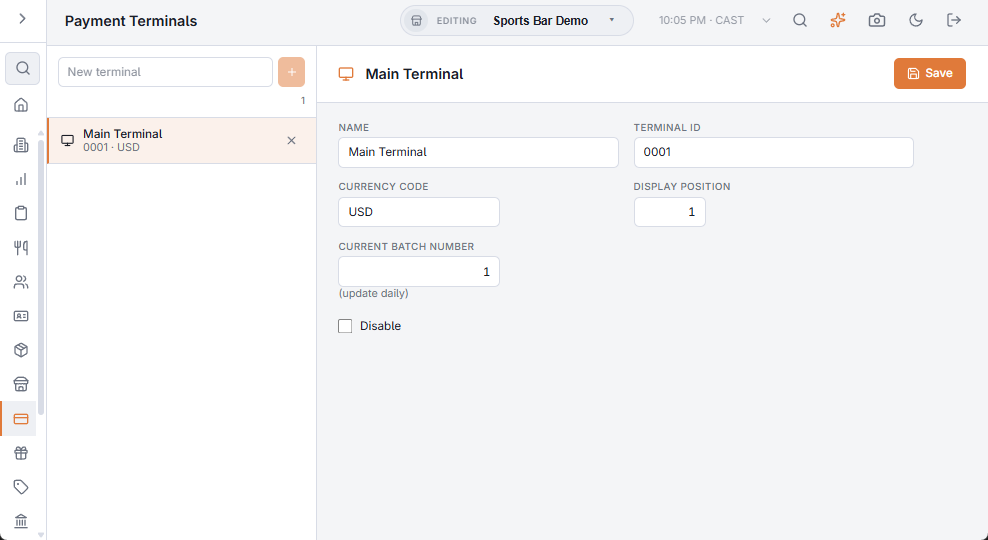
Adding and editing a terminal
- Type a name in New terminal and press + or Enter.
- Fill in the fields and press Save. Changes are not kept until you do.
- Name — how the terminal appears on the Manual Credit Card screen (“Bar terminal”, “Counter 1”).
- Terminal ID — the ID your processor gave the machine. It is shown on the button and in reports, for reference.
- Currency code — the currency the terminal charges in. A new terminal starts as USD; change it if your store charges in another currency. The terminal is offered only for card types with the same currency.
- Display position — the order of the terminals in the list and at the register.
- Current batch number — the terminal’s open batch. Update it each day when the batch is closed; it is stamped on every manual card payment.
- Disable — takes the terminal off the register while it is away for repair. It stays on this page, faded, and can be turned back on.
The × on a row deletes the terminal after you confirm. Payments already recorded keep its name in reports.
At the register
The Manual Credit Card screen opens for a Card payment method whose processing method is Manual processing. The cashier picks the Card type, then the Terminal (picked automatically when only one fits), and enters the amount, tip, last 4 digits and auth code. If no enabled terminal matches the card type’s currency, the screen says so and the payment cannot be recorded until one is added here.
Manual card payments appear in the daily sales report by terminal and batch. Related: Credit card types, Payment methods.