Combine merges multiple open orders into one check — two tables joining up, a bar tab folding into a dinner table, or one party accidentally rung as two orders.
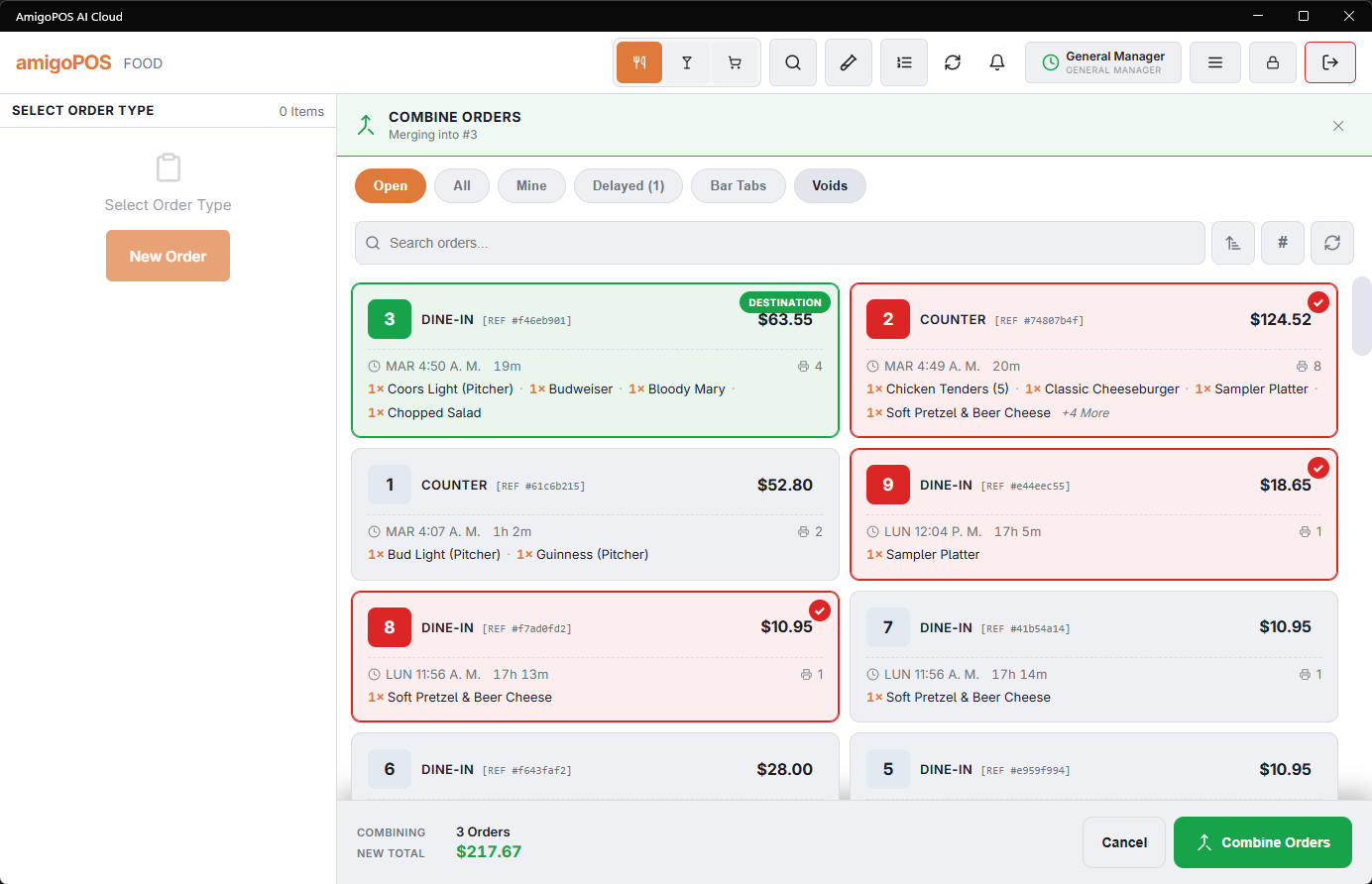
The flow
- From the orders list, select the order that will survive and tap Combine — it becomes the destination (“merging into #214” shows in the header).
- Tap the source orders to fold in; the combine bar tracks the selection count and the running new total as you pick.
- Submit. The sources’ items move onto the destination with their guests and modifiers; the sources close as combined.
Notes
- Everything sent stays sent — combining is bookkeeping; the kitchen sees nothing new and nothing reprints.
- The destination’s table and server win; combine then transfer if the merged party also changes hands (Transferring an order).
- Partially paid sources bring their payments along; the merged balance reflects them.
- The classic bar-to-table move — “put my tab on the table” — is exactly this: destination = the table’s order, source = the tab.
Not while timers are running
An order with a running or paused timer (pool table, lane, rental) cannot be split or combined. The POS says Order #12 Has A Running Or Paused Timer. Open The Order, Stop The Timers (Not Pause), Then Try Again.
Recall the order, stop each timer, then split or combine: the stopped time lines split like any other item. See Settling, splitting and combining timed checks.
Permission
Combining needs the Combine Orders permission on the job. Without it, tapping Combine asks for a manager, who can approve on the spot; the approval is recorded.
Orders that were split
With Allow combine after split off (Back Office › Store Setup › General Settings), an order that was split evenly, or made by splitting another, cannot be combined: Combine on it says so, and it is not offered as a source either. On, split orders combine like any other. See General settings.
The tables of combined orders
When the orders sat at different tables, the combined check keeps them all: its own table, plus the tables of the orders folded into it as additional tables, joined by a line on the floor plan. Give a table back from Party Tables in the table panel once the guests have moved. Pool tables and other timed tables are not kept, and a combined check with no table of its own, such as a bar tab, holds none. To put one party on several tables without combining orders, see Combining tables for a large party.