When a party needs more than one table, one check can hold all of them. The check keeps its own table and takes the others as additional tables: every register shows them in use in the party’s status colour, a line joins them on the floor plan, and the check, the receipt and the kitchen tickets read T4+T5. Paying or voiding the check frees all of its tables at once.
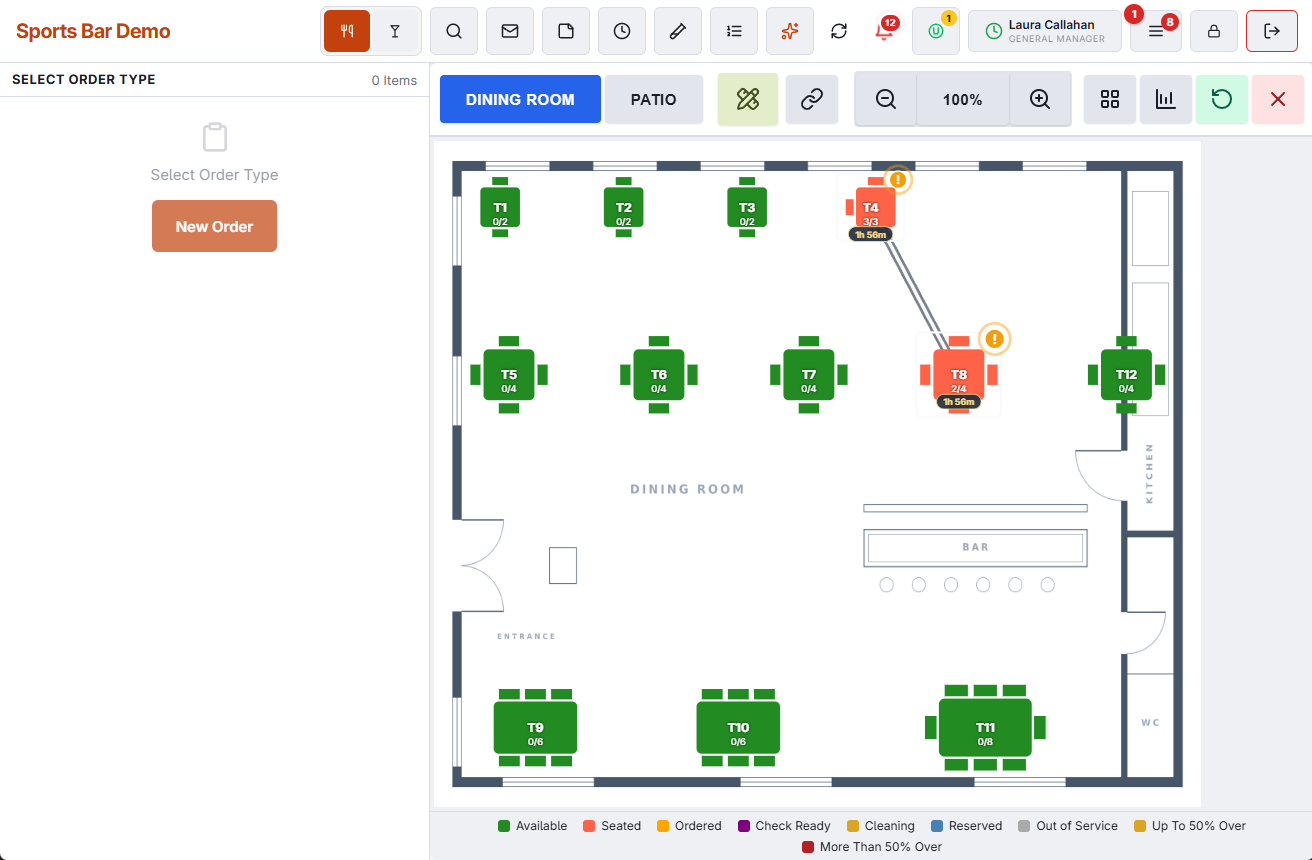
Starting an order on several tables
- On the floor plan, tap Multiple Tables (the link button on the toolbar). It asks for the Combine Orders permission; without it, a manager can approve on the spot.
- Tap the free tables, main table first. A picked table gets an amber ring; tap it again to drop it. The bar under the toolbar lists the picks and adds up their seats, for example T4 + T5 · 10 Seats.
- Tap Use These Tables. The order starts as it does from a single table, already named T4+T5.
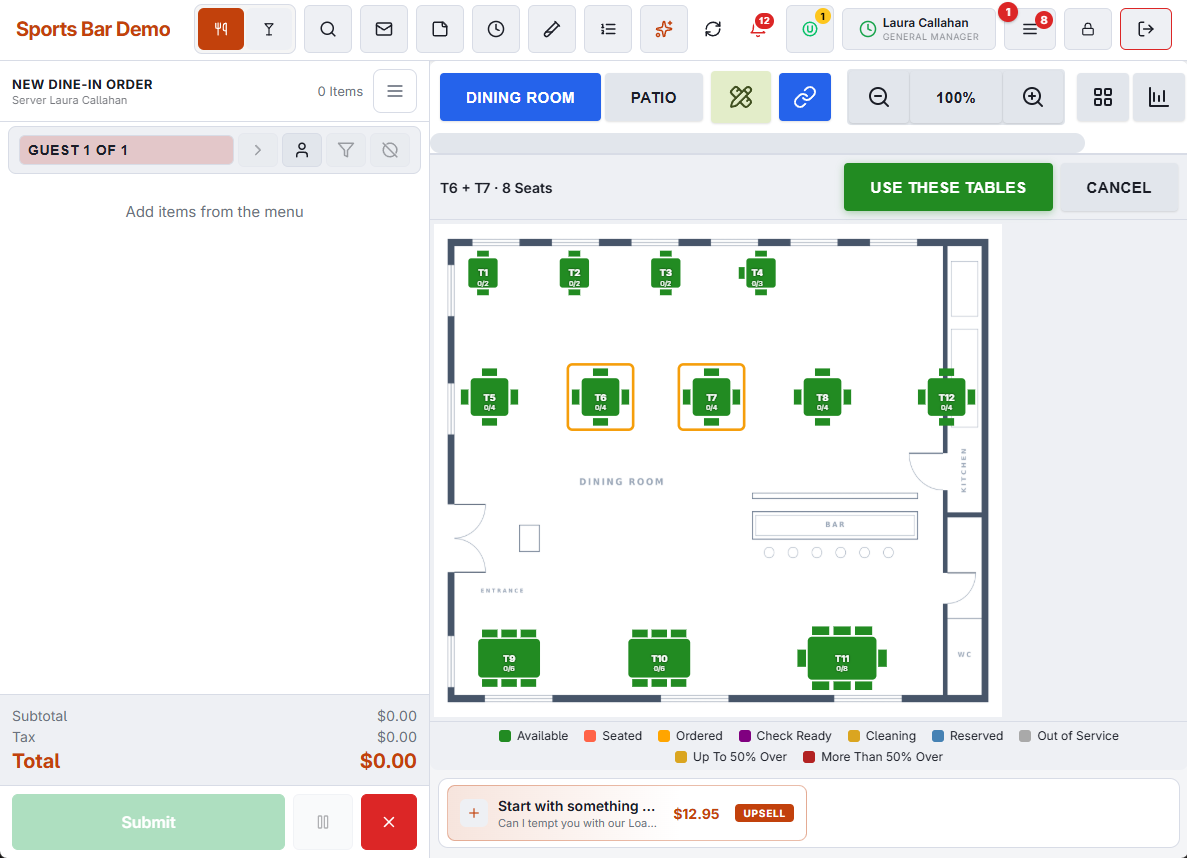
The first table you tap is the check’s own table. The others are attached when the order is first sent. If another register took one of them in the meantime, the order keeps its own table and a message names the table that could not be added.
Adding a table during the meal
- Tap any of the party’s tables. The Party Tables section of the panel shows the check’s own table first, then each additional table.
- Tap Combine Tables. The free tables of the room are listed nearest first, each with its seats.
- Tap the ones to add, then Add Tables.
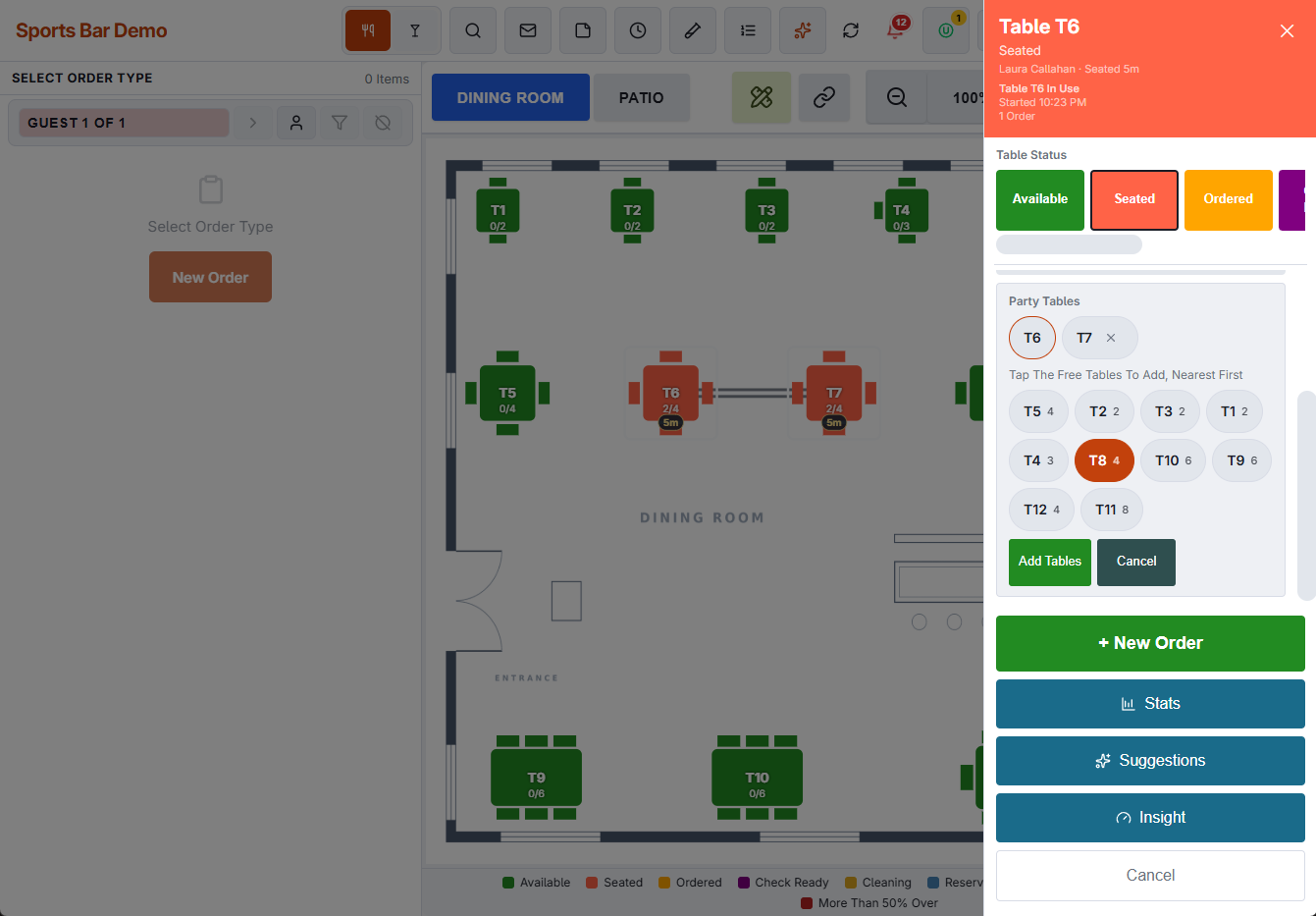
The added tables take the status the party’s table has at that moment. When the table has more than one open check, all of them take the new tables. Combine Tables needs the Combine Orders permission.
Giving a table back
When part of the party leaves, tap the × on that table in Party Tables (Release Table). The table is free at once and takes the store’s after-payment table status, when one is set. The check’s own table is not given back this way: it stays with the check until the check is paid or moved to another table.
What cannot be combined
- A table in use by another party: Table Is In Use.
- Pool tables, lanes and other timed tables, which each run their own timer: Timed Tables Cannot Be Combined.
What follows the check
- Table status — set on any of the party’s tables, it shows on all of them.
- Split — the new checks hold the same tables as the check they were split from.
- Combine Orders — the combined check keeps the tables of the checks that went into it. See Combining orders.
- Moving the check to one of its additional tables makes that table its own.
- QR table ordering — a guest who scans the code at any of the party’s tables orders onto the party’s check.
- Table Insight, Suggestions and the Floor view — they open from any of the party’s tables, and the Floor view lists the party once, as T4+T5.
- The waitlist — every table of the party counts as taken until the party leaves.
Reservations
- In the reservation book, Assign Table puts the same Multiple Tables button on the floor: tap the tables, main table first, then Use These Tables. The booking reads T6 + T7 and each of its tables carries the booking pill. See Floor plan and assigning tables.
- A table that is in use right now can be picked, because the booking is for later. The book still refuses a table that is booked for that time.
- Seat starts the order on the main table, and the check takes the booking’s other tables with it. Bookings that the table finder placed on two tables do the same.
In the reports
Sales, payment and server reports are not affected: a combined party is one check. The seating reports count the party at every table it held.
- Its sales and covers are shared across its tables by seat count. Ten guests at a 4-seat and a 6-seat table count as 4 and 6 guests, and the sales split 40 / 60. The check itself is counted once, and store totals do not change.
- An added table counts from when it was added until it was given back or the check was paid. One held for less than 10 minutes is ignored.
- Table Performance counts a turn at each of the tables. Table Fit compares the whole party with the seats of all its tables.
- Turn Times and every average turn leave combined parties out, so one large party does not change what a single table normally takes. The measured turn times that reservations use leave them out too.
When the period has combined parties, RevPASH, Table Performance, Table Fit, Turn Times and Reservation Analytics show a Combined Tables note with their number and how they were counted, on the page and in the PDF.