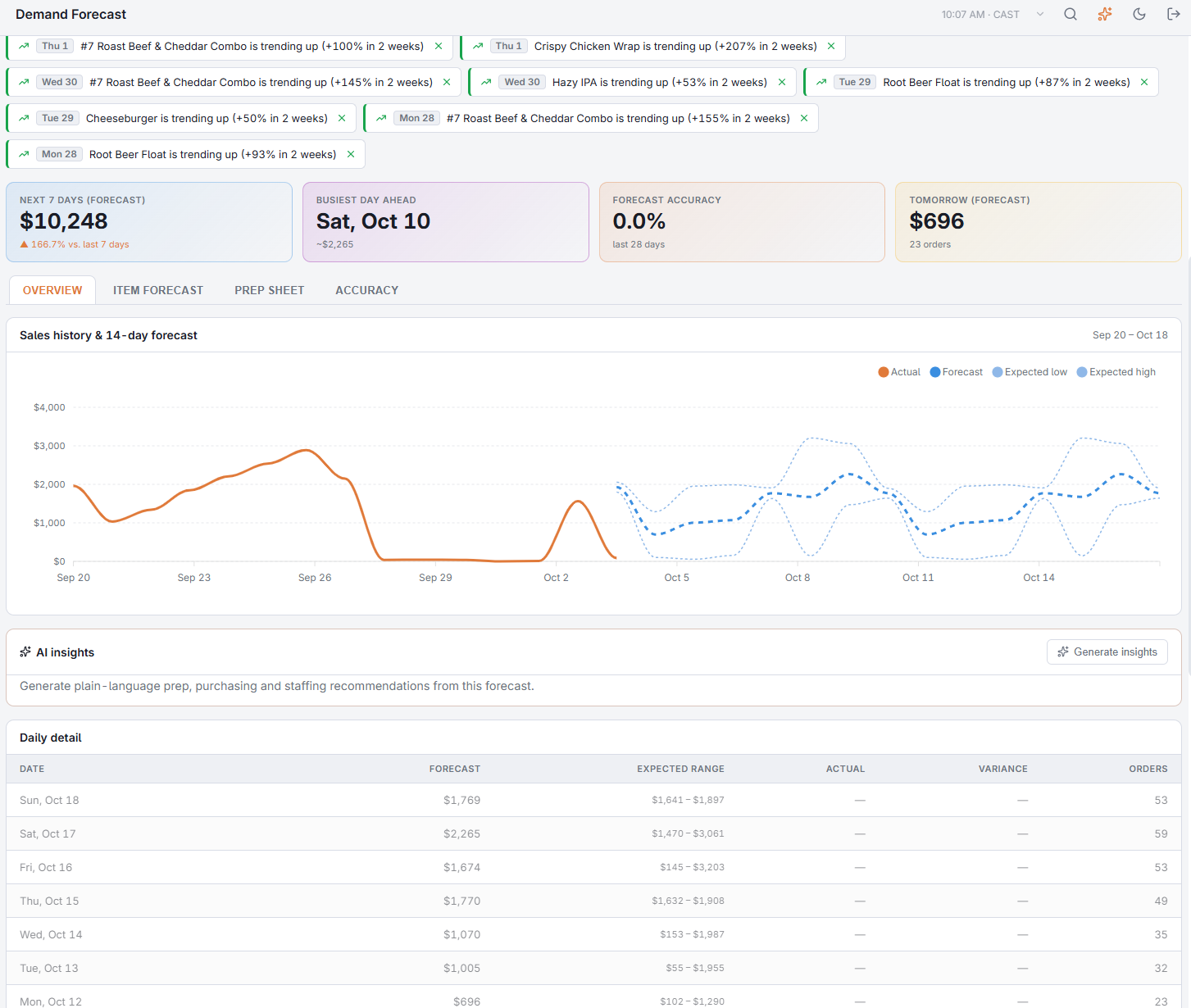
Back Office › Analytics › Performance › Demand Forecast predicts the next 14 days of sales and the next 7 days of quantities per menu item from your own sales history, and scores each forecast against what you actually sold. Use it to plan prep, purchasing and staffing. The page is hidden on plans that don’t include AI Reports.
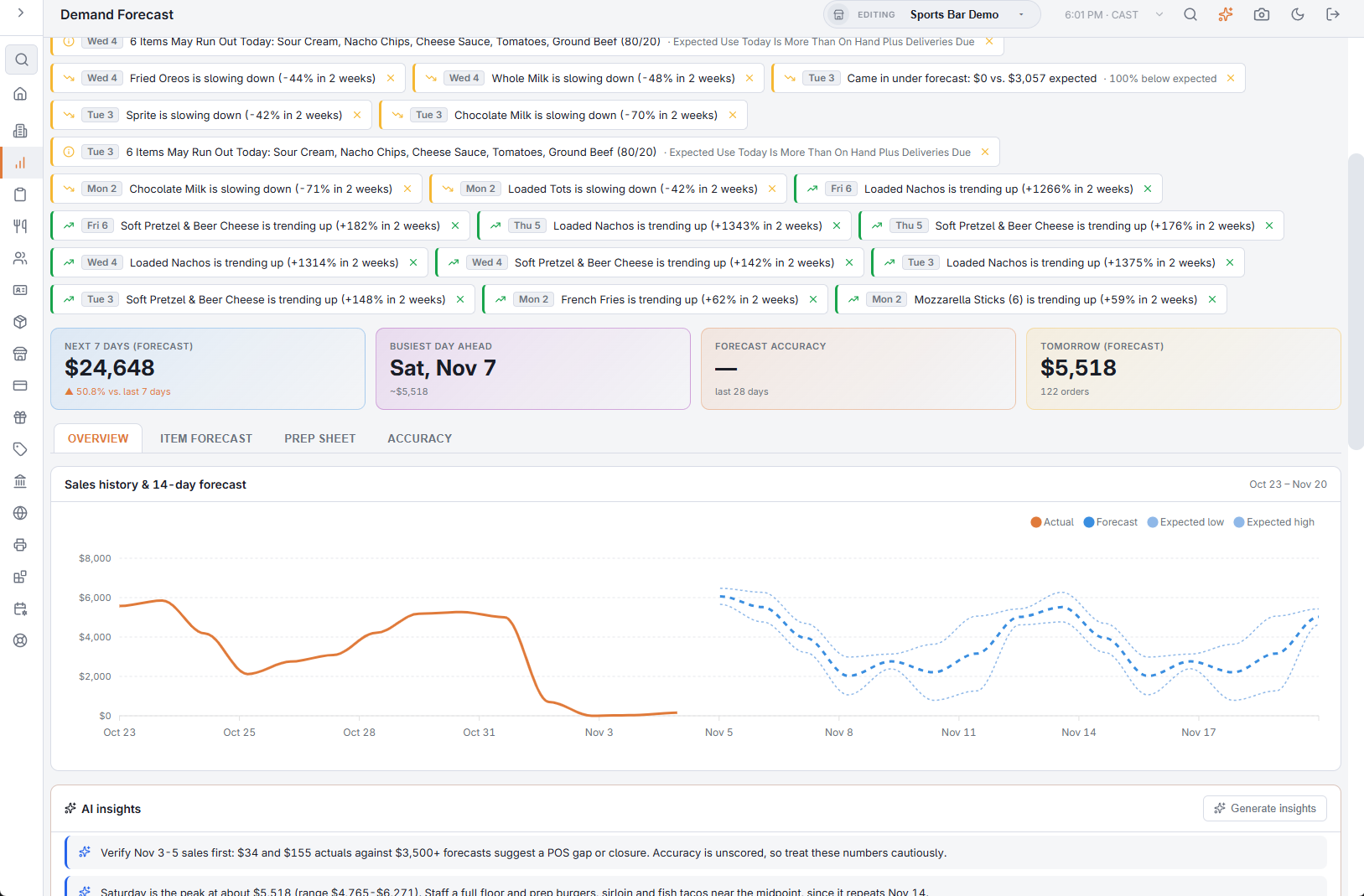
The toolbar
- Refresh — loads the forecast again.
- CSV — downloads the daily series: date, forecast, Expected low, Expected high, actual, orders and whether the day is closed.
- PDF — the forecast, tomorrow’s prep sheet and the accuracy log as one report, to preview, download or email. It covers one store: with All Stores and more than one store, the button stays greyed out until you pick a store. See Exporting and PDF preview.
- Schedule — emails that PDF on a recurrence. Choose Daily to send tomorrow’s prep sheet to the kitchen every morning. See Emailing the performance reports on a schedule.
- The store box — one store, or All Stores to add the stores’ days together.
There are no dates to pick: the forecast always starts from today, and the page shows the last 14 days next to the next 14.
How the forecast is made
Each day is forecast from the same weekday in your recent weeks, weighted toward the latest ones, blended with the middle value of the last eight, and adjusted for the sales trend of the last four weeks against the four before. A Saturday forecast comes from your recent Saturdays. A weekday with no sales in any of its recent weeks (at least two of them) is treated as closed and forecast as zero.
The forecast is recalculated once each business day. If it has not run yet when you open the page, it runs then. While the store has fewer than 14 days with sales, a note above the cards says how many days of history there are so far; forecasts sharpen after about two weeks. When there is no forecast to show, the page reads No data available with Forecasts Appear Once The Store Has A Few Days Of Sales History.
The cards
- Next 7 days (forecast) — the forecast total, with the change against actual sales of the last 7 days.
- Busiest day ahead — the open day with the highest forecast in the next 7, and its amount.
- Forecast accuracy — over the last 28 days: 100% minus the average error of the scored days. It shows once five days have been scored, and turns green at 80% or more. Check it first: it tells you how much to trust the rest of the page.
- Tomorrow (forecast) — tomorrow’s forecast, with the expected number of orders.
Alerts
Alerts appear above the cards when the daily run finds something worth your attention:
- yesterday beat the forecast or came in under forecast by well more than the expected range allows;
- an item is trending up or slowing down — its last two weeks against the two before (up to two of each);
- a busy day ahead — a day in the coming week forecast at least 25% above your daily average of the last four weeks;
- ingredients that may run out today (see Run-out alerts below).
Alerts stay for seven days. Dismiss one with the × once you have acted on it; it does not come back. With All Stores the alerts of every store are listed together.

Overview
The chart, Sales history & 14-day forecast, shows actual sales for the last two weeks as a solid line and the forecast for the next two as a dashed line. The thin dotted lines are the expected low and high: the range the forecast expects about eight days in ten to land inside. Landing inside it is normal variation, not a miss. A wide range means that weekday genuinely varies at your store. Amounts on the chart use the same currency symbol as the rest of the page.
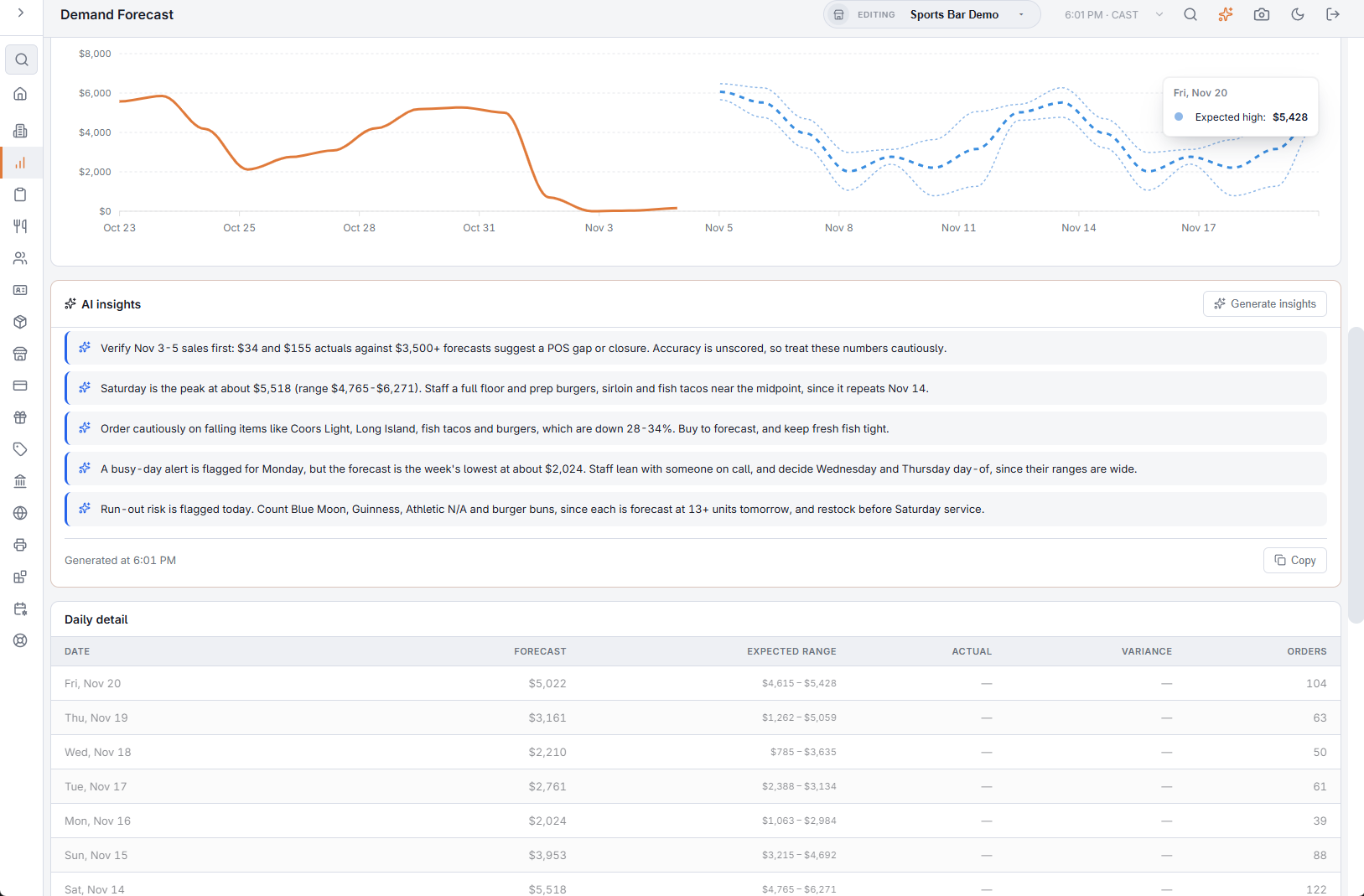
Daily detail lists the same days, newest first: Forecast, Expected range, Actual, Variance (actual minus forecast) and Orders (expected for days ahead, actual for days past). Today is marked In Progress and closed days Closed.
AI insights
Generate insights turns the forecast into three to five short recommendations: prep and purchasing quantities, staffing for busy or slow days, items to push or watch. Copy copies them. They are made for one store, so the card is hidden with All Stores, and they need the two weeks of history. Asking again within the next few hours usually returns the same list; a new list uses your AI allowance (see AI usage, limits and your monthly allowance). Under the list, Generated at gives the store time the list was made, so a list returned again keeps its first time.
When no list can be made, the card says why instead: Not Enough Sales History Yet., Today’s AI Limit For This Account Has Been Reached. It Resets At Midnight UTC., AI Insights Are Not Set Up On This Server., or Insights are unavailable right now.
Item forecast and prep sheet
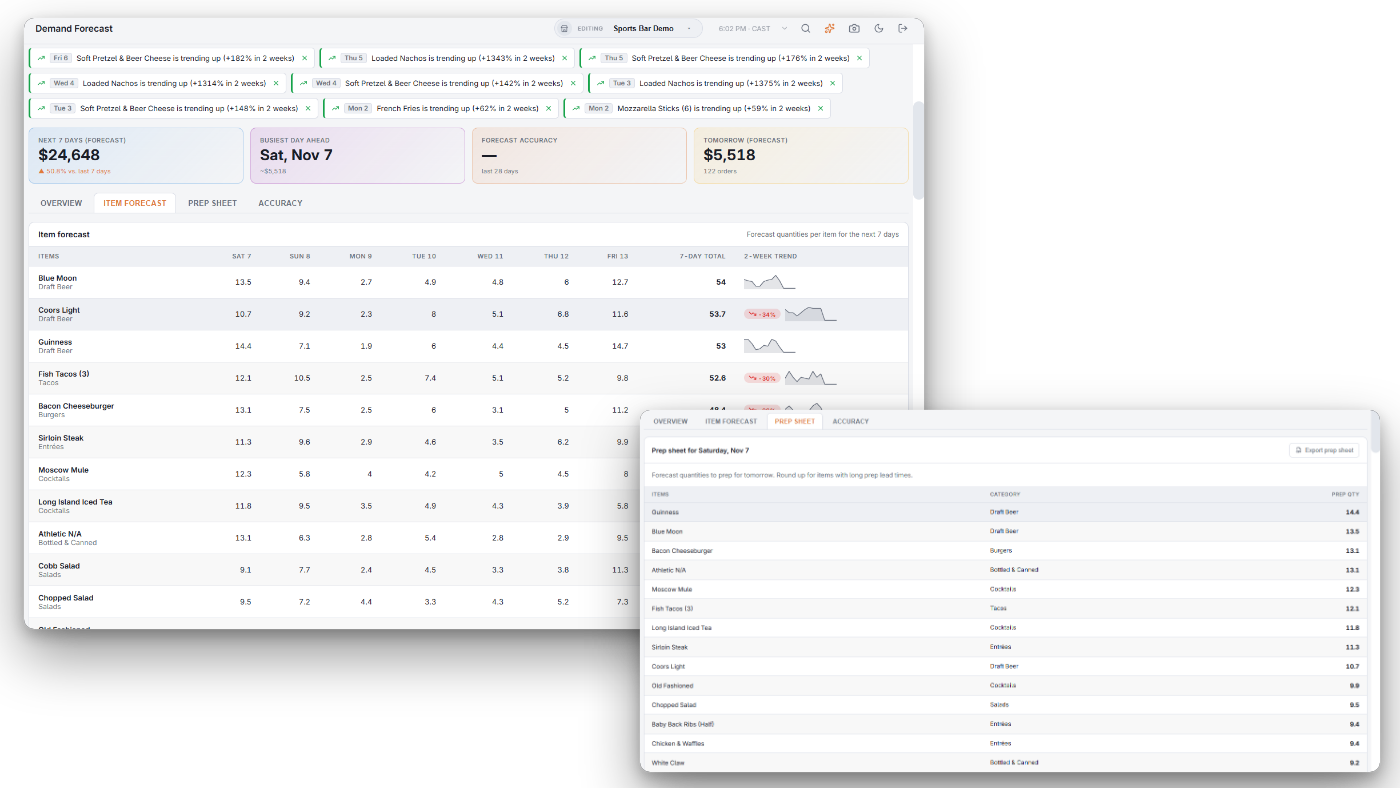
Item forecast lists up to 100 menu items with the forecast quantity for each of the next 7 days and the 7-day total. The 2-week trend column shows a badge when the item’s last two weeks are 25% or more above or below the two before, and a small chart of its last 14 days.
Prep sheet lists tomorrow’s quantities, biggest first. Export prep sheet downloads it as a CSV. Round up for items with long prep lead times, and treat the quantities as a starting point during the first weeks.
Both tabs need one store selected; with All Stores they ask you to select a single store.
Accuracy
Each day’s forecast is scored against actual sales once the day is over. The Accuracy tab lists the scored days of the last 28: Forecast, Actual, Error (green within ±10%) and In range, a tick when the day landed inside the expected range. Nothing needs adjusting on your part: each day becomes history for the next forecast.
Asking the assistant
The AI assistant answers from the same forecast: “How busy will Saturday be?”, “What should we prep tomorrow?”, “How reliable is the forecast?”
Ordering from the forecast
The same store forecast drives Suggest From Usage on purchase orders, turning expected sales into expected ingredient use — see Ordering from the forecast. The Scheduler also uses it; see Drafting the schedule from the forecast.
Run-out alerts
When the daily forecast runs, one alert lists the ingredients that may run out today — for example 3 Items May Run Out Today: Wings, Buns, Romaine. An ingredient is listed when today’s expected use is more than what is on hand plus deliveries due today. It sits with the other forecast alerts and can be dismissed the same way. For a live check during service, ask the assistant — see Inventory and purchasing questions.