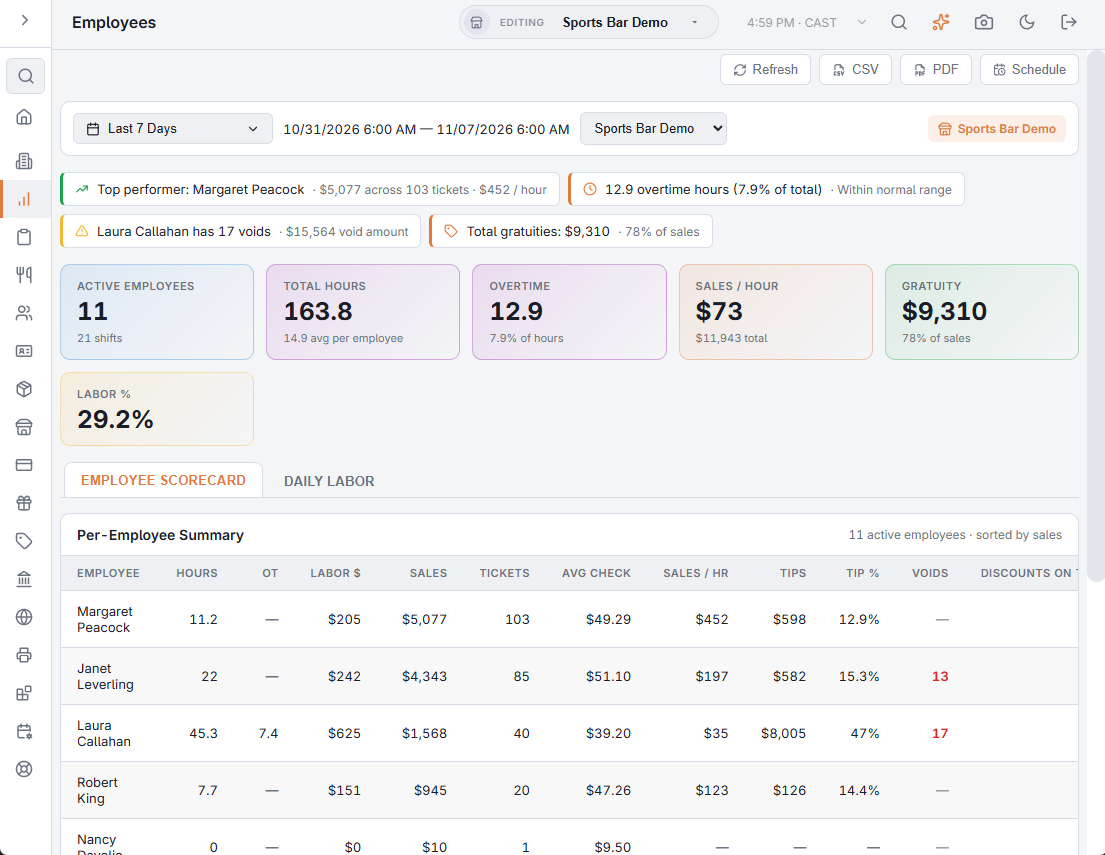
Back Office › Analytics › Analytics › Employees puts each employee’s hours, labor cost, sales, tips and exceptions on one row for the dates on the toolbar, with a day-by-day labor table.
An employee is listed when they have hours, shifts or sales in the period. Hours and labor cost come from the time clock, so fix punch errors in Timesheets first. For the dates, store and export buttons, see Exporting and PDF preview.
Insights
Up to four lines across the top:
- Top performer — the employee with the most sales, with their tickets and sales per hour.
- Overtime hours and their share of all hours; a warning above 10%.
- An employee with 5 or more voids, when more than one employee is listed.
- Total gratuities and their share of sales.
KPI cards
| Card | What it shows |
|---|---|
| Active Employees | Employees listed, with the number of shifts. |
| Total Hours | Hours worked, with the average per employee. |
| Overtime | Overtime hours on the time sheets, as a share of all hours. Turns amber above 10%. |
| Sales / Hour | Total sales divided by total hours, with the total sales. |
| Gratuity | Tips recorded on the shifts, as a share of sales. |
| Labor % | Labor cost as a share of sales. |
Employee Scorecard
Per-Employee Summary: one row per employee, highest sales first, with a total row.
| Column | What it holds |
|---|---|
| Hours, OT | Hours on shifts that started in the period, and their overtime. A shift still open counts up to now. |
| Labor $ | Labor cost of those shifts. |
| Sales, Tickets, Avg Check | Order totals and number of the tickets the employee owns, voided tickets left out, and sales per ticket. |
| Sales / Hr | Sales divided by hours. |
| Tips, Tip % | Cash and non-cash tips recorded on the employee’s shifts, and tips as a share of the tipable sales on those shifts. See Declaring cash gratuities. |
| Voids | Voided tickets, counted against the employee who voided them (or the ticket’s owner when no one is recorded). Red at 5 or more. |
| Discounts On Their Orders | Discounts on the employee’s own tickets, whoever applied them. Point at the heading for the same explanation. |
| Removed | Lines removed from tickets, counted against the employee who rang the line. |
Daily Labor
One row per day, newest first: Date, Employees, Shifts, Hours and Labor Cost. Today is marked In Progress. For labor against sales over time, see Labor performance.
Export
CSV exports the scorecard and the daily labor table. PDF opens the Employee Analytics Report in landscape.
All Stores
With All Stores selected, the page adds up every store. An employee who worked at more than one store has one scorecard row with the figures of all their stores, and counts once in Active Employees. On Daily Labor, the Employees column also counts each employee once a day, even when they worked at two stores that day. The PDF covers one store: with more than one store, pick a store before you open it.