Back Office › Cash Management › Employee Banking shows, live, how much cash each banked employee is holding for the house: their open orders, the orders they have banked, the deposits they have made and what they still owe. It is read-only; deposits and End Shift are done at the register in Shift banking overlay. Banking is turned on and its limits set at Employee Banking Settings.
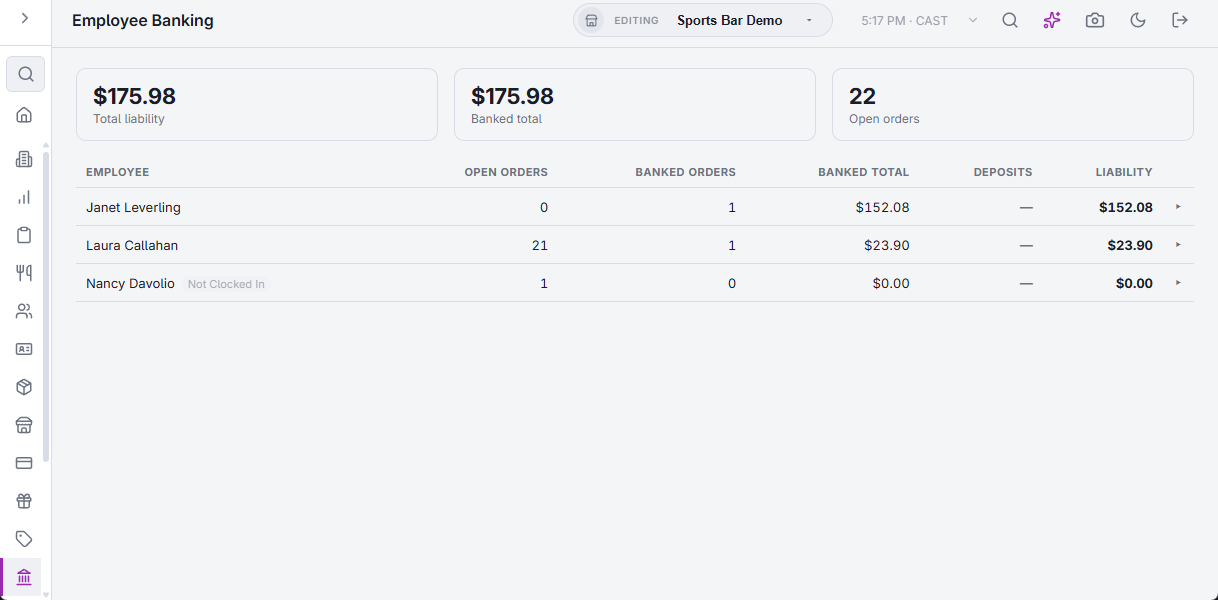
The figures at the top
- Total liability — what all listed employees still owe.
- Banked total — the amount to collect on all banked orders.
- Open orders — orders not yet settled or banked, for all listed employees.
The employee list
An employee is listed while they have an open order, a banked order not yet settled, or a deposit not yet applied by End Shift. With nobody to list, the page reads No Open Banking Activity. The columns are:
- Employee — with Driver when every order they banked is a delivery, Not Clocked In when they are off the clock, and Over limit when they have reached the Liability limit.
- Open orders and Banked orders — how many of each.
- Banked total — the amount to collect on their banked orders.
- Deposits — cash already handed in this shift, shown as a minus.
- Liability — what they still owe: the banked total less the deposits.
A row is tinted once the employee reaches the Liability warning threshold, and marked Over limit at the Liability limit. A threshold set to 0 is off.
Banked orders
Select an employee’s row to list their banked orders: Order number, the time it was Banked, the Customer, the Balance due and the amount Collected. When the store gives a cash discount on banked orders, a Cash Discount column shows the part they do not owe. Select the row again to close it.
Keeping current
The page refreshes itself when an order is banked, settled or deposited at any station, and at least once a minute.
How banking works, end to end: Server banking vs. driver banking and Employee banking and deposits.